EasyManua.ls Logo

HP 48G - Object Types and Syntax

HP 48G
84 pages
Print Icon
To Next Page IconTo Next Page
To Previous Page IconTo Previous Page
Loading...
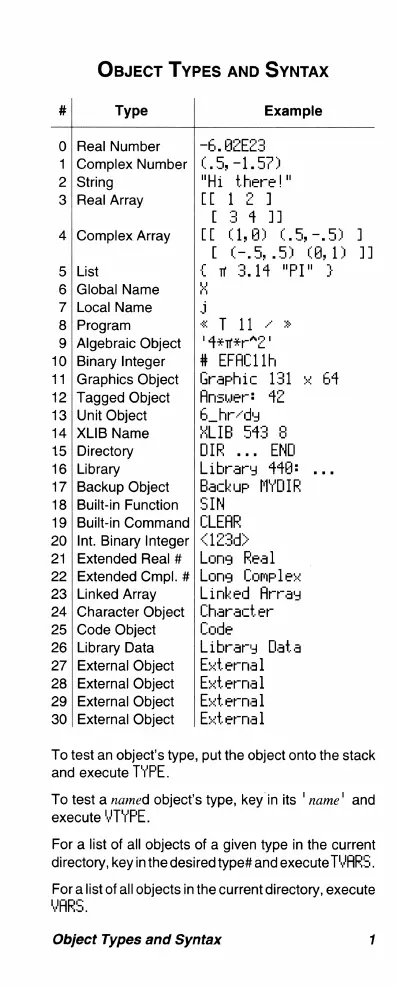
OBJECT
TYPES
AND SYNTAX
#
Type
Example
0
Real
Number
-6
HEZEES
1
Complex
Number
(.5,
=1.57)
2
String
"Hi
there!"
3|
Real
Array
(121
[
24
1]
4
|Complex
Array
[[
(1,8}
.5
-.5)
1]
[
¢-.5.5)
@,
12
11
5|
List
£
3.14
"PI"
3
6
Global
Name
H
7
Local
Name
B
8
Program
«
T
11
» =
9
Algebraic
Object
'4#m#r*¢"
10
Binary
Integer
#
EFACL1h
11
Graphics
Object
Graphic
131
=
64
12
Tagged
Object
Ansuwer:
42
13
Unit
Object
B_hr-dy
14
XLIB
Name
#LIB
543
3
15
Directory
DIR
...
END
16
Library
Library
444:
17
Backup
Object
Backup
MYDIR
18
Built-in
Function
SIM
19
Built-in
Command
CLEAR,
20
Int.
Binary
Integer
<123d>
21 |Extended
Real
#
|Lona
Real
Extended
Cmpl.
#
Linked
Array
Character
Object
Code
Object
Library
Data
External
Object
External
Object
External
Object
External
Object
Long
Complesw
Linked
Array
Character
Code
Library
Data
Ewternal
Ewternal
Euternal
Ewternal
To
test
an
object’s
type,
put the
object
onto
the
stack
and
execute
TYFE.
To
test
a
named
object’s
type,
key
in
its
'
name'
and
execute
YTYFE.
For
a
list
of
all
objects
of
a
given
type
in
the
current
directory,
key
inthe
desired
type#
and
execute
TWARS.
For
alist
of
all
objects
in
the
current
directory,
execute
YHRS.
Object
Types
and
Syntax
1

Related product manuals