EasyManua.ls Logo

HP 48G - Page 29

HP 48G
84 pages
Print Icon
To Next Page IconTo Next Page
To Previous Page IconTo Previous Page
Loading...
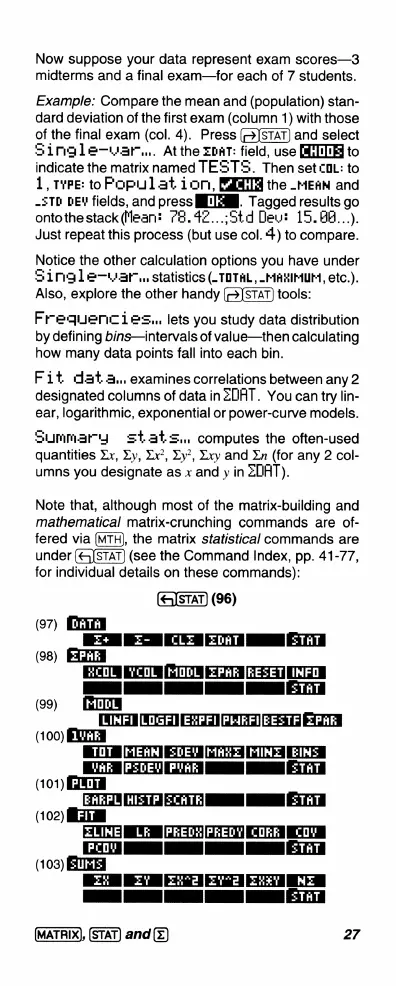
Now
suppose
your
data
represent
exam
scores—3
midterms
and
a
final
exam—for
each
of
7
students.
Example:
Compare
the
mean
and
(population)
stan-
dard
deviation
of
the
first
exam
(column
1)
with
those
of
the
final
exam
(col.
4).
Press
and
select
Single—war..
Atthe
Zoat:
field,
use
to
indicate
the
matrix
named
TEST'S.
Then
settOL:
to
1,
mvPE:
toFPopulat
ion,
the
_MEAN
and
-5To
pEY
fields,
and
press
THll.
Tagged
results
go
ontothestack
(Mlean:
73.4Z...;5td
Deu:
15.84...).
Just
repeat
this
process
(but
use
col.
4)
to
compare.
Not:ce
the
other
calculation
options
you
have
under
S
1mgle—war.,
statistics
(-
TOTAL,
-MAKIMUM,
etc.).
Also
explore
the
other
handy
(2)STAT)
tools:
Frequencies..,
lets
you
study
data
distribution
by
defining
bins—intervals
of
value—then
calculating
how
many
data
points
fall
into
each
bin.
Fit
dat
a..
examines
correlations
between
any
2
designated
columns
of
data
in
ZDAT.
You
can
try
lin-
ear,
logarithmic,
exponential
or
power-curve
models.
Summarydg
st
at
s,
computes
the
often-used
quantities
Xx,
Xy,
Xx?,
Xy?
Xxy
and
Xn
(for
any
2
col-
umns
you
designate
as
x
and
y
in
ZDAT).
Note
that,
although
most
of
the
matrix-building
and
mathematical
matrix-crunching
commands
are
of-
fered
via
(MTH),
the
matrix
statistical
commands
are
under
(&)STAT)
(see
the
Command
Index,
pp.
41-77,
for
individual
details
on
these
commands):
(96)
(97)
T+E-
[CLE
[ZoRT]
[STAT]
HMODL
ZPAF
[REZET]
INFO
IINN
e
T
(99)
[EIrm
LINFI
[LOGFI|
EXPFI|PLREFI|EEZTF|
EPAF
WAk
[PEDEV|PYAR]
|
STAT|
(101)
A
ScATRl
|
STAT]
(102)
IZIM
ZLIME|
LF
[PREDH|PREDY]
CORE
COV
(pcov]
[
]
[sTAT]
(103
XA
N
EEE
A
I
I
e
(MATRIX],
and(z)
27
(98)
(100)

Related product manuals