review the front panel
4
hp digital copier series
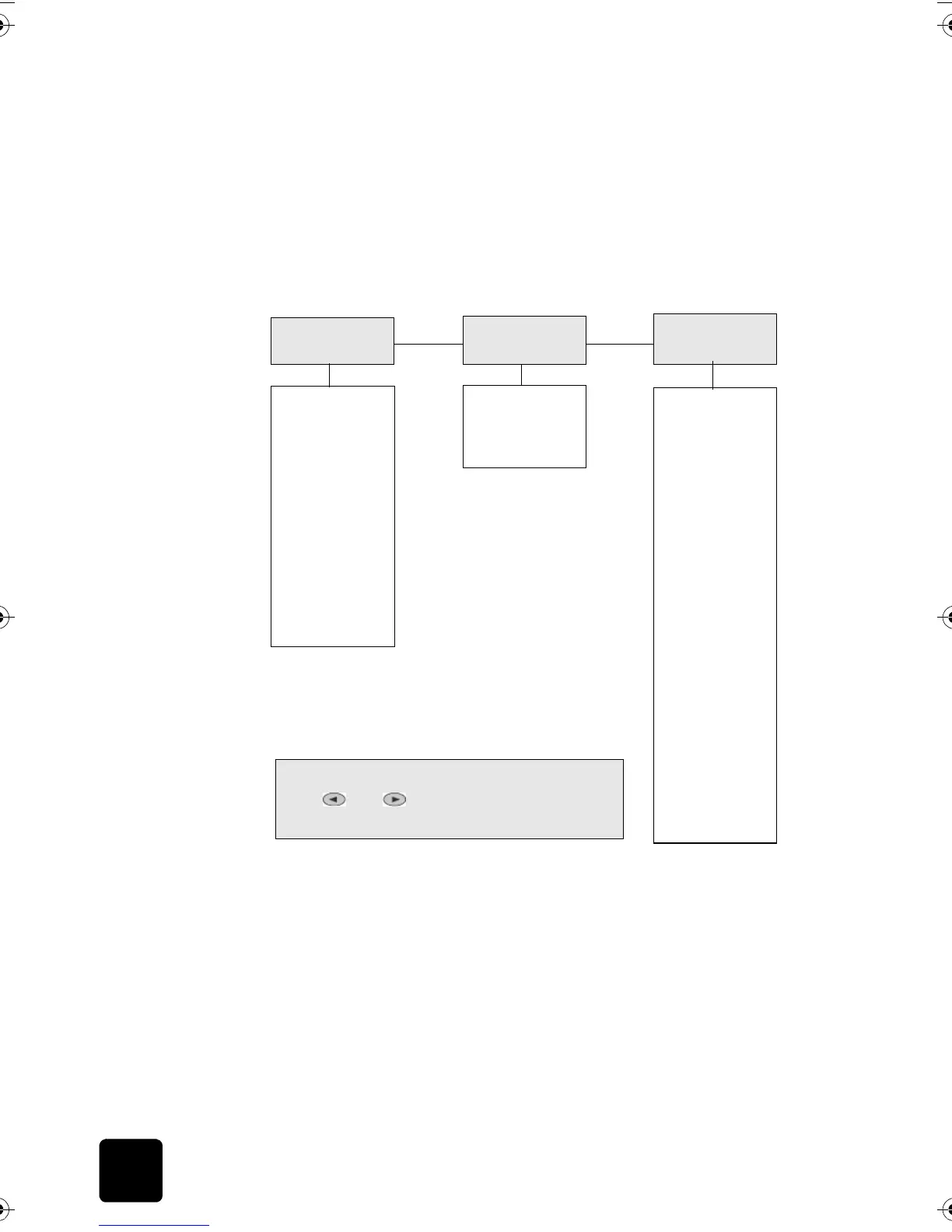
You can also access Menu functions by pressing the number that
corresponds to a menu option. For example, to set the language and
country/region, press Menu, then press 3 and 7. This automatically selects
the Status and Maintenance menu (3), then the Set Country and Language
option (7).
menu options
The following Menu functions are available.
0:Collation
(model 610 only)
1:Enhancements
2:Paper Size
3:Color Intensity
4:Set Copy
Defaults
5:Restore Copy
1:Copy Setup
Press Menu
to display the Copy Setup options.
Press
and to move to the setting you want.
Press
Enter
to select the displayed setting.
1:Menu Settings
2:Report Self-Test
2:Print Report
1:Check Ink
Level
2:Clean
PrintHeads
3:Align
PrintHeads
4:Perform Color
Calibration
5:Restore
Factory Defaults
6:Set Power
Save Mode Time
7:Set Country
and Language
8:Ring and Beep
Volume
3:Status and
Maintenance
GwenRG.book Page 4 Thursday, January 31, 2002 5:20 PM






 To Next Page