HPE Aruba Networking CX 6300 Switch Series | Installation and Getting Started Guide 16
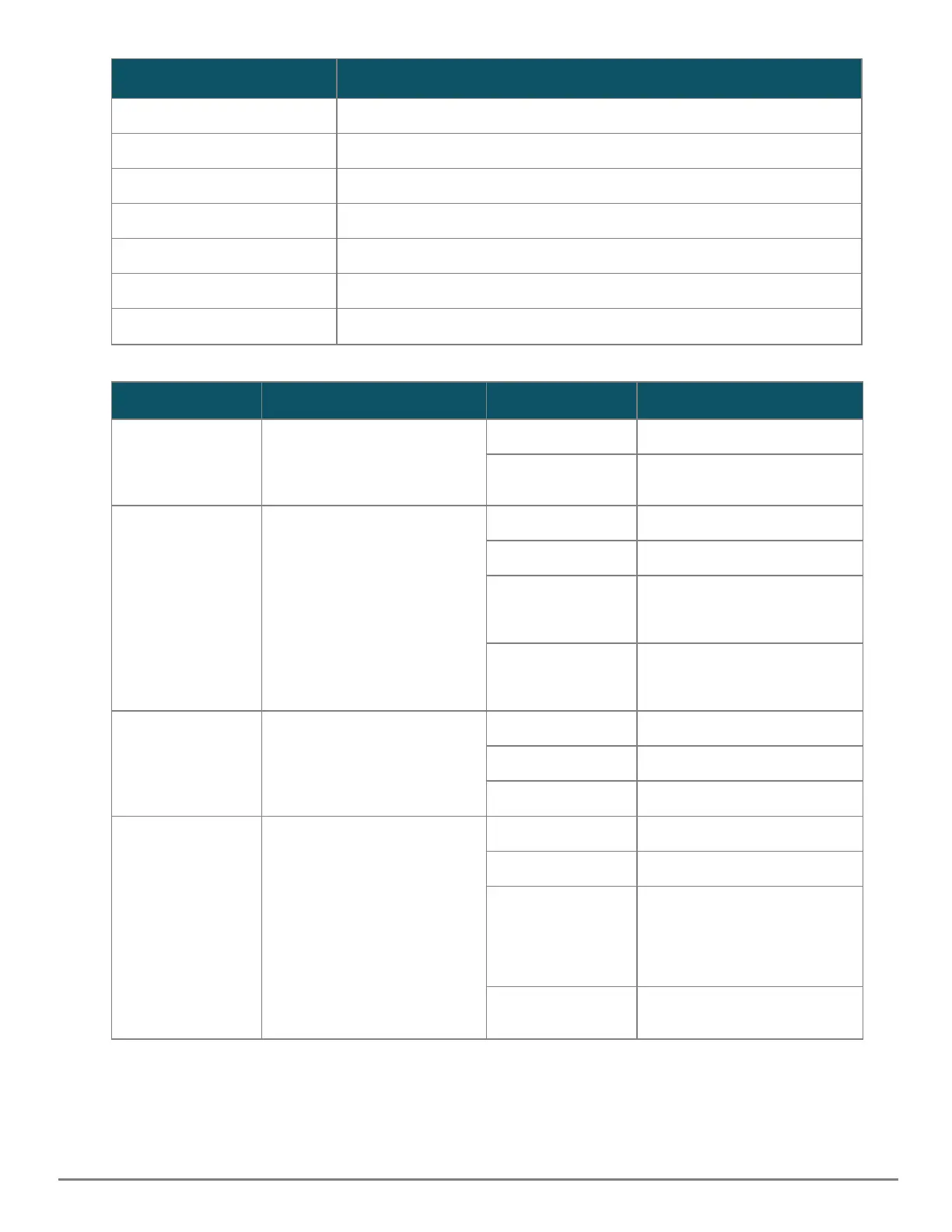
Label
Description
4 Speed mode selected LED
5 Stk LED S
6 Reset button
7 UID (Unit Identification)
8 Global Status LED
9 Mode select button
10 OOBM port LED
Switch LEDs Function State Meaning
Back LED Status of modular components
installed in the back of the
chassis (not applicable for
6300F switches
On - Green Normal
Slow Flash - Amber Fault in one of the modules in
the back of the chassis
PoE LED Indicates Port LEDs are
showing PoE information (not
applicable for non PoE
switches)
Off PoE mode not selected
On - Green PoE mode selected
Slow Flash - Amber One or more ports
experiencing PoE failure. PoE
mode not selected.
On - Amber One or more ports
experiencing PoE failure. PoE
mode selected.
Spd LED Indicates Port LEDs are
showing speed information
Off Speed mode not selected
On - Green Speed mode selected
Not Implemented No fault defined
Stk LED Indicates Port LEDs are
showing stacking mode
information
Off Stacking mode not selected
On - Green Stacking mode selected
On - Amber One of the switch is
experiencing stacking failure.
Port LEDs will be used to
indicate the number of the
stacking member.
Slow flash Amber A port has a stacking failure.
Stacking mode not selected
Table 7: Front Panel LED Behavior










 To Next Page