22 Section 2: Memory Stack, LAST X, and Data Storage
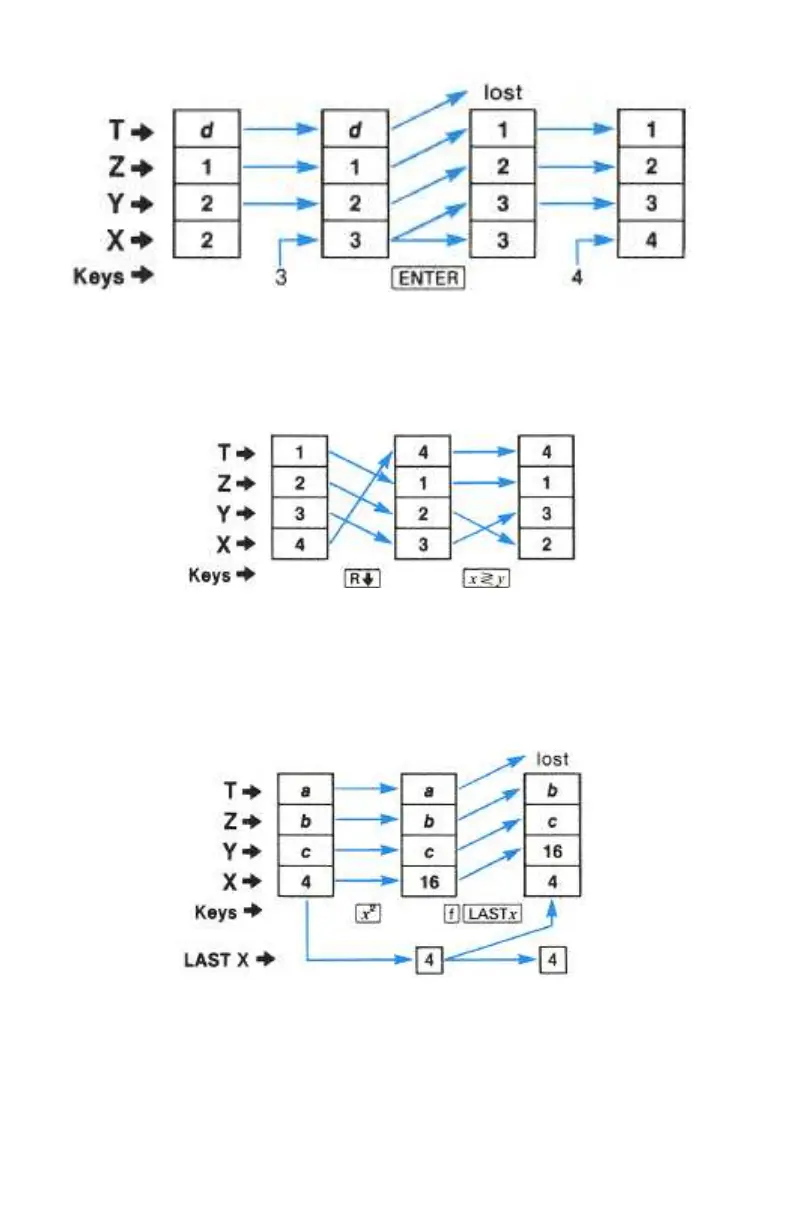
) (roll down), and ® (X exchange Y). Pressing ) rotates the contents
of the stack registers down one register (the X-register value moves to the T-
register). No values are lost. ® exchanges the numbers in the X- and Y-
registers. If the stack were loaded with the sequence 1, 2, 3, 4, the following
shifts would result from pressing ) and ®.
K (LAST X). When a numeric function is executed, a copy of the value
occupying the display (X-register) before the function was executed is stored in
the LAST X register. Pressing ´K places a copy of the current contents of
the LAST X register into the display (X-register). Refer to appendix A, Stack
Lift and LAST X, for a listing of the functions that save x in the LAST X
register.
Calculator Functions and the Stack
When you want to key in two numbers, one after the other, you press v
between entries of the numbers. However, when you want to key in a number
immediately following a calculation or other function (like ®, ), etc.)



 To Next Page