38 Section 3: Numeric Functions
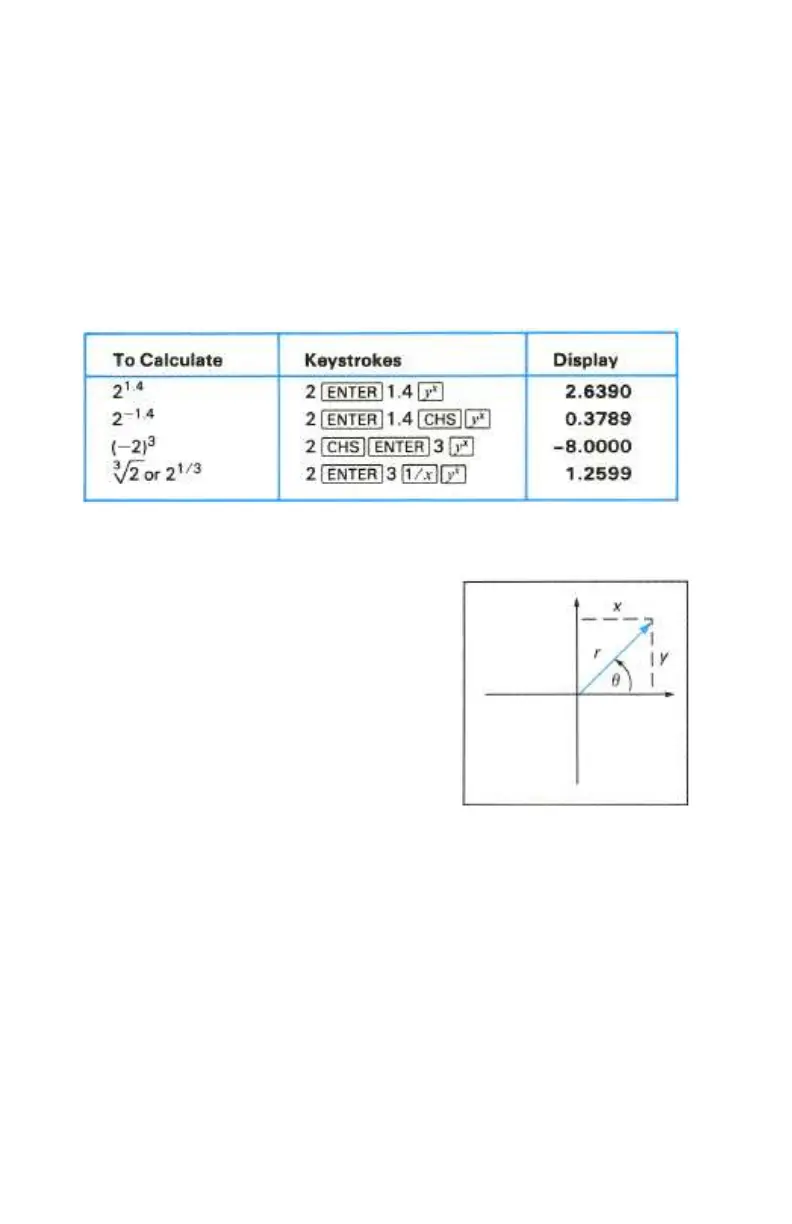
The Power Function
Pressing Y calculates a power of a number—that is, y
x
. The y-value is keyed
in before the x-value.
1. Key in the base number, which is designated by the y on the key.
2. Press v to separate the second number (the exponent) from the
first number (the base).
3. Key in the exponent, which is designated by the x on the key.
4. Press Y to calculate the power.
Polar/Rectangular Coordinate Conversions
Two functions (:, ;) are provided in
your HP-10C for polar/ rectangular coordinate
conversions.
The angle θ is assumed to be in decimal
degrees, radians, or grads, depending upon
which trigonometric mode (Degrees, Radians,
or Grads) the calculator is set to. Angle θ is
measured as shown in the illustration to the
right. The answer returned for θ is between
180° and −180°.
Polar Conversion. Pressing ´: (polar) converts values in the X- and Y-
registers representing rectangular coordinates (x, y) to polar coordinates
(magnitude r, angle θ). First displayed is r; press ® (x exchange y) to
display θ. (For a discussion of memory registers, refer to section 2.)
Rectangular Conversion. Pressing ´; (rectangular) converts values in
the X- and Y-registers representing polar coordinates (magnitude r, angle θ) to
rectangular coordinates (x, y). First displayed is x; press ® (x exchange y) to
display y.



 To Next Page