34 Section 3: Numeric Functions
• Use the number in the display (X-register) as the argument for the
function.
• Replace the number in the display (X-register) with the result of
executing the function.
• Do not affect numbers in the Y-, Z-, and T-registers.
General Functions
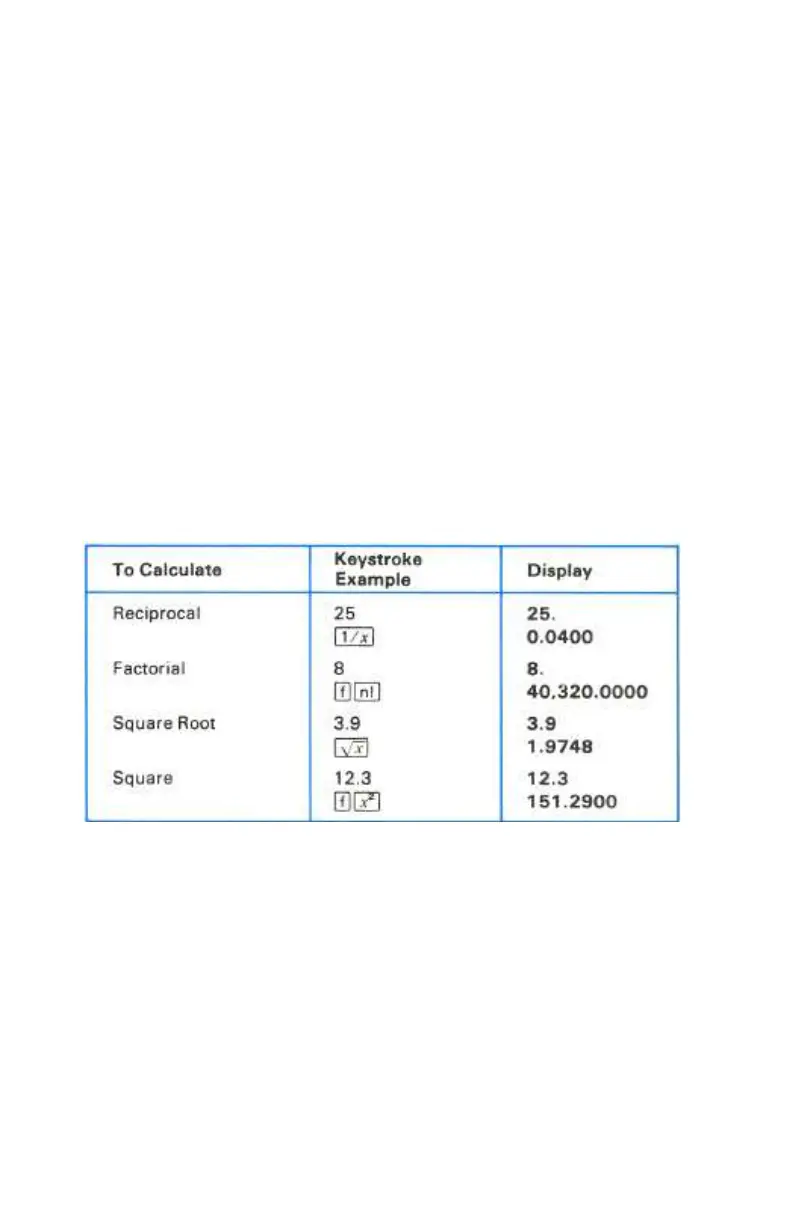
Reciprocal. Pressing ⁄ calculates the reciprocal of the number in the display
(X-register), that is, divides 1 by the number in the display.
Factorial. Pressing ´! calculates the factorial value as follows: when n, a
positive integer ≤ 69 is in the display (X-register), ! calculates the product of
the integers from 1 to n. Also, 0! = 1.
Square Root. Pressing ¤ calculates the square root of the number in the
display (X-register).
Squaring. Pressing ´x calculates the square of the number in the display
(X-register).
Trigonometric Operations
The six basic trigonometric functions operate in the trigonometric mode you
select.
Trigonometric Modes. Selecting a specific trigonometric mode does not
convert any number already in the calculator to that mode; it merely tells the
calculator what unit of measure (degrees, radians, or grads) to assume a number
is expressed in for a trigonometric function.
Degrees Mode. Pressing ´D selects the Degrees trigonometric mode. No
annunciator appears in the display.



 To Next Page