72 Section 6: Branching and Looping
under Simple Branching, once the program begins executing the “loop”, it will
execute it again and again.
If you want to terminate the execution of a loop, you can include an £ or
~ instruction (described below) or an ¦ instruction within the loop.
You can also terminate execution by pressing any key while the loop is being
executed.
Example: Your friendly neighborhood Radiobiology Lab wants to predict the
diminishing radioactivity of a test amount of
131
I, a radioisotope. The following
program automatically figures the number of milliCuries of isotope theoretically
remaining at four-day intervals of decay. (The half-life of
131
I is 8 days.) The
initial batch (N
0
) of isotope for this example is 100 milliCuries.
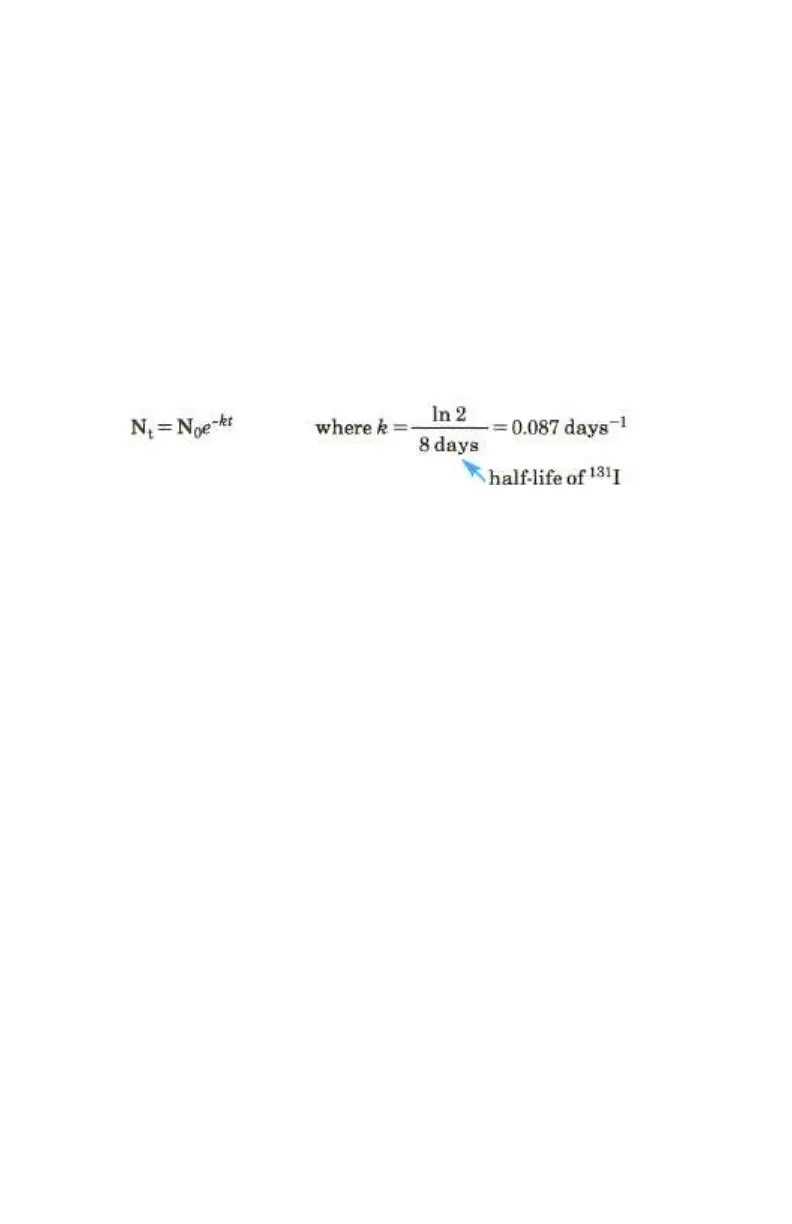
The formula for N
t
, the amount of radioisotope left after t days, is:
We'll store the N
0
value (100 milliCuries) in register R
1
before running the
program, and enter the first t value (4 days) just prior to executing the program.
The program will automatically increase the value of t by 4 days for each
successive N
t
calculation (each loop).
Keystrokes Display
¥
00-
Sets calculator to
Program mode.
´CLEAR M
00-
Clears program memory.
O0
01- 44 0
Stores number from
display in R
0
. This
number will be t, the
number of days the
131
I
batch has existed.
l0
02- 45 0
Recalls t. This program
line is the one to which
program execution will
later branch, t will
change each time the
program is run.
´©
03- 42 31
Pauses to display t.
2
04- 2
´N
05- 42 12
8
06- 8
÷
07- 10
*
08- 20
kt.



 To Next Page