19
Adjusting the hp sb21 focus
Rotate the focus ring until the image is clear.
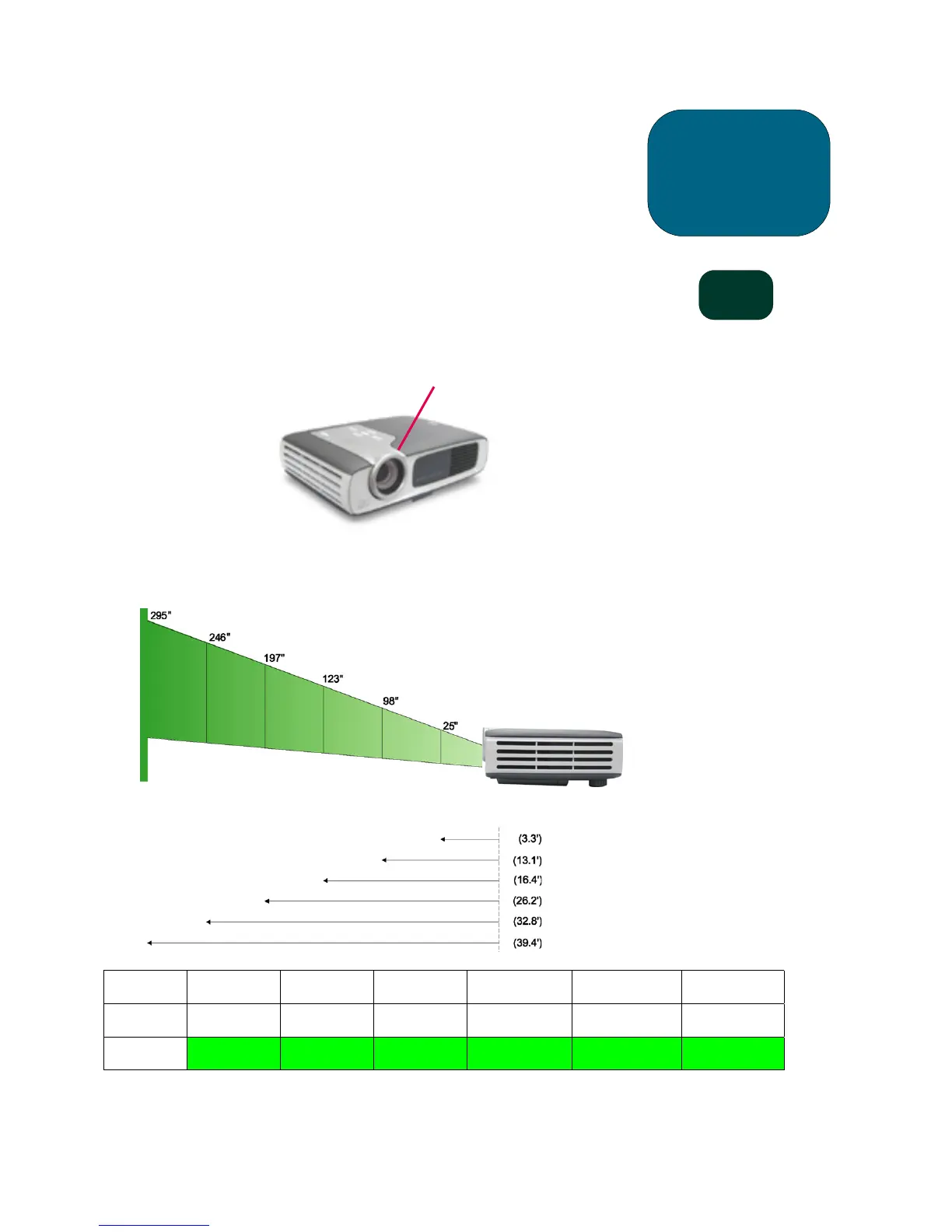
The projector will focus at distances from 1.0 m to 12 m (3.3 feet to 39.4 feet).
Projected image size (diagonal)
Screen
(Diagonal)
25” 98” 123” 197” 246” 295”
Screen
Size (wxh)
20.0”x15.0” 78.4”x58.6” 98.4”x73.8” 157.6”x118.2” 196.8”x147.6” 236.2”x177.2”
Focal
Distance
3.3’ 13.1’ 16.4’ 26.2’ 32.8’ 39.4’
NOTE: This graph is for user’s reference only.
operation
sb21
Focus Ring
Focal
Distance
Calculating the Projected
Image Size
The screen diagonal dimension
can be approximated by using one
of these formulas:
7.5*Distance(ft.)=Diagonal(in.)
0.625*Distance(m)=Diagonal(m)
For example:
If your sb21 is 10 feet from the
screen, the approximate screen
diagonal dimension will be
7.5*10 = 75 inches.



 To Next Page