EasyManua.ls Logo

HP Smart Array P800 User Manual

HP Smart Array P800
44 pages
To Next Page IconTo Next Page
To Previous Page IconTo Previous Page
Page #22 background image
Upgrading or replacing controller options 22
b.
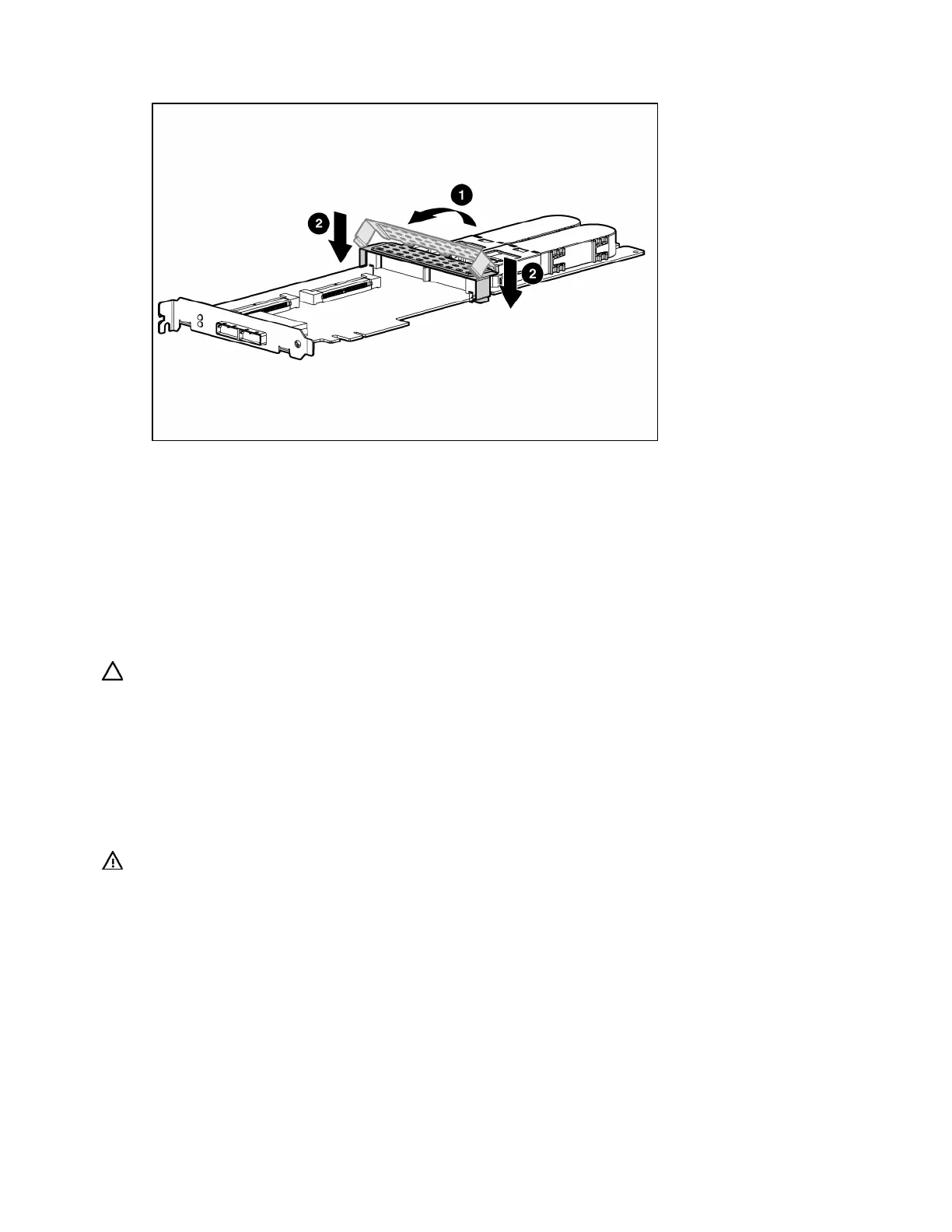
Push the clip firmly at both ends (2) until it clicks into place under the controller board.
13. Reinstall the controller in the server.
After installing a battery pack, you might see a POST message during reboot indicating that the array
accelerator (cache) is temporarily disabled. This behavior is normal because the new battery pack is likely
to have a low charge. You do not need to take any action because the recharge process begins
automatically when the battery pack is installed. The controller operates properly while the battery pack
recharges, although the performance advantage of the array accelerator is absent. When the battery
pack has been charged to a satisfactory level, the array accelerator is automatically enabled.
Replacing the cache module or controller
CAUTION: Electrostatic discharge can damage electronic components. Be sure you are properly grounded
before beginning this procedure. For more information, see "Electrostatic Discharge (on page 37)."
1. Close all applications, and then power down the server. This procedure flushes all data from the
cache.
2. Observe the BBWC Status LED ("Battery pack LEDs" on page 35).
If the LED is blinking every 2 seconds, data is still trapped in the cache. Restore system power,
and repeat the previous steps in this procedure.
If the LED is not lit, proceed with the next step.
WARNING: There is a risk of explosion, fire, or personal injury if the battery pack is not
properly handled. Refer to "Battery replacement notice (on page 40)" before installing or
removing any item that contains a battery pack.
3. Remove the controller from the server.


Table of Contents

Question and Answer IconNeed help?

Do you have a question about the HP Smart Array P800 and is the answer not in the manual?

HP Smart Array P800 Specifications

General IconGeneral
BrandHP
ModelSmart Array P800
CategoryController
LanguageEnglish

Summary

Hardware features

Controller specifications

Lists the technical specifications of the HP Smart Array P800 controller, including dimensions, power, and supported drives.

Overview of the installation procedure

Quick installation procedure (Windows or Linux)

Provides a step-by-step guide for the initial installation and configuration of the controller.

Installing the controller hardware

Installing the controller board

Details the physical process of installing the controller board into the server's PCIe slot.

Updating the firmware

Methods for updating the firmware (Windows® or Linux®)

Describes how to update the controller's firmware using Smart Components on HP's website.

Installing device drivers and Management Agents

Systems using Microsoft® Windows®

Details the installation of drivers and agents for Windows operating systems.

Systems using Linux®

Explains how to install drivers and management agents for Linux operating systems.

Upgrading or replacing controller options

Replacing or adding a battery

Provides step-by-step instructions for replacing or adding a battery pack to the cache module.

Replacing the cache module or controller

Guides users through the process of replacing the cache module or the entire controller.

Replacing, moving, or adding hard drives

Recognizing hard drive failure

Describes common indicators and methods for identifying a failed hard drive.

Replacing hard drives

Covers the common reasons and procedures for replacing failed or degraded hard drives.

Automatic data recovery (rebuild)

Explains the automatic data recovery process (rebuild) after a drive replacement.

Electrostatic discharge

Preventing electrostatic discharge

Provides precautions to prevent damage from static electricity to sensitive components.

Grounding methods to prevent electrostatic discharge

Details various methods for proper grounding to protect against ESD.

Related product manuals