Access panel solenoid lock
The access panel solenoid lock provides a method to lock the access panel by means of a local or
remote signal-controlled solenoid. This section describes how to remove and install the access panel
solenoid lock.
Removing the access panel solenoid lock
To remove the access panel solenoid lock:
1.
Prepare the computer for servicing by following the
Predisassembly procedures on page 69.
CAUTION: Failure to follow the predisassembly procedures can result in equipment damage or
data loss.
2.
Remove the access panel (see
Removing the access panel on page 72).
3.
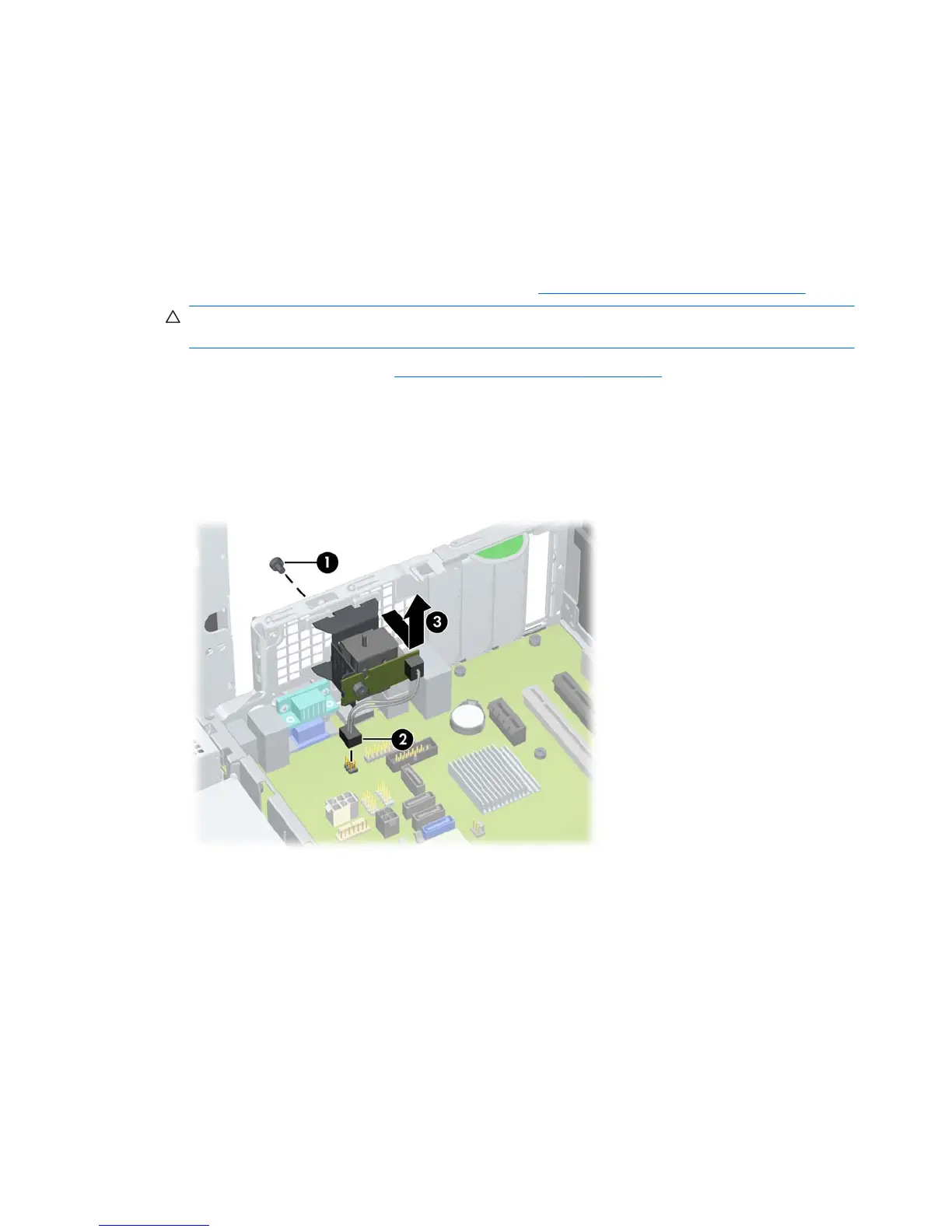
Remove the screw that fastens the solenoid lock to the chassis (1) as shown in the following figure.
4.
Disconnect the access panel solenoid lock cable from the system board (2).
5.
Pull the solenoid lock assembly inward and then up (3) to remove the assembly from the chassis.
Figure 5-9 Removing the access panel solenoid lock
Installing the access panel solenoid lock
Reverse the above steps to install the access panel solenoid lock. This involves connecting the solenoid
lock cable to the system board and fastening the solenoid lock to the chassis.
Removing and installing drives
This section describes how to remove and install the Z200 SFF drives:
●
Optical disk drive
●
Internal hard disk drive
●
Optional hard disk drive or media card reader
78 Chapter 5 Replacing components ENWW


 To Next Page