
 To Next Page


M
michelle17Sep 9, 2025
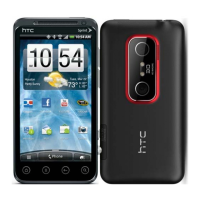
Why does my HTC EVO 3D Cell Phone say charging is necessary?
- KKevin MillerSep 9, 2025
The message indicating that charging is necessary appears because the battery is almost empty.

Why does my HTC EVO 3D Cell Phone say charging is necessary?
The message indicating that charging is necessary appears because the battery is almost empty.
What does 'out of range indicator' mean on my HTC Cell Phone?
The 'out of range indicator' on your HTC Cell Phone means you are either outside the service area or in a location with poor signal strength. Also, check that you are not covering the built-in antenna with your fingers or hand.
Why is the display light off on my HTC EVO 3D?
If the light of the display is turned off on your HTC Cell Phone, check if the Screen timeout of Display is set to a short duration.
Why can't I change contact settings on my HTC EVO 3D?
If you cannot operate the respective contact settings on your HTC Cell Phone, it may be because the other party’s phone number is not notified. If there is no notification, the setting for individual incoming image of the contacts and the ring tone setting are not enabled.
 General
| Display | 4.3 inches, 540 x 960 pixels |
|---|---|
| Processor | Dual-core 1.2 GHz Scorpion |
| RAM | 1 GB |
| Expandable Storage | microSD, up to 32 GB |
| Front Camera | 1.3 MP |
| Dimensions | 126 x 65 x 12.1 mm |
| Weight | 170 g |
| Main Camera | Dual 5 MP |
| Battery | Li-Ion 1730 mAh |
| Operating System | Android 2.3 (Gingerbread) |
| Network | GSM / HSPA |
| Internal Storage | 1 GB |