Home
HTI
Thermal cameras
HT-105
Page 13 (General Settings)
HTI HT-105 - General Settings
18 pages
Manual
Save Page as PDF
To Next Page
To Next Page
To Previous Page
To Previous Page
Loading...
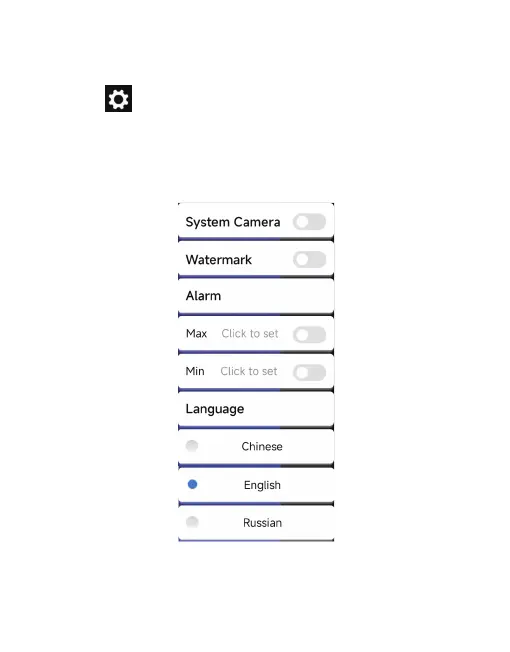
Click “
” to pop up the setting interface. In the interface,
you can set whether to open the system camera, watermark,
high/low temperature settings, and language selection.
Chinese, English, Russian, as shown in the figure below
.
11
3.2.6 Settings
12
14
Table of Contents
Main Page
Table of Contents
2
Precautions
3
Product Overview
4
Application Scenario
4
Main Functions
4
Product Use
5
Equipment Connection
5
Software Operation
6
Gallery, Photo and Video
6
Shutter Refresh
7
Temperature Measurement Analysis
7
Color Palette
9
Temperature Measurement Setting
12
Settings
13
Technical Parameters
14
Related product manuals
HTI HT-18
17 pages
HTI HT-19
17 pages
HTI HT-19+
19 pages
HTI HT-18+
21 pages
HTI HT-A1
18 pages
HTI HT-A2
9 pages
HTI HT-A3
8 pages
HTI HT-03
17 pages
HTI HT-C8
10 pages
HTI HT-04D
18 pages
HTI HT-A10
18 pages
HTI HT-203U
18 pages



 To Next Page