12
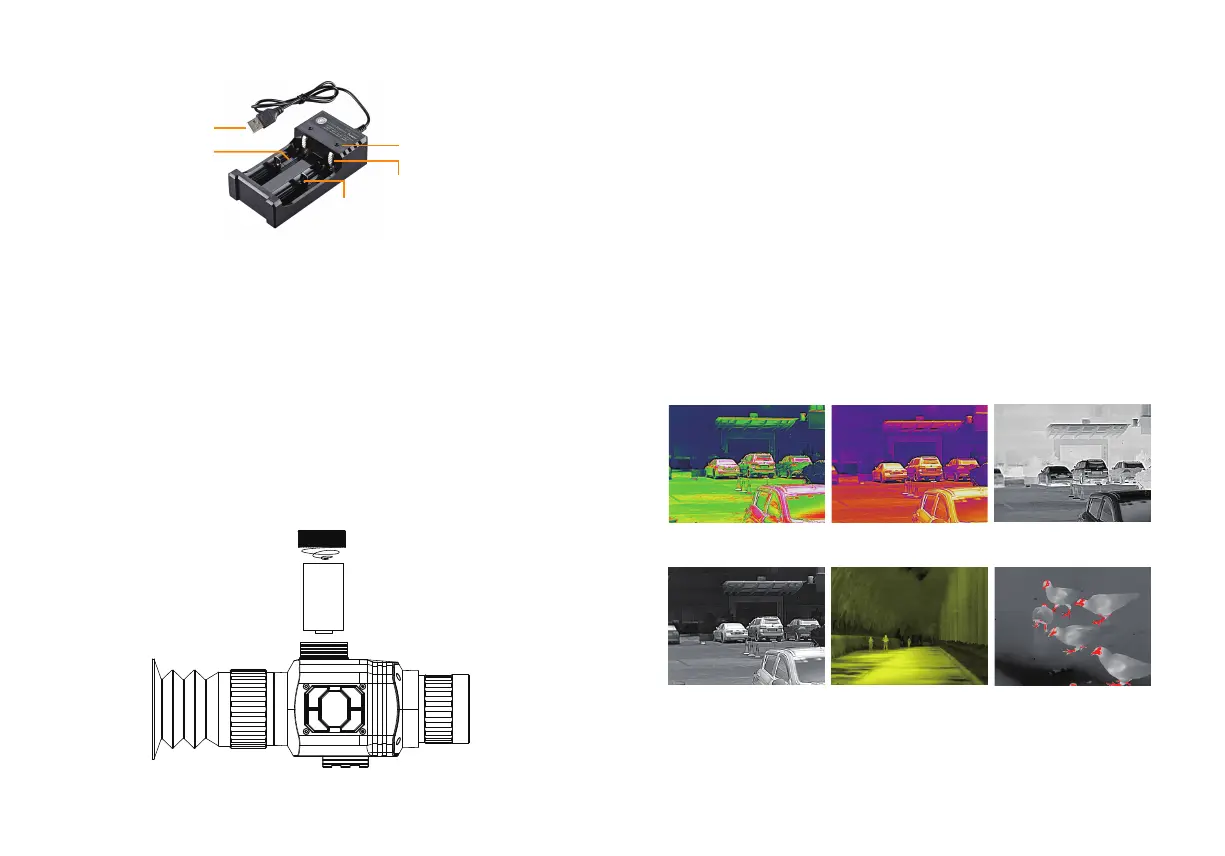
Description of Battery Installation
Application of Color Palette
Image effects out of photo taken by six kinds of color palettes:
Prompt: When this product lies idle for long, it shall be charged at
least every three months to prevent irreversible loss of capacity due
to too low battery power arising from its own discharge as it is kept
too long.
The palette menu can change the pseudo color of the infrared
thermal image, and provides 6 palettes: rainbow, hot metal, white
heat, black heat, yellow saturation and bird watching mode.
Choosing an appropriate palette can better display the details of the
target object. For rainbow, the hot metal palette focuses on displaying
colors, which is very suitable for high thermal contrast and is used to
improve the color contrast between high and low temperatures.
However, the white hot palette provides uniform linear colors.
1. Open the battery cover: Unscrew the battery cover counterclock-
wise.
2.Install the lithium battery: Put the battery into the battery
compartment with the negative pole of the battery facing outward.
3. Install the battery cover: Tighten the battery cover clockwise.
13
USB interface
LED indicator
Battery slot
Positive contact
Negative contact
-
+
Rainbow Hot metal
Black heat
White heat
Yellow saturation Bird watching mode



 To Next Page