DPU40D-N06A3, DBU20B-N12A3, and
DBU50B-N12A1 Distributed Power System
User Manual
Copyright © Huawei Technologies Co., Ltd.
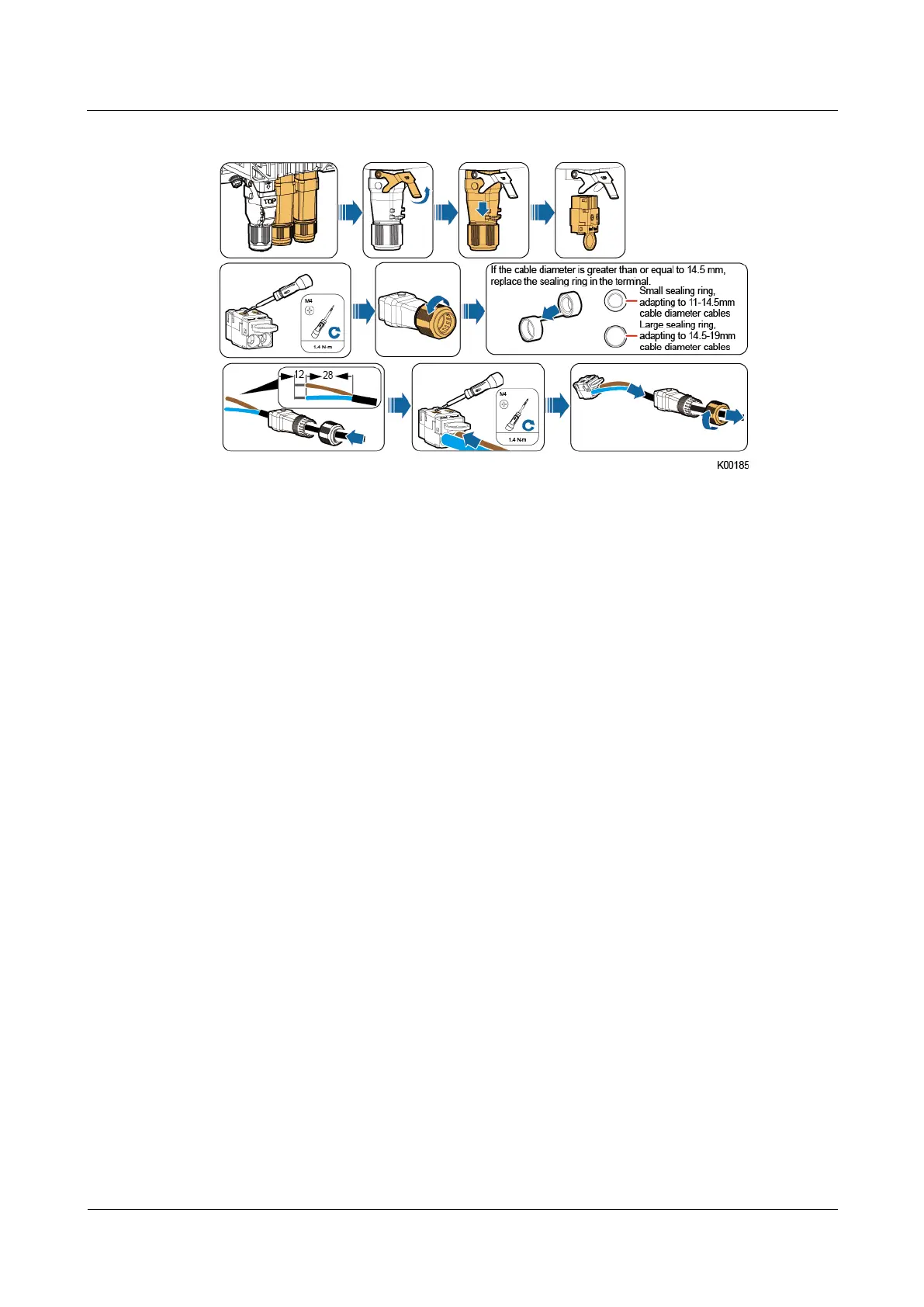
Figure 5-7 Assembling the new quick connector
Step 5 Use waterproof tape to seal the cable connector.
Step 6 Switch on the upstream input circuit breaker for the lithium battery.
Step 7 Take off the protective gloves.
----End
Follow-up Procedure
Pack the faulty component and return it to the local Huawei warehouse.
5.3.3 Replacing a PSU (PSU Only)
Prerequisites
You have obtained a pair of protective gloves, an inner hex torque screwdriver, a
flat-head screwdriver, a Phillips screwdriver, and waterproof tape.
You have prepared a new PSU.
Procedure
Step 1 Put on the protective gloves.
Step 2 Switch off the upstream input circuit breaker for the PSU.
Step 3 Remove the old PSU.
1. Record the cable connection positions on the PSU.
2. Use a flat-head screwdriver to pry the fastener on the quick connector and take off the
connector, as shown in the following figure.







 To Next Page