eLTE3.1 Dispatch Platform
Product Description
Huawei Proprietary and Confidential
Copyright © Huawei Technologies Co., Ltd.
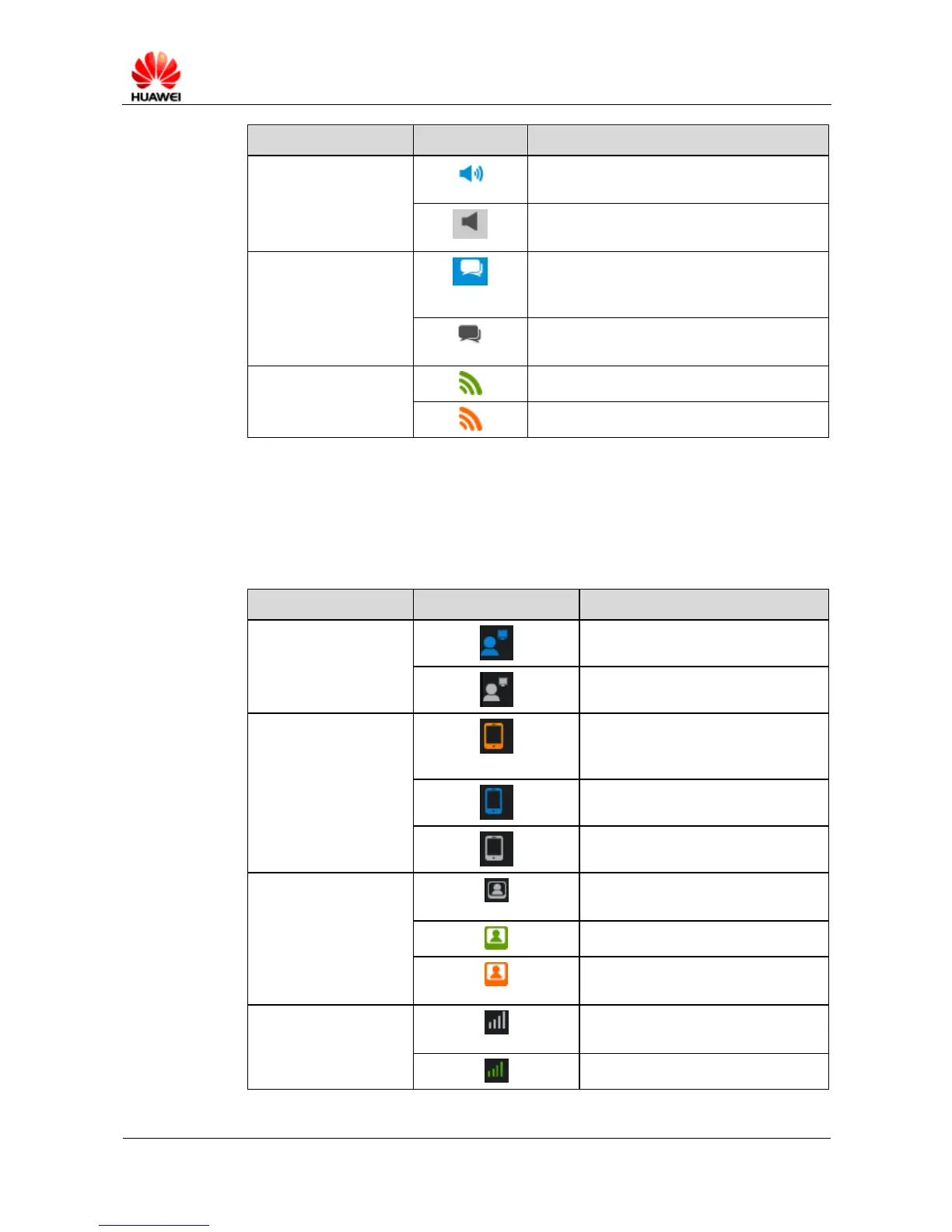
The group is not muted so the speaker in the
group can be heard.
The group is muted so the speaker in the
group cannot be heard.
The eDC610 user is pressing and holding the
PTT button to get the call floor or the user is
speaking.
The eDC610 user released the call floor and is
listening.
The group is idle and no one is speaking.
A member is speaking in the group.
Terminal Status
Table 6-3 describes terminal status.
Table 6-3 Terminal status
The eDC610 user is online.
The eDC610 user is offline.
The PTT user's voice and video
services are not registered with the
network.
The video service is not registered
with the network.
The video service is idle.
Video is uploading or a PTP video
call is in progress.
The voice service is not registered
with the network.
The voice service is idle.



 To Next Page