HUAWEI SCL Smartphone FAQs
75/82
3.21 Does my phone support App2SD? How do I move an
installed application to the microSD card?
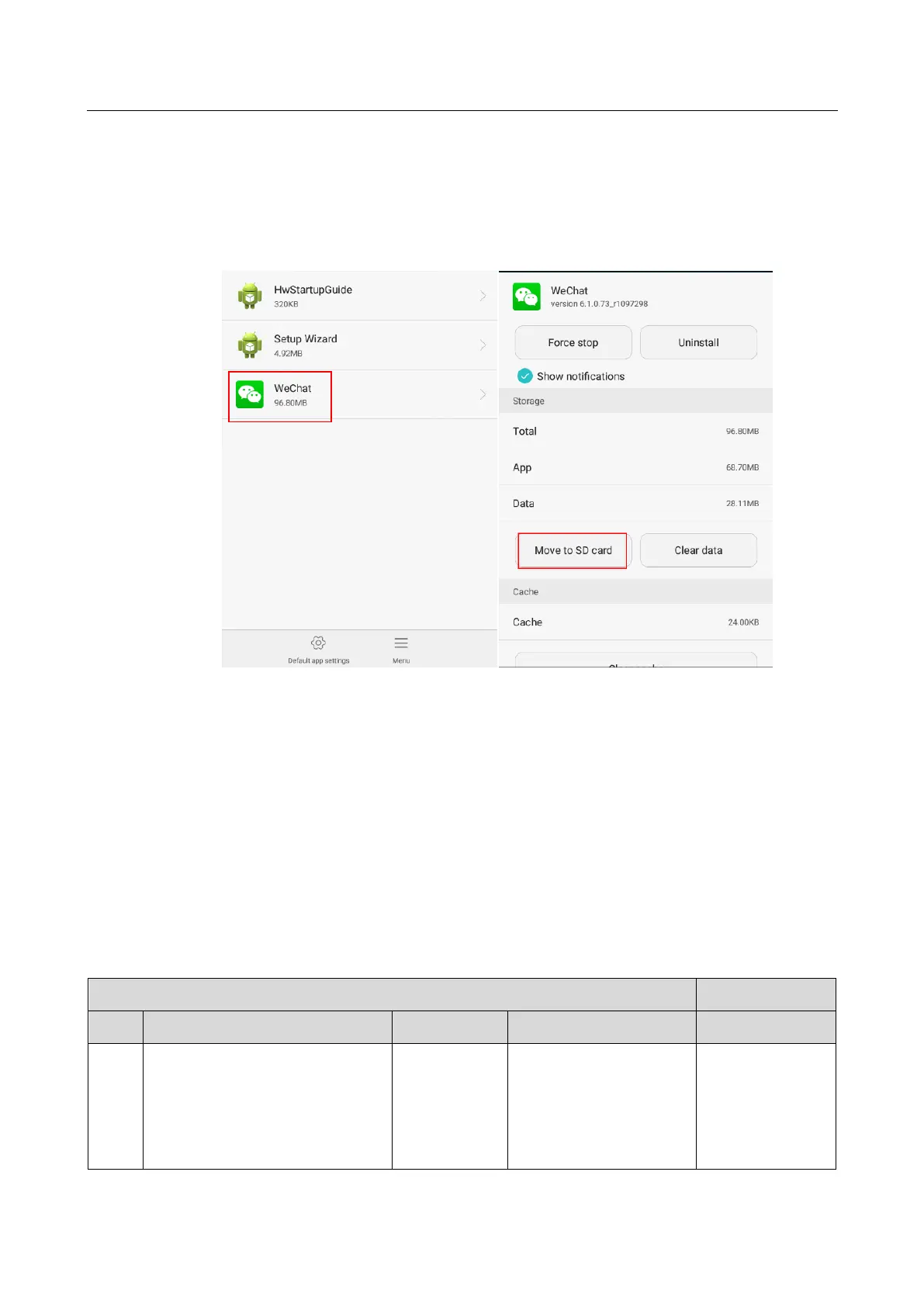
Yes. To move an installed application to the microSD card, go to Manage apps and touch the
application then Move to SD card.
3.22 How are my phone ROM and RAM allocated?
The ROM and RAM sizes displayed on your phone may be smaller than the values in the
phone specifications, because the system occupies a part. The
SCL-L01/SCL-L02/SCL-L03/SCL-L04/SCL-U31 has an 8 GB ROM and 1 GB RAM. Except
for the part that is occupied by the system, it has an available RAM of at least 400 MB.
8 GB ROM
The ROM contains system applications, files, and databases, which takes up about 4.2 GB
and is hidden from users. The ROM space available to users is 3.8 GB. You can use this 3.8
GB space to store any types of files.
ROM partitions (a phone ROM is similar to a hard disk on a computer)
Boot and operating system data
backup partition
This partition stores the
boot and operating system
backup data.
The data in this partition
is used when you restore
your phone to its factory


 To Next Page