TP482000B V300R002C03 Telecom Power
(TP482000B-N20B1, TP482000B-N20B2,
TP481200B-N20B1, and TP481200B-N20B2)
User Manual
Copyright © Huawei Technologies Co., Ltd.
If the Info button is blinking at 4 Hz, the SMU05A is running properly
but is not communicating with the host properly.
Note:
After a menu is displayed, the LCD screen becomes dark if no button is pressed within 30 seconds; the
standby screen is displayed if no button is pressed within 1 minute.
After login, the login screen is displayed again if no button is pressed within 1 minute.
The preset password is 000001.
To restart the SMU, hold down and for more than 10 seconds.
To increase or decrease a parameter value quickly, hold down or .
LCD
The SMU05A uses a 3.5-inch LCD, which displays up to seven rows of large-font menu items
on each screen.
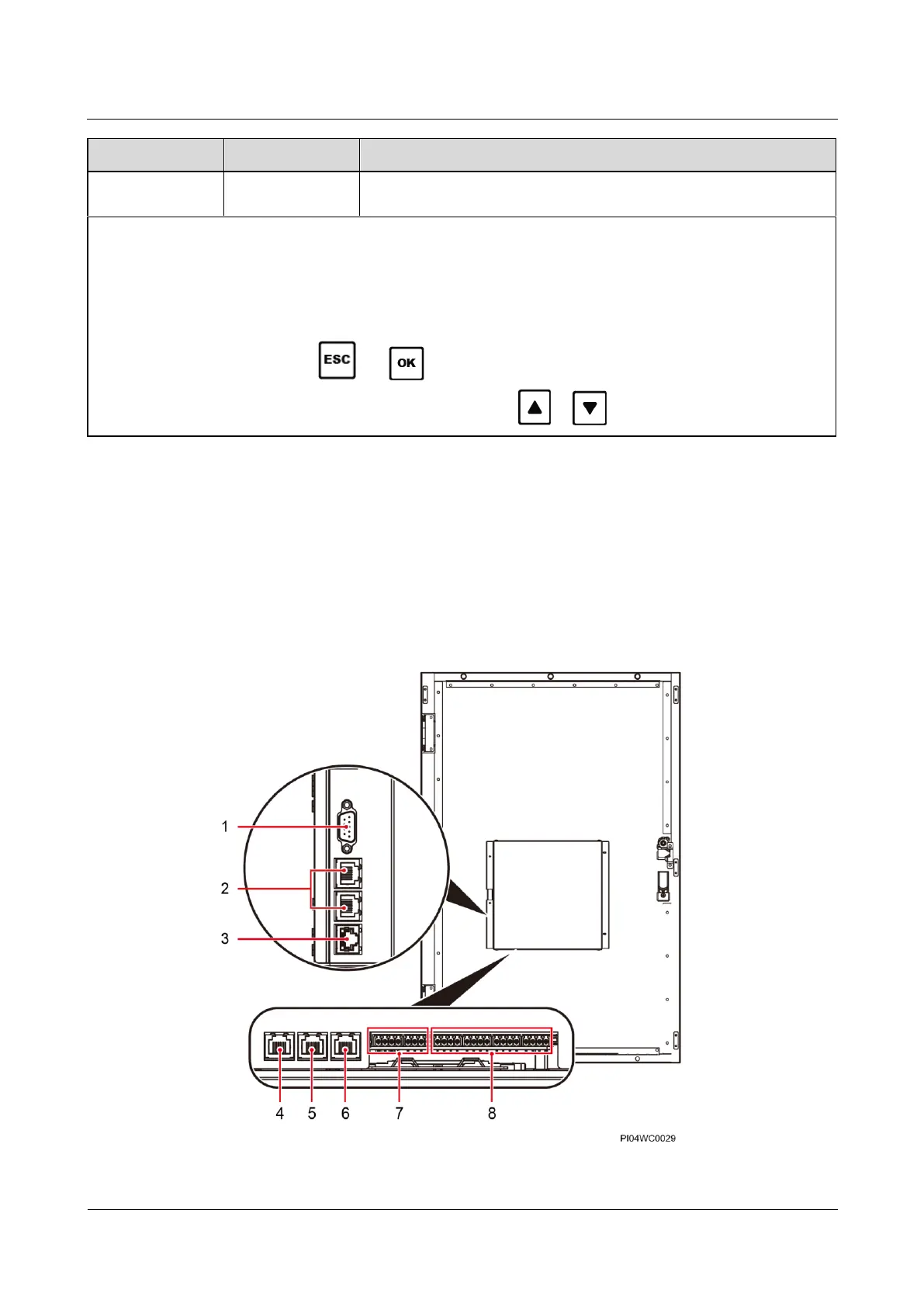
Ports
Figure 5-3 SMU05A ports


 To Next Page
 Loading...