TP482000B V300R002C03 Telecom Power
(TP482000B-N20B1, TP482000B-N20B2,
TP481200B-N20B1, and TP481200B-N20B2)
User Manual
Copyright © Huawei Technologies Co., Ltd.
5.2 Monitoring Unit
5.2.1 SMU05A
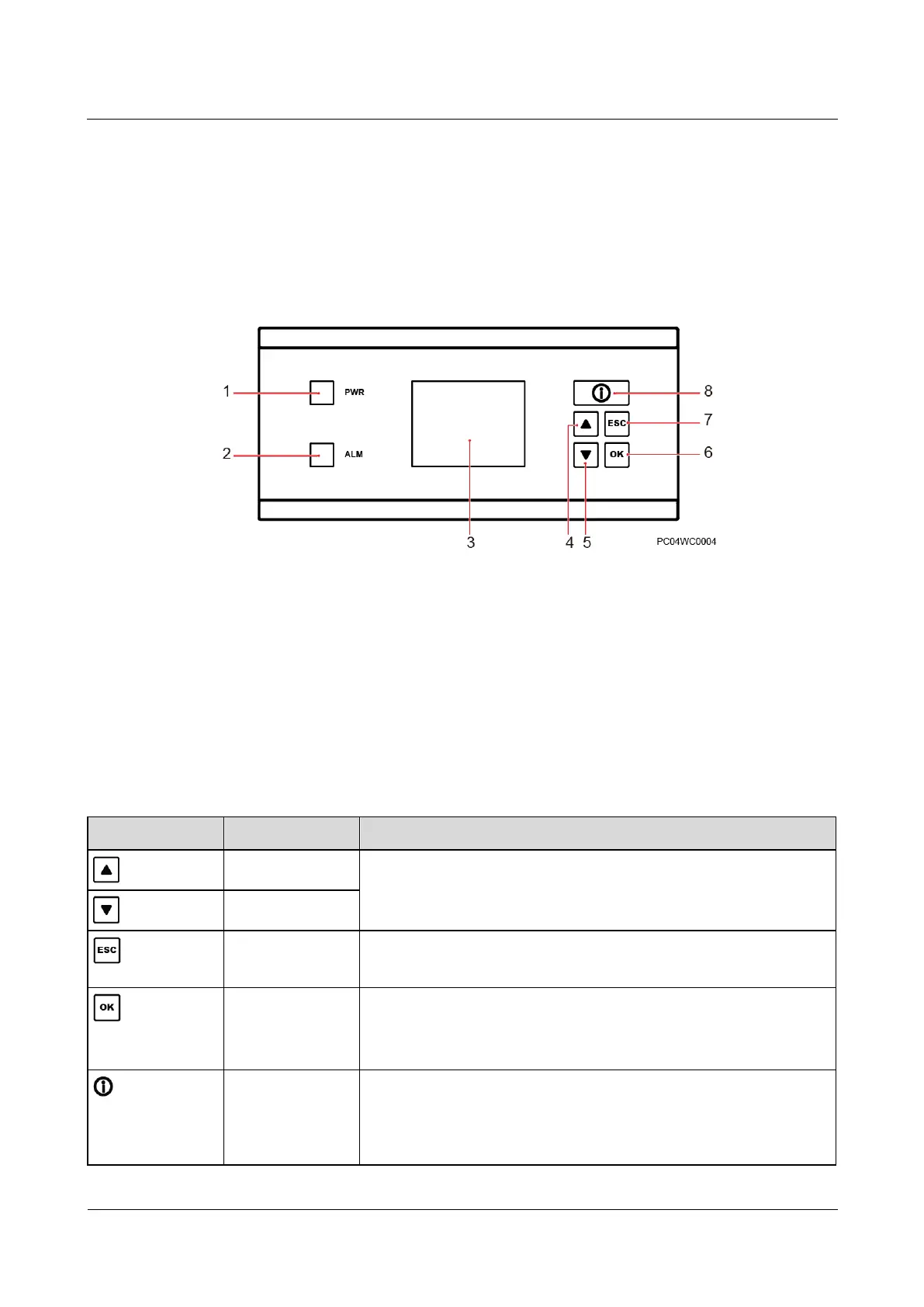
Panel
Figure 5-2 SMU05A panel
(3) Liquid crystal display (LCD)
Buttons
The SMU panel has five buttons for setting and querying parameters on the LCD.
Table 5-2 Button description
Scrolls through the menus or changes the value of a parameter.
Displays software version information on the standby screen.
Returns to the previous menu without saving the settings.
Enters the main menu from the standby screen.
Enters a submenu from the main menu.
Saves parameter settings.
Enters the standby screen from any screen or enters the active alarm
screen from the standby screen.
If the Info button is blinking at 0.5 Hz, the SMU05A is running
properly and communicating with the host properly.



 To Next Page