TP482000B V300R002C03 Telecom Power
(TP482000B-N20B1, TP482000B-N20B2,
TP481200B-N20B1, and TP481200B-N20B2)
User Manual
Copyright © Huawei Technologies Co., Ltd.
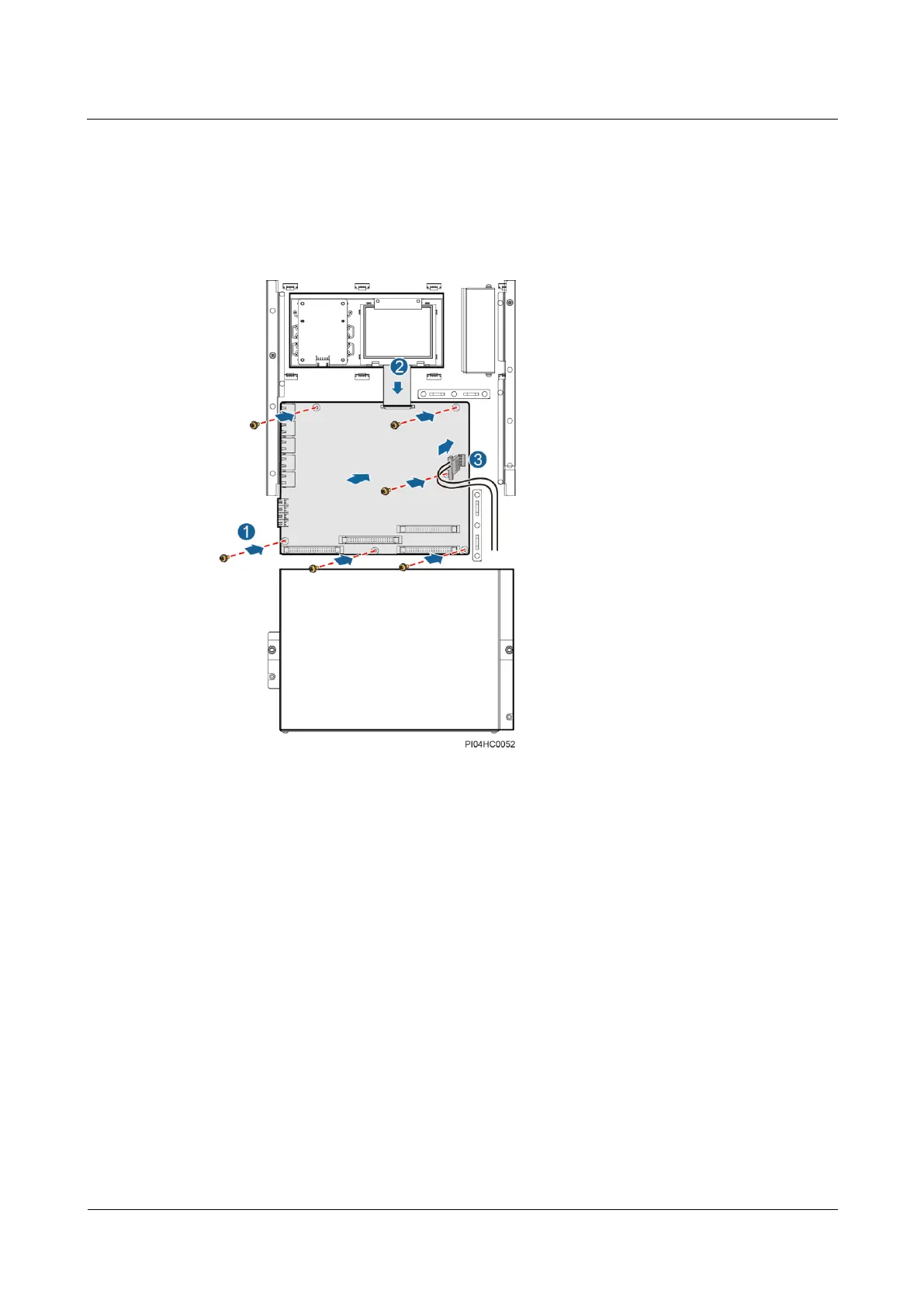
1. Place the new signal sampling board in position and tighten the screws.
2. Reconnect the communications cables and signal cables to the new signal sampling
board based on the recorded information.
3. Reconnect the power cable to the J98 port on the signal sampling board.
Figure 7-16 Installing a signal sampling board
Step 8 Place the cover on the power distribution monitoring unit, and tighten the screws.
Step 9 Reconnect the cables to the RJ45 ports on the power distribution monitoring unit based on the
recorded information.
Step 10 Disconnect the ground cable for the ESD wrist strap, and take off the ESD wrist strap and
ESD gloves.
----End
7.3.2 Replacing the LCD
Prerequisites
You have obtained an ESD wrist strap, a pair of ESD gloves, an ESD box or bag, a tool
kit, and the cabinet door key.
The new LCD is intact.







 To Next Page