Ver. 1.4 – 6-21
20
Configure Video Settings .
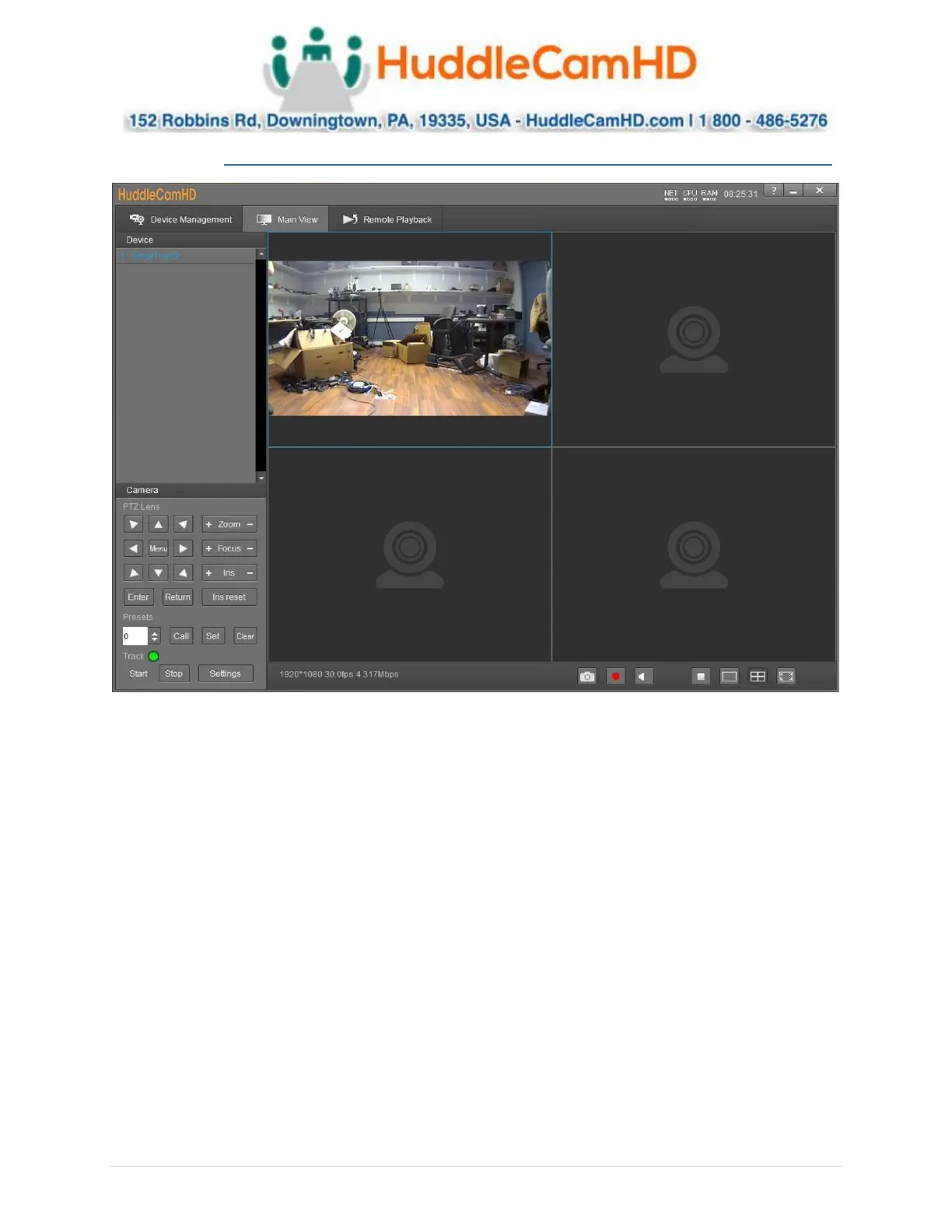
In the Video Interface you can view and control up to four cameras simultaneously. You have full control
over Pan, Tilt, Zoom, Focus, Iris, OSD Menu, Presets & Tracking Settings. Device List: List of added
cameras from the Device Management section
• Camera(s) Video Feed: Video feed from camera head or reference camera
o Right click camera from Device List and select video feed you wish to view.
▪ Teacher Close-Up: Tracking camera video feed
▪ Teacher Panorama: Reference camera video feed
• PTZ Control: Control the selected camera
• Menu Button: Opens the OSD Menu of the selected camera
• Zoom Control: Zoom the selected camera in or out
• Focus Control: Focus the selected camera tele or wide
• Iris Control: Adjust the Iris value up or down
• Iris Reset: Reset the Iris value
• Preset Control: Call, set & clear camera presets.
o Options include: 0 ~ 255
• Tracking Control: Enable or Disable tracking control
• Settings Button: Opens the tracking settings


 To Next Page
 Loading...