Ver. 1.4 – 6-21
19
Remote Configuration (Continued) _
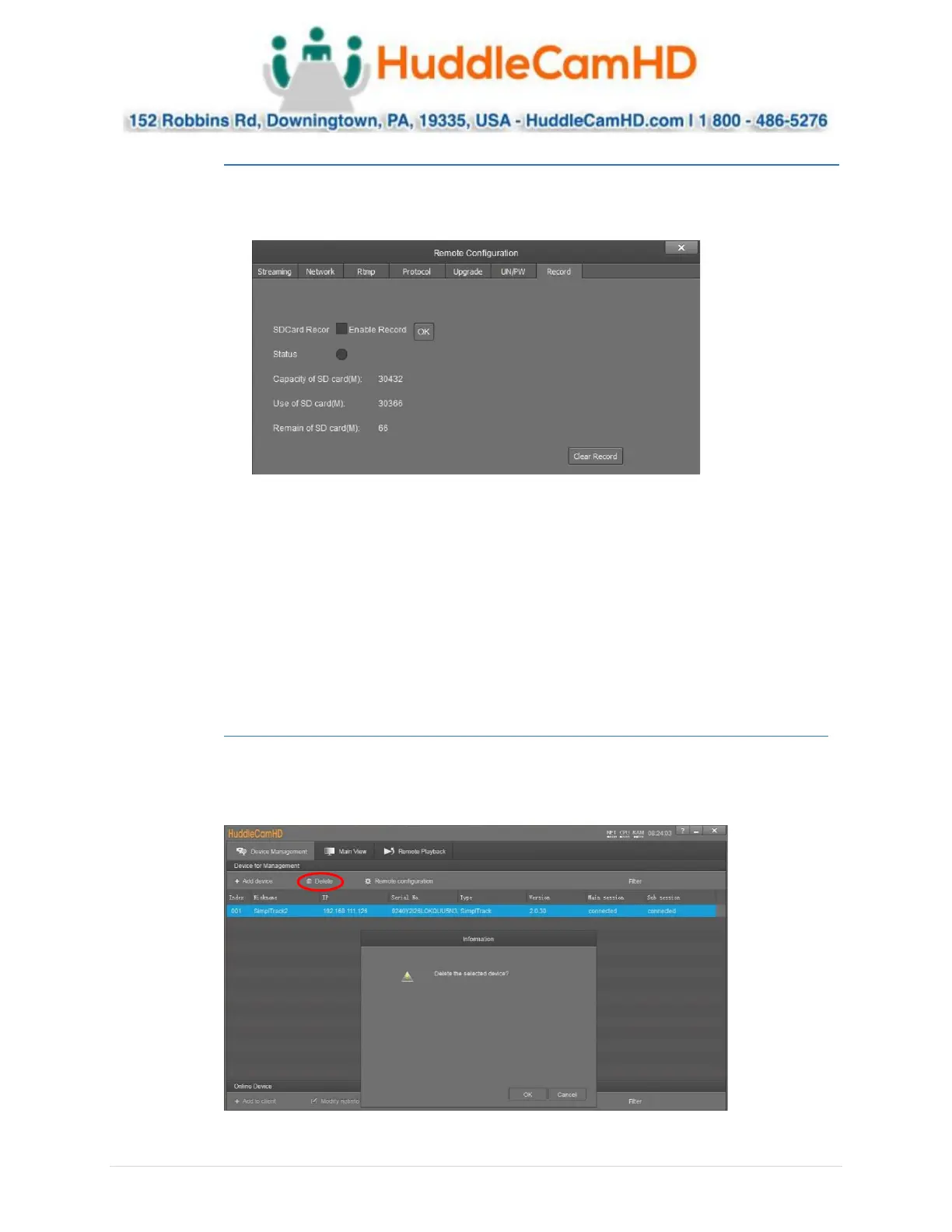
The Record category allows you to set up and view the status of the Photobooth recording.
Note: A Micro SD card is required for use with the Photobooth feature.
• SD Card Record: Enable or disable recording to the Micro SD card
o Default value: Unchecked (Off)
• Enable Record: After changing “SD Card Record” value, click “OK” to apply
• Status: Displays status of SD card recording
o Options include: Black/Unlit: Not recording, Green: recording, Red: Cannot record to SD
card
• Capacity of SD card(M): Displays total size of Micro SD card in kilobytes
• Use of SD card(M): Displays the number of kilobytes consumed on Micro SD card
• Remain of SD card(M): Number of kilobytes remaining on the Micro SD card
Remove Camera .
To remove a camera from the Device Management list, first select it, then click the Delete button above
the list. You will be prompted with a confirmation window to remove the camera. Click OK to remove
the device or Cancel to keep the current settings.


 To Next Page
 Loading...