Ver. 1.4 – 6-21
23
▪ Basic 2 (Continued) _______________
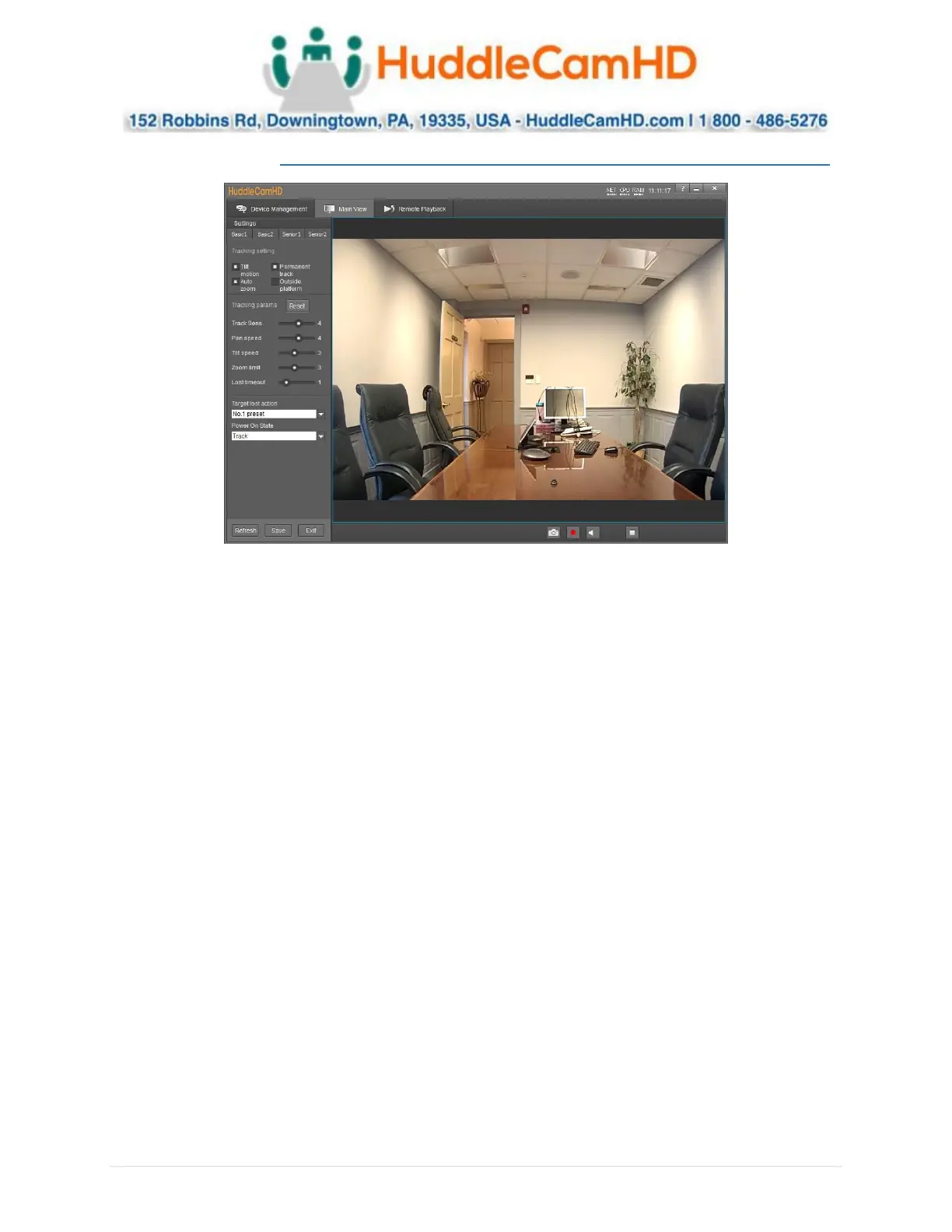
• Tilt Motion: Enable/Disable tilting while tracking.
• Auto Zoom: Enable/Disable zooming while tracking.
• Permanent Track: Enable/Disable tracking any moving object.
• Outside Platform: Enable/Disable tracking outside the Tracking Zone.
• Tracking Parameters Reset: Resets the tracking settings to default values.
• Tracking Sens.: Affects the sensitivity at which the camera tracks objects/individuals.
o Range: 0 – 7
• Zoom Sens.: Adjust the sensitivity of the zoom.
o Range: 0 - 7
• Zoom Limit: Allows for adjustment of how much the camera zooms while tracking.
o Range: 0 – 7
• Target Lost Action: Affects what the camera does when the tracked object or individual is lost.
o Options include: No. 1 Preset, No. 2 Preset, Stay
▪ Preset 0 is best utilized when framed around your “stage”.
▪ Preset 1 is best utilized when framed around your “subject”.
• Power On State: Affects whether the camera tracks or not upon powering on.
o Options include: Track & Do not track


 To Next Page
 Loading...