20Set Up the Network
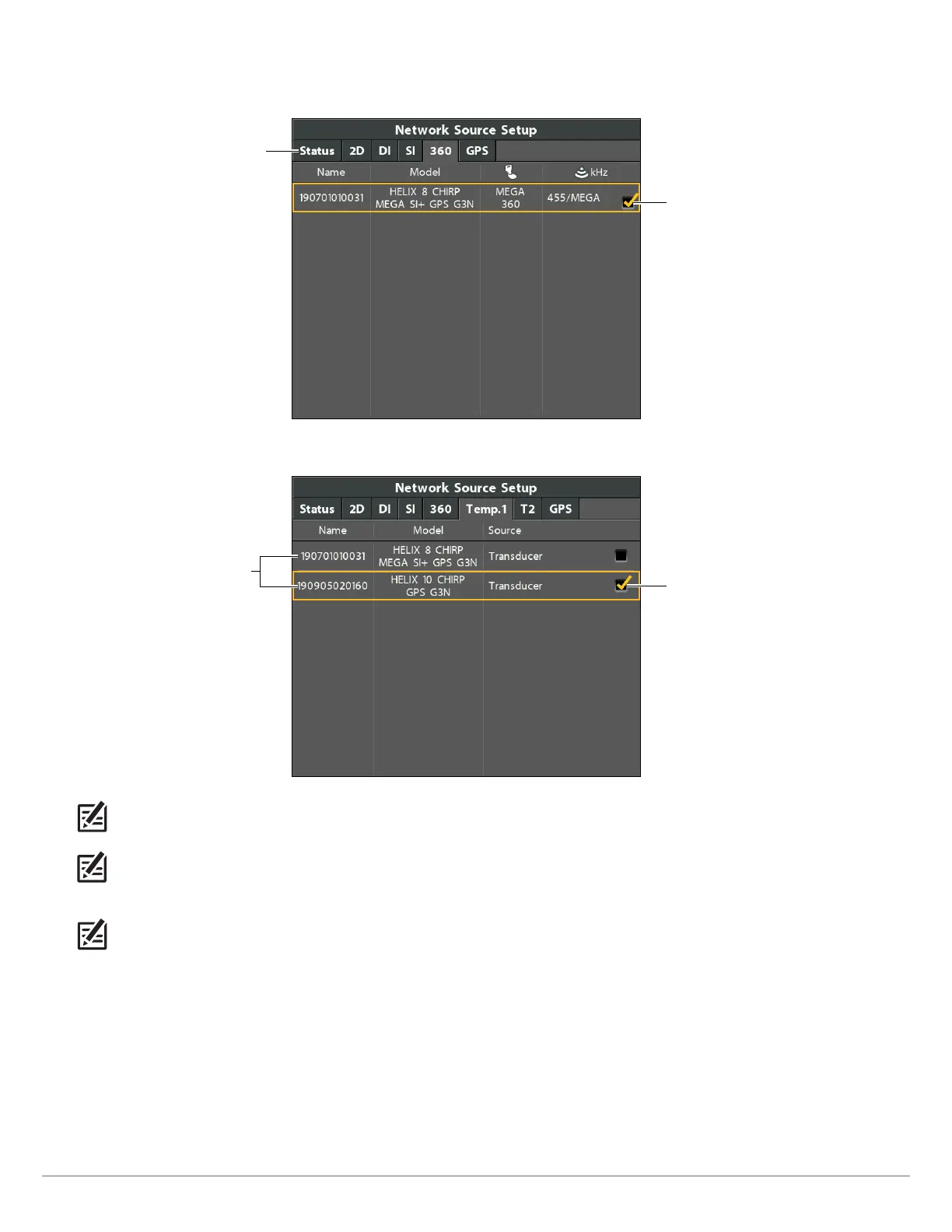
A checkmark will display in the box to show it is selected.
Selecting the MEGA 360 Imaging Transducer (HELIX)
Use the Cursor Control
key to choose the
transducer, and press
the RIGHT Cursor key
or the CHECK/INFO
key to select it.
Press the RIGHT or
LEFT Cursor keys
to select a tab.
Selecting the Temperature Source (HELIX)
Use the Cursor Control
key to choose the
transducer, and press
the RIGHT Cursor key
or the CHECK/INFO
key to select it.
available
sources
NOTE: If the control head is not capable of displaying a certain frequency from a transducer on the network, NONE will be displayed
in the beam frequency column in the Network Source Setup dialog box.
NOTE: The availability of beams is determined by the type of transducer that is connected to the control head and your Humminbird
model. If a connected transducer is not displayed in the Network Source Setup dialog box, select the Main Menu > Sonar tab >
Transducer Select or Connected Transducer, and set the transducer type.
NOTE: If you have questions about which transducers are compatible with your control head, visit our Web site at humminbird.com
or contact Humminbird Technical Support at 1-800-633-1468.
3. Close: Press the EXIT key until the dialog box is closed.






 To Next Page