33 Display Settings
HELIX Series
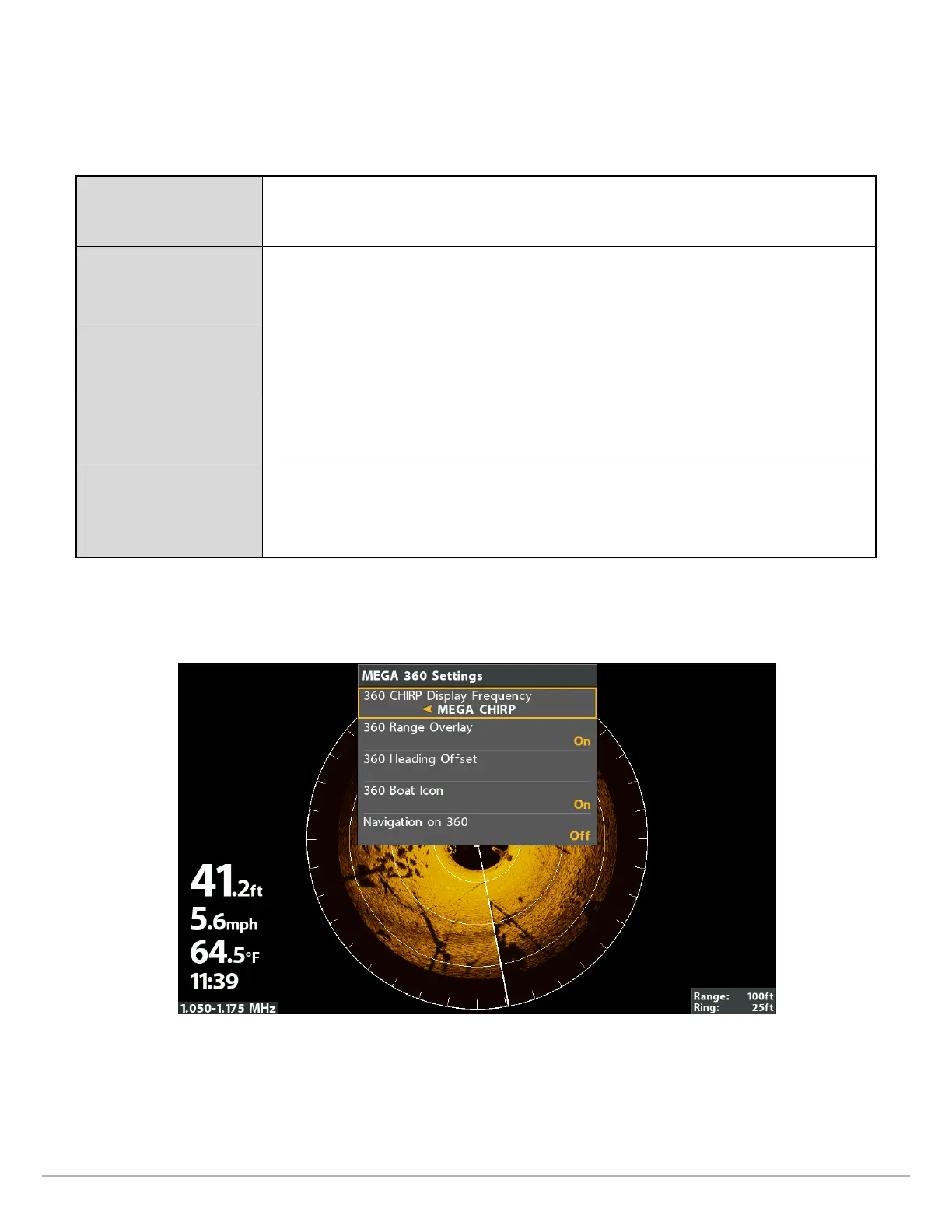
1. Main Menu: Press the MENU key twice.
2. Select the Accessories tab > 360 Sonar Settings.
3. Use the Cursor Control key to select an option from the submenu, and press the RIGHT or LEFT Cursor keys to change the
menu setting, as follows:
360 Range Overlay Select On to display the range rings on the view, or select Off to hide the range rings.
360 Heading Offset
If the position of objects on the display are slightly different than what you observe in
the environment around you, use this menu option to rotate the display and correct the
alignment. See the MEGA 360 Imaging Installation Guide for more information.
360 Boat Icon Select On to display the boat icon, or select Off to hide the boat icon.
Navigation on 360
To mark and display waypoints on the 360 View, select On. See Mark and Display
Waypoints for more information.
360 Offset
The 360 Offset Icon represents the installation location of the GPS Receiver/Heading
Sensor. Adjust the setting to match the distance between the 360 Imaging transducer
and the GPS Receiver/Heading Sensor. See the MEGA 360 Imaging Installation Guide for
more information.
4. Close: Press the EXIT key until the Menu System is closed.
MEGA 360 Display Settings (HELIX)






 To Next Page