17
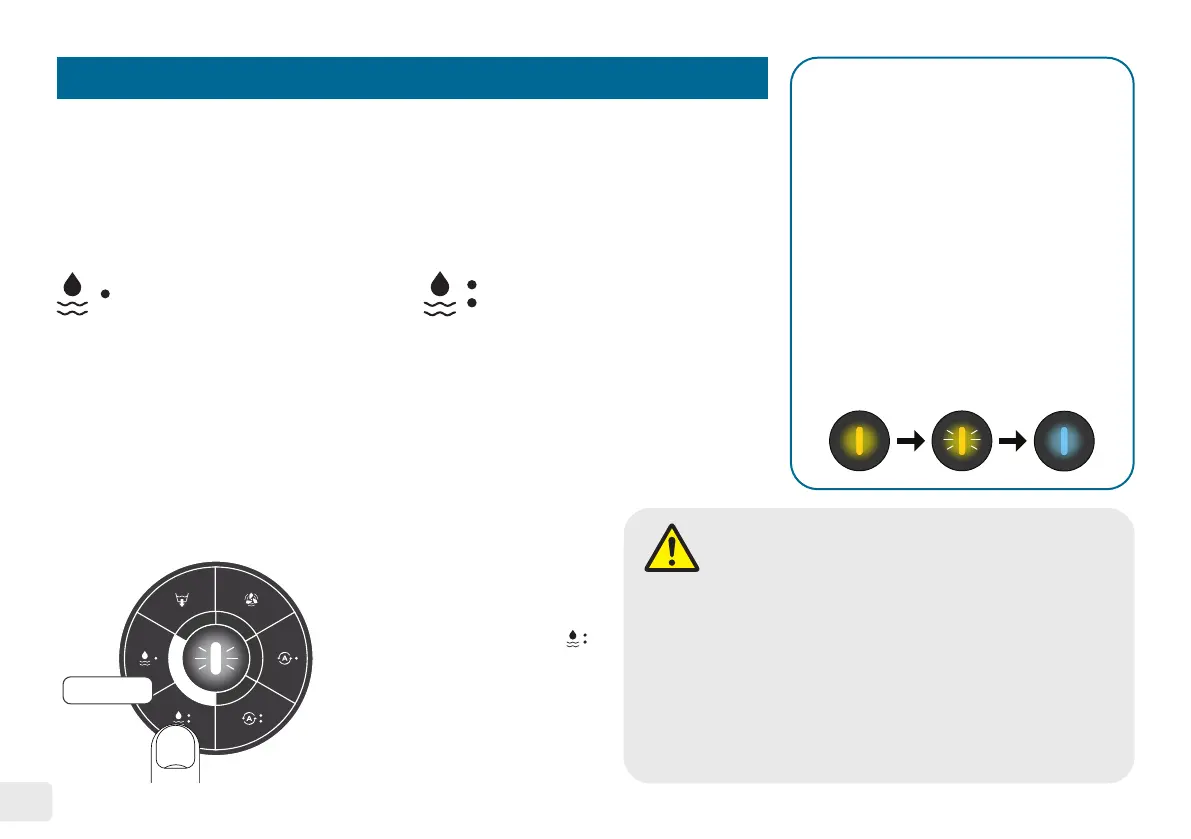
Setting 1: Quick Washing Mode Setting 2: Deep Washing Mode
Setting 3: Heavy Washing Mode
( 2 LED white light is shown; 10-minute washing )
( 2-minute washing ) ( 5-minute washing )
• When the washing mode has been running continuously for
more than 30 minutes, power off the machine and let it rest
for 15 minutes before starting the next washing cycle.
• DO NOT move, pull, or push the record during any operation�
• DO NOT start any cycle without water added in the
water basin�
• DO NOT move the machine during any operation�
Washing Mode
The Washing Mode allows users to run the washing cycle separately, without the
draining and drying cycle. There are three settings available.
This setting is ideal for new
records or records with light
dust accumulation. Press
this button once, and the
LED light will begin blinking,
then press the start/pause
button to initiate the 2-minute
washing cycle.
This setting is recommended for
records that are considerably
dirty. Press this button once,
and the LED light will begin
blinking, then press the start/
pause button to initiate the
5-minute washing cycle.
Safety Feature - Thermal Protection
The machine has a thermal sensor to
prevent overheating during ultrasonic
activity. If the water temperature in
the basin reaches or exceeds ≥55˚C
(≥131˚F), it will automatically stop
the working cycle and display a solid
yellow light. To resolve this issue,
press the start/pause button once to
initiate a cool down cycle. The water
will drain out, and the drying fans will
activate for cooling simultaneously for
6 minutes. The yellow light will blink
until the cycle completes with a solid
blue light.
CAUTION
3 seconds
This setting is recommended
for very dirty and moldy records
that require intensive cleaning.
To activate this mode, press
button once, and then long-
press the same button for 3
seconds until two white LED
lights appear. Afterward, press
the start/pause button to initiate
the 10-minute washing cycle.


 To Next Page