4
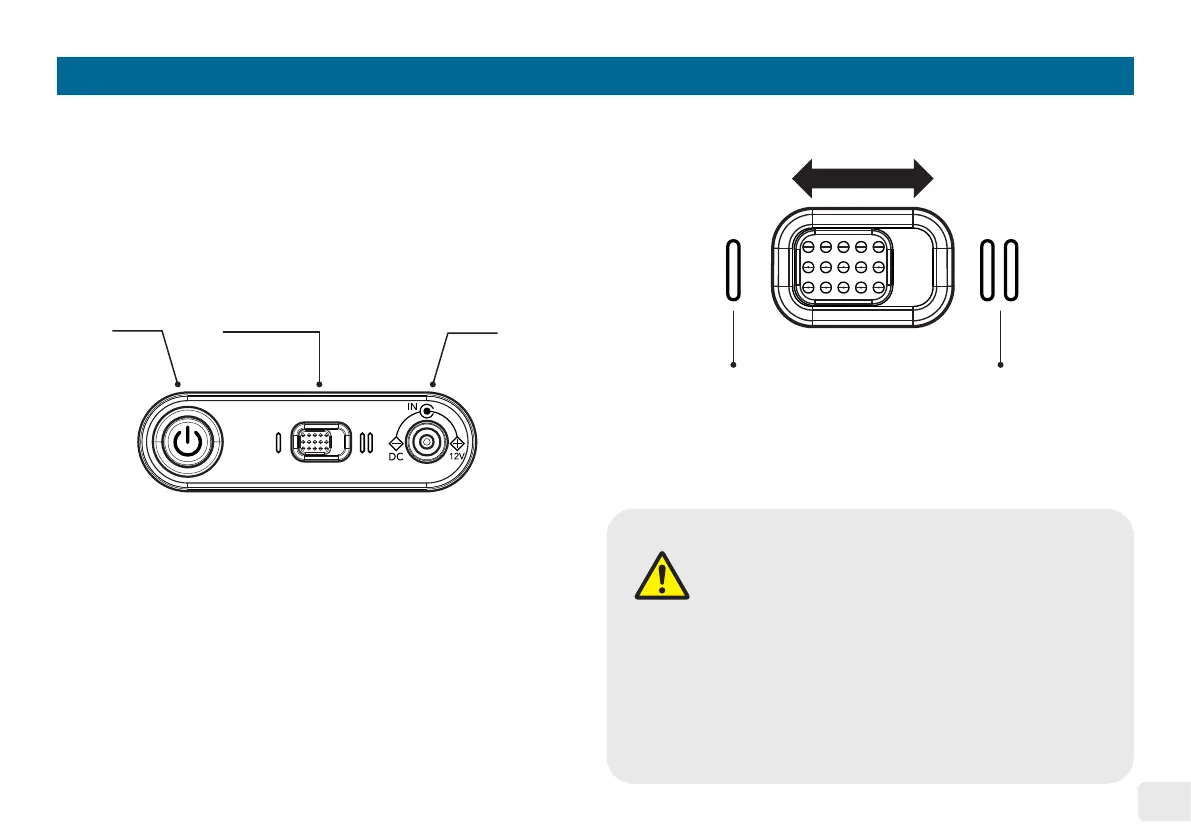
Side Control Panel
Power
Button
Drying Time
Setting Switch
Power
Port
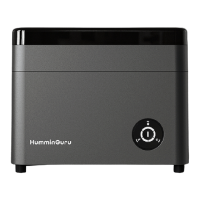
3-minute
Drying Time
6-minute
Drying Time
CAUTION
• DO NOT disconnect the power adapter during
any operation cycle�
• DO NOT change the drying time setting during
any operation cycle�
• Turn off the machine before unplugging the
power adapter from the machine or the wall
power outlet�
Drying Time Setting
The slide switch for drying time setting gives user the option
to select the drying duration for the optimal drying result. For
the rst time use, the default setting is 3 minutes of drying.
Sliding the switch to the right will change the drying time to 6
minutes for the modes that involve drying function. The choice
of drying time is subject to the condition of the vinyl record, the
temperature, and the relative humidity of the environment.
The side control panel has a power button, a drying time setting
switch, and a power port. Connect the power adapter to the
power port and the wall power outlet and then press the power
button until it clicks to turn on the machine.


 To Next Page