15
There are four mode options to select
from based on your preferences.
1. Auto Mode
2. Washing Mode
3. Drying Mode
4. Draining Mode
Using the Machine
Notice:
• The draining process is set to be 40
seconds long. Air extraction sound
at the end of the draining cycle is
normal�
• Select your desired drying time of
3-minute ( ) / 6-minute ( ) on the
side control panel before you start
the Auto Mode or the Drying Mode�
SELECT THE MODE
Basic Operation
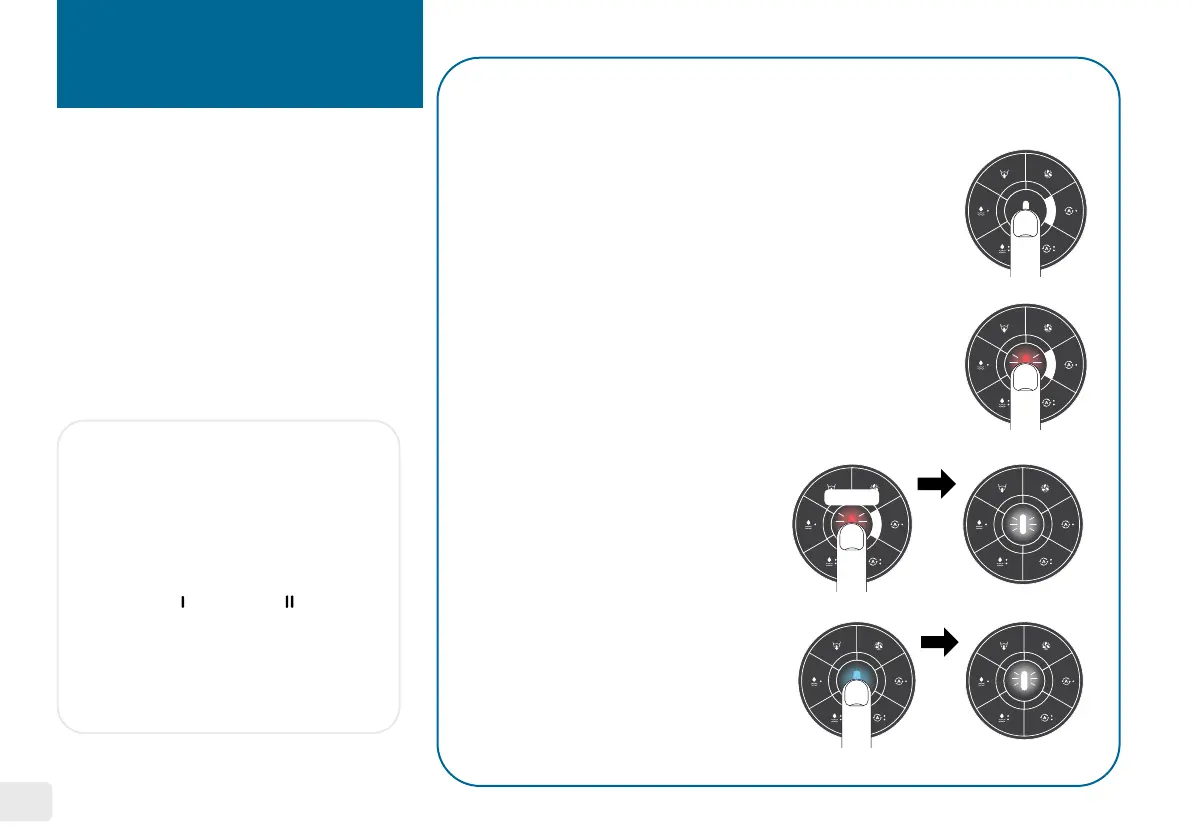
Select a mode and press the start/pause
button. The cycle will begin to operate.
Press the start/pause button and the light will
turn into a blinking red light. To resume the
operation, press the start/pause button again.
To Start
To Pause / Resume
Pause the cycle and then long
press the start/pause button for
3 seconds until the blinking white
light appears.
To Cancel
You will be alerted with a solid blue
light when the cycle completes.
Press the start/pause button to
reset the machine.
Completion
3 seconds


 To Next Page