7
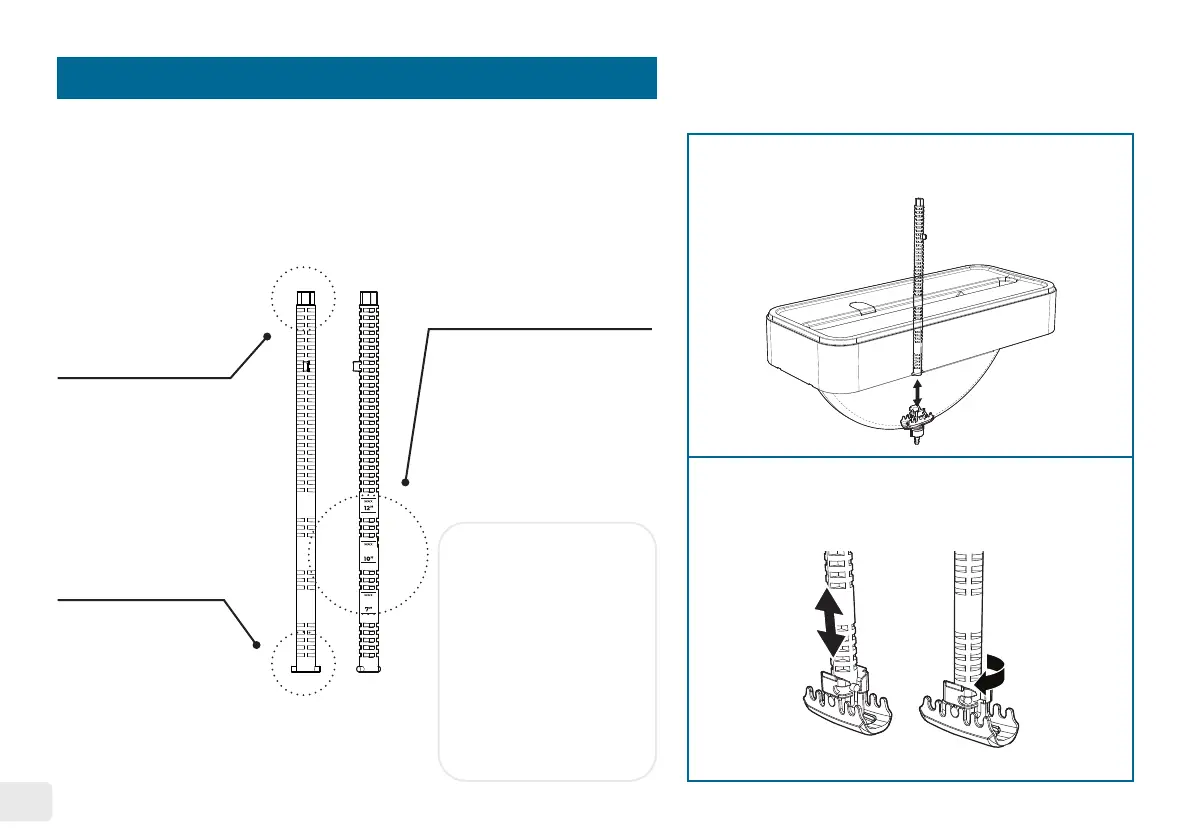
Maintenance Tool
3
Rotation Wheel
Adjustment Jig
Water Level Indicator
How to use the maintenance tool as a
water level indicator
Water Basin Filter
& 7” + 10” Water
Basin Support Jig
The maintenance tool is designed to perform three main tasks:
1). Adjust the rotation wheels position to accommodate 7”, 10”, and 12”
records. 2). Install or remove the water basin lter and 7”& 10” water
basin supports. 3). Work as a water level indicator.
1.
2.
Vertically place the tool into the water basin.
Insert the tool into the lter slot and rotate
it 45˚ clockwise to secure the tool.
• 12” Record Water Level
• 10” Record Water Level
• 7” Record Water Level
Notice:
• Each water level
indicator includes the
maximum water level
mark�
• Install the water basin
supports before using
the water level guides
for 7” and 10” record
as a reference�
45˚
*See page 13 for
installation instructions


 To Next Page