25
The default for this thermostat setting is in a 12
hour format. You can change the format to 24 hour
format by pressing Day/Time and then Program.
e AM/PM indicator will be off when the thermostat is in 24
hour mode.
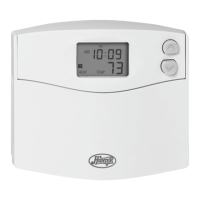
Setting day and time:
1. Press
Day/Time. (AM/PM and current hour will
ash)
2. Press
Up or Down to adjust the setting.
3. Press
Day/Time again to adjust the minute setting.
4. Press
Day/Time again to adjust the day of the
week.
5. Press
Day/Time to return to the normal display.
You may also press Hold/Return at any time to return to the
normal display.
SETTINGS, CONT.


 To Next Page