41
3. Span setting mode – allows you to adjust the
system ON/OFF cycle rate. The default setting
is 2 (the system cycles ON or OFF when the
temperature is within 1
o
F (0.5
o
C) above and
below the set temperature.) The span setting
can be adjusted if your system is cycling too fast
or too slowly.
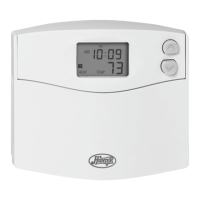
Press and hold both the
Up and Down buttons
until the word SPAN appears. Use the
Up or Down
button to adjust the span setting.
(Up will increase your cycle time by allowing the system to
run longer; Down will decrease your cycle time by causing
the system to run for a shorter length of time.)
Span settings remain the same for HEAT and
COOL system settings. When batteries are
installed, or the unit is
RESET, the span cycle will
revert to 2.
ICONS AND FEATURES, CONT.


 To Next Page