39
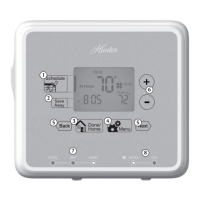
ICONS AND FEATURES
1. INDIGLO
®
Night-Light - will backlight the display
for easy viewing in the dark. Press any button to
illuminate the light.
(If no button is pressed after 5 seconds, the backlight will
turn o.)
Note: If the thermostat shows a Low Battery Warning, the
backlight will not operate. Follow the instructions on pages 42-
43 to change batteries.
2. Filter change indicator - will ash after 400 hours
of system use as a reminder to check or change
your lter. Press and hold the
Filter button for
3 seconds after changing the lter to reset the
lter timer.
(Pressing the Filter button for less than 3 seconds will cause
the Filter change indicator icon to appear. The lter timer
will not be aected unless the button is held for more than
3 seconds.)


 To Next Page