
 Need help?
Do you have a question about the Husqvarna PG820 RC and is the answer not in the manual?
Explains various symbols displayed on the machine for operational guidance and safety warnings.
Details the three distinct levels of warnings used throughout the manual to indicate potential hazards.
Provides crucial safety precautions and notes that must be read and understood before operating the machine.
A welcome message from Husqvarna, expressing satisfaction with the customer's choice of product.
Highlights the key technological advancements, performance values, and distinguishing features of the PG820 RC.
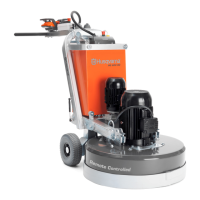
Provides a detailed diagram and list identifying each major component of the floor grinder.
Offers a diagram and list to identify all components and controls on the remote control unit.
General information on the importance of safety equipment and daily checks for proper operation.
Explains the function of the main switch and how to check its operation for powering the machine on and off.
Describes the STOP/RUN control on the main panel and the procedure for testing its functionality.
Instructions for testing the emergency stop button located on the machine's main control panel.
Instructions for testing the emergency stop button located on the remote control's handle panel.
Procedure to check the functionality of the STOP/RUN switch on the remote control.
Explains the machine stop function on the remote control and how to test its operation.
Details how to check that the locking pins on the wheel motors are correctly depressed for operation.
General safety warning regarding power disconnection before assembly or adjustments.
Instructions on adjusting the handle height for optimal operator ergonomics during use.
Steps for connecting the dust extraction system and the main power source to the grinder.
Provides general details on Li-ion batteries, charging temperatures, and usage of original parts.
Information regarding the machine's battery for remote control and its operating/charging limitations.
Details the operating time, charging, and usage recommendations for the remote control's battery.
Lists essential personal protective equipment required for safe operation of the machine.
Basic safety directions for operators, emphasizing responsibility and machine cleanliness.
Highlights the importance of exercising caution, common sense, and seeking expert advice when needed.
Defines the machine's risk area and emphasizes the operator's responsibility for supervision and safety.
Covers essential safety measures related to electrical hazards, connections, and damaged cords.
Provides guidance on proper electrical grounding to mitigate the risk of electric shock.
Safety guidelines for using extension cords and cables, including checking for damage and avoiding hazards.
Explains wireless and wired control modes, and the necessity of pairing the remote control.
Information on configuring software settings and pairing the remote control with the machine.
Explains navigation of the SETTINGS submenu for various machine configurations.
Guides users through the SERVICE submenu for accessing diagnostics and machine information.
Step-by-step guide to calibrate the speed controls for the grinding discs and planetary head.
Procedure for calibrating the direction and speed of the grinding discs via the remote control.
Procedure for calibrating the direction and speed of the planetary head via the remote control.
Instructions for calibrating the left/right movement of the Joystick X on the remote control.
Instructions for calibrating the forward/back movement of the Joystick Y on the remote control.
Procedure for calibrating the grinding discs' direction and speed using the machine's control panel.
Procedure for calibrating the planetary head's direction and speed using the machine's control panel.
Instructions on using arrow keys to adjust the OFFSET value for machine displacement compensation.
Describes the methods available for maneuvering the machine, both manually and remotely.
Guidelines for using the support wheel for short-distance movements within the work area.
Details on how to maneuver the machine wirelessly using the remote control.
Instructions for maneuvering the machine via remote control using a connected CAN cable.
Provides general guidelines for diamond segments used in grinding applications.
Explains how diamond grit size affects scratch patterns, tool life, and performance.
Discusses how the hardness of the binding agent influences wear rate and grinding efficiency.
Details the impact of the number of diamond tools on machine load, current draw, and scratch pattern.
Outlines the principles and considerations for both wet and dry grinding applications with diamond segments.
Specific instructions for polishing processes using the HiPERFLOOR Premium with PG820 RC.
Emphasizes the need for gloves as diamond tools can become very hot during operation.
Instructions on using a hammer to safely remove diamond segments from the grinding disc.
Step-by-step guide for affixing new diamond segments onto the grinding disc correctly.
Explains Dual Drive Technology for independent control of planetary head and disc speeds and directions.
Provides advice on initial speed settings and when it is appropriate to increase speed.
Describes the machine's pull direction and how to optimize grinding efficiency by setting rotation.
Information on the integrated variable speed drives and frequency converters and their functions.
Instructions for removing, assembling, raising, and lowering the support wheel.
Guidelines for safely transporting the machine on a means of transport, including ramp usage.
Recommendations for cleaning and storing the machine after use.
Instructions for maintaining battery health during long-term storage periods.
Essential safety checks and preparations required before starting the machine.
Step-by-step instructions for starting the machine in manual maneuvering mode.
Step-by-step instructions for stopping the machine in manual maneuvering mode.
Step-by-step instructions for stopping the machine while operating in remote maneuver mode.
General warnings and advice on performing maintenance correctly to ensure longevity and safety.
A detailed schedule outlining daily, weekly, and periodic maintenance tasks for the machine.
Specific warnings and guidelines for cleaning the machine, advising against water spray.
Checks for cord integrity, tightness of fasteners, and head lock security.
Description of the dry planetary drive system and its components, including the chain ring.
Procedure to inspect the planetary seal for dust ingress, indicating its effectiveness.
Information on spring steel fingers, fatigue, and recommended inspection intervals for grinding discs.
Maintenance requirements for the grinding disc drive system and recommended service intervals.
Explains error messages and fault codes displayed on the remote control, with corresponding causes.
Addresses disturbances in radio communication during grinding and potential solutions.
Troubleshooting issues where the grinder is difficult to hold due to load or motor problems.
Troubleshooting uneven scratch patterns caused by diamond mounting or head lock issues.
Addresses causes and solutions for the grinder jumping unexpectedly during operation.
Steps to troubleshoot why the machine fails to turn on.
Diagnosing display issues where Hz values do not update when switching from STOP to RUN.
Troubleshooting display problems preventing frequency reference from reaching 80 Hz on the large drive.
Troubleshooting display problems preventing frequency reference from reaching 120 Hz on the small drive.
Diagnosing low DC link voltage readings when the machine is in standby mode.
Diagnosing low DC link voltage readings when the machine is in operation.
Troubleshooting the meaning and cause of the red light appearing on the control panel during operation.
Troubleshooting the F1.1 over current fault indicated on the display panel.
Troubleshooting the F1.3 earth fault indicated on the display panel.
Troubleshooting the F1.9 under voltage fault indicated on the display panel.
Troubleshooting the F1.11 output phase supervision fault indicated on the display panel.
Troubleshooting F1.14 over temperature faults for variable speed drives due to environmental or sensor issues.
Troubleshooting motor stall conditions and mechanical stiffness issues affecting grinding discs.
Troubleshooting F1.16 motor over temperature faults, often related to excessive current draw.
Technical specifications for the control system, including signal transmission and communication protocols.
Provides a warning regarding FCC RF exposure requirements and recommended separation distances.
Technical specifications for the battery charger, including input voltage, frequency, and current ratings.
Outlines the warranty claim process, requirements, and conditions for product coverage.
Specifies the warranty period for equipment, exclusions, and conditions for warranty claims.
 General
| Brand | Husqvarna |
|---|---|
| Model | PG820 RC |
| Category | Floor Machine |
| Language | English |




 To Next Page