22
4.3. Main Body Screen Description
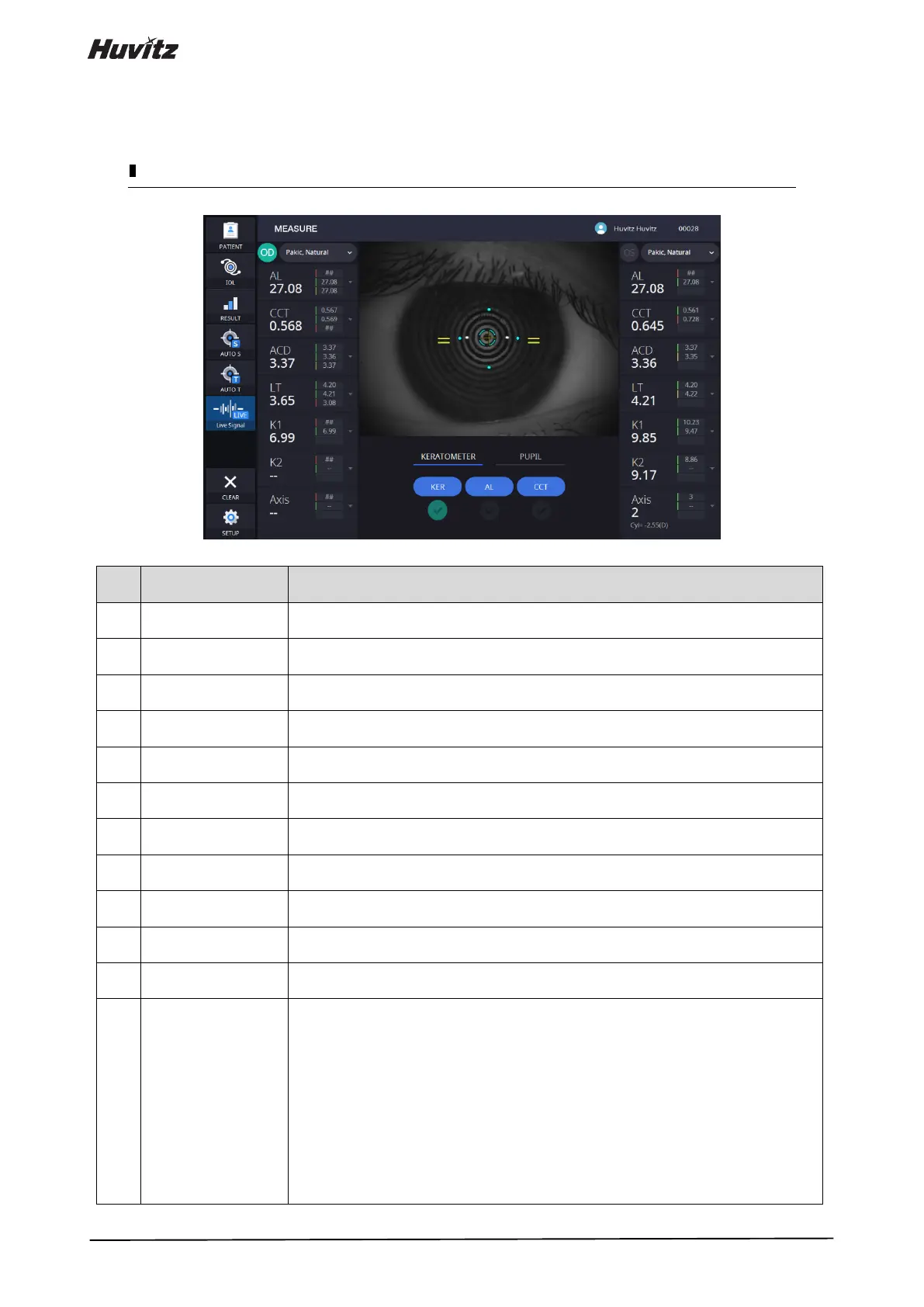
Shows the information of patient ID and name.
Go back to patient detail page.
Go to IOL calculation page.
Simulate the IOL lens with measured data.
Go to Result page.
Result page shows the detail information about the patient measurement.
Show auto shooting selection status.
Show auto tracking selection status.
Show live signal selection status.
Clear all of the measurement data.
Change the measurement settings.
Shows the patient's Lens and Vitreous body information.
(If clicking, selection box will be slide down. And, User can change the options.)
It shows the live camera images.
It shows latest measured values.
So, user can check the measurement.
Each value color indicates evaluation result, green means that value is very reliable,
yellow means that value is reliable a bit, red means that value is hard to reliable.
("##” value is perfectly error value.)
-AL: Axial Length.
-CCT: Central Corneal Thickness.
-ACD: Anterior Chamber Depth.
-LT: Lens Thickness.
-K1: Flat Keratometry.
-K2: Steep Keratometry.
-Axis: Angle degree of K1.


 To Next Page