E
E
2524
D/E/F 18.303.H5/05.19
D/E/F 18.303.H5/05.19
6.3 SETTING THE SWITCHING POINTS AND SWITCH-BACK POINTS /
HYSTERESES
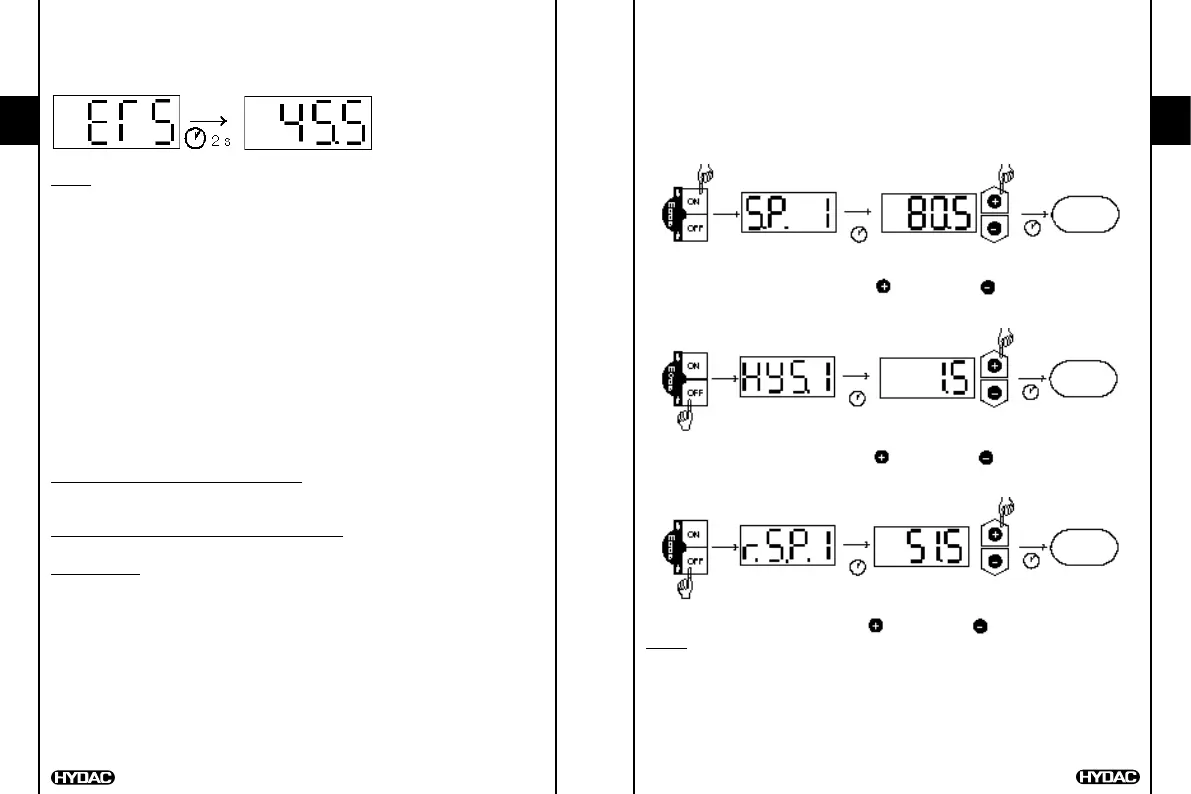
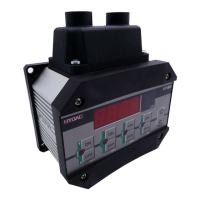
Press appropriate key
Switching point/switch-back point/hysteresis number is displayed e.g. "S.P. 1"
After 2 seconds the current setting ashes.
Using the "+" and "–" keys, alter the setting.
After 3 seconds the display switches back.
6.3.1 Setting a switching point
temperature
display
SP1
2 s 3 s
press ON key display set switching point
= larger value = smaller value
6.3.2 Setting a hysteresis
(Only possible if the switch-back mode is set to "hysteresis".)
temperature
display
SP1
2 s 3 s
press OFF key display set hysteresis
= larger value = smaller value
6.3.3 Setting a switch-back point
(Only possible if the switch-back mode is set to "switch-back point")
temperature
display
SP1
2 s 3 s
press OFF key display set switch-back point
= larger value = smaller value
Notes:
If "LOC" appears in the display when trying to alter the settings, programming
is disabled. Corrective action: set hardware and software programming
enable to "ON". (See Point 9 "Programming enable")
If the "+" or "–" key is held down during alteration, the value automatically
advances in larger increments.
If a setting has been altered, "PROG" appears briey in the display when the
display switches over. The new setting is then saved in the unit.
5. Digital display
After switching on the supply voltage, the unit briey displays "ETS" and then
displays the current temperature.
Notes:
In the basic settings the display can be altered so that, once switched on,
the unit displays a switching point or the maximum value permanently. In
this case "S.P. 1", "S.P. 2", "S.P. 3", "S.P. 4", or "MAX" appears briey on the
display following the switch-on message. The current temperature can be
displayed briey by pressing the "+" or "–" key.
If the current temperature exceeds the nominal temperature of the unit, it can
no longer be displayed and the display begins to ash.
If the current temperature is below 0.5 °C, then 0 is displayed.
6. Output function
6.1 RELAY OUTPUTS
The ETS 1700 has 4 relay outputs. One switching point and one switch-back
point and/or one hysteresis can be set for each relay. The appropriate relay
pulls in when the pre-set switching point is reached and drops back when the
temperature falls below the switch-back point.
Whether the unit operates with adjustable hystereses or adjustable switch-back
points is determined via the "switch-back mode", in the basic settings (see Point 8).
Switch-back mode is set to "hysteresis":
The pre-set hysteresis determines the switch-back point (switch-back point =
switching point minus hysteresis).
Switch-back mode is set to "switch-back point":
The switch-back point is set directly.
Abbreviations: "S.P.1" .. "S.P.4" = switching points 1..4
"HYS.1" .. "HYS.4" = hystereses 1..4
"r.S.P.1" .. "r.S.P.4" = switch-back points 1..4
6.2 ANALOGUE OUTPUT
Analogue output signal 4..20 mA or 0..10 V
(adjustable in the "Basic setting" menu)


 To Next Page