20 21
User Guide User GuideHYDRAFACIAL MD
™
Elite
™
HYDRAFACIAL MD
™
Elite
™
EN EN
Troubleshooting
Problem Possible Cause Solution
No Power
Power cord
Make sure power cord is properly connected to back of the unit and to a working wall
outlet.
Fuses
Unplug unit from main wall outlet. Use a small at head screwdriver to remove the fuse
holder box located in between the ON/OFF switch and power cord, and check that fuses
are in good working conditions (not blown).
Touchscreen
Blank screen/No video signal
If the main power is ON and the touchscreen is blank, press the power button located on
the right hand side of touchscreen. Check video cable connection in the rear.
No image, or inverted image on the screen
Call your local distributor for assistance.
Screen does not respond to touch
Low or No Fluid
Flow
Toggle switch Make sure the switch is on.
Empty bottle Make sure your skin solution bottle is not empty.
Improper connection
Make sure that your HydraFacial handpiece is properly connected to the side of the
skin solution station block, and to the waste canister. Also, make sure that the lid is rmly
attached to the waste canister.
Tip is improperly installed
Make sure the tip is rmly installed onto the handpiece. Angled tips should face downwards
in order to facilitate ow.
Flow control valve is closed
Make sure the ow control valve on the handpiece is open. To increase
uid ow, turn the ow control valve towards the + sign.
Low or No Fluid
Flow
Leak in the line Check lines for any kinks or leaks.
Too many solution stations are on Make sure you only have a maximum of two skin solution stations on the ON position.
Faulty station
If using only one station at a time, turn current station off and try another station. If this
corrects the problem please check on the previous station that internal bottle seal is
completely broken and pick up assembly (metal portion) is fully submerged. Repuncture
bottle if needed.
Operator technique
Make sure that you are holding the handpiece correctly and not working against gravity or
blocking the tubing.
Waste canister is full
Do not let the waste canister ll above 450 mL. If the canister becomes overfull, a built-in
oat will occlude the vacuum opening and skin solution ow through the handpiece will
cease. Empty the waste canister after each service.
Clogging Flush all stations thoroughly. Make sure the System is cleaned after each service.
Cartridge is loose
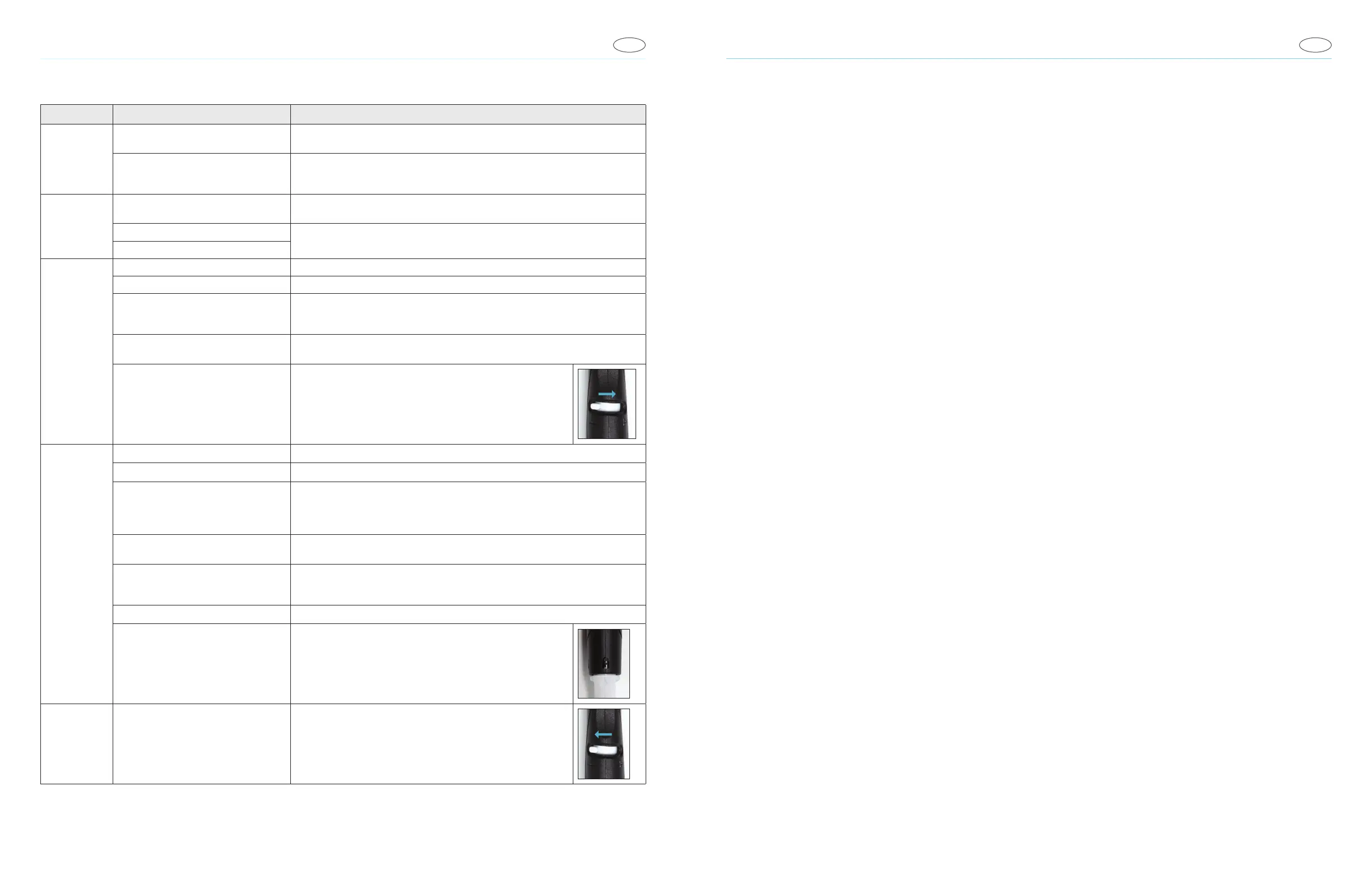
Make sure that the gray cartridge is properly inserted into the
handpiece. The arrow on the cartridge should line up with the lock
symbol.
Too Much Fluid
Flow
Flow control valve is opened too far
Make sure the ow control valve on the handpiece is not opened
too far. The default setting for the ow control valve is 50% open.
To decrease uid ow, turn the ow control valve towards the – sign.
Limited Warranty
Form of Product Warranty
LIMITED WARRANTY (HydraFacial
™
System)
What Is Covered:
The warranty for the HydraFacial
™
System (the “System”) covers defects in material or workmanship in the System.
Who Is Covered:
This limited warranty applies and extends only to the original Customer purchasing the System from Edge Systems LLC in the country
where the sale occurred. This limited warranty is non-transferable and non-assignable by the original Customer. Edge Systems LLC
shall have no obligations under this limited warranty in the event that an original Customer attempts an unpermitted assignment of the
original Customer’s rights under this limited warranty. Notwithstanding the foregoing, Edge Systems LLC agrees to extend the benets
of this limited warranty to a leasing company providing nancing to the original Customer for the System, provided that the System
is leased back to and operated by the original Customer and any such leasing company has no greater rights than the original
Customer.
How Long:
The System warranty runs for a period of one (1) year from the date of installation of the System to the original Customer.
We will provide any replacement part for the balance of the original warranty period.
What Edge Systems LLC Will Do:
For the System, Edge Systems LLC will, within the applicable warranty period, at Edge Systems LLC's sole discretion, repair or replace
any defects in the System without any costs to the Customer for parts or labor (except as specically stated).
What Is Not Covered:
This warranty does not cover any equipment which has been damaged by accident, misuse, abuse, or modication, or which
has been used in violation of the System instructions or for any purpose other than one for which it was manufactured, or caused
by unauthorized repair or use of unauthorized parts, including, without limitation, damage to the System arising from use of skin
solutions or tips purchased or otherwise obtained from a non Edge Systems LLC approved supplier. This warranty does not cover
freight damage; or any damage caused by acts of god or third parties not within the control of Edge Systems LLC, such as damage
caused by power surges or lightning. This warranty does not cover the costs of installation, adjustment of user controls, initial technical
adjustment (set-up) and routine user required maintenance. This warranty does not extend to any System machinery, appliances or
property of the customer used in conjunction with or connected to the System. This warranty is the exclusive remedy against Edge
Systems LLC and no other remedy (including but not limited to incidental or consequential damages for injury to person or property,
lost prots, lost sales or any other incidental or consequential loss) shall be available. This warranty is in lieu of any other warranty,
express or implied, including but not limited to any implied warranty of merchantability or tness for a particular purpose.
Any representations or promises inconsistent with or in addition to this limited warranty are unauthorized and shall not be binding
upon Edge Systems LLC. Please note that some states do not allow limitations on how long an implied warranty lasts or do not allow
the exclusion or limitation of incidental or consequential damages, so the above limitations may not apply to you.
How To Obtain Service:
To obtain Service under this warranty, the Customer must contact Edge Systems Technical Support team within the warranty period.
Edge Systems LLC can be reached by telephone (toll free) at (800) 603-4996 or (562) 597-0102. While under warranty, Edge
Systems LLC will arrange for shipping and cover shipping charges should the System need repair.



 To Next Page
 Loading...