14 15
User Guide User GuideHYDRAFACIAL MD
™
Elite
™
HYDRAFACIAL MD
™
Elite
™
EN EN
3. The toggle switches control which skin solution bottle is being used. When a switch is in the ON position, uid will be drawn
from that bottle. When switched to the OFF position, no uid will be drawn from the corresponding bottle.
Note: Always keep the “SYSTEM RINSE” toggle switch (gray) off while performing procedures.
Skin Imaging Camera (Not available in all countries)
1. Attach the tool holder, top rst, onto the accessory rail. Tighten the thumbscrews to lock the tool holder in place.
2. Insert the cable end connector from the camera into the port located on the right side of the unit. Push in and twist until
it is completely locked.
3. Place the camera on the tool holder when not in use.
On, Off, and Standby/Sleep Modes
Turn ON the System
1. Verify the switch on the power entry module located on the back of the unit is in the OFF ( O ) position.
Connect the power cord to the power entry module and connect the plug into a grounded wall outlet.
2. Switch the power entry module switch to the ON ( I ) position.
3. The Illuminated Power Switch will light up blue.
4. Press the blue Illuminated Power Switch. The System should begin its boot up cycle at this point.
Standby/Sleep Mode
1. Press the Illuminated Power Switch and a “System Cleaning Reminder” will appear on the screen.
2. If you have not cleaned the skin solution stations, press NO and the System Cleaning Protocol Page will appear.
Note: You must clean the skin solution stations before you can turn the System off or switch to the standby mode. Always turn
to the Standby/Sleep mode at the end of each day.
3. If you have cleaned the skin solution stations, press YES and the System will go into standby mode.
Turn OFF the System
1. Follow the above steps to switch the System into Standby/Sleep Mode. Then switch the power entry module switch on the back
of the unit to the OFF position, and the System is completely shut off.
Touchscreen
This section shows how to operate the touchscreen and navigate the pages. The user interface is designed to be intuitve and
consistent on each page, therefore, only some pages will be shown below as an example. The touchscreen has been preset for
optimal performance with the HydraFacial program. Thus, you cannot and will not need to adjust the monitor.
1. Access each page by lightly tapping the buttons displayed with your ngertip, not ngernail. If the touchscreen does not respond,
verify that you have actually pressed on the button and did not miss it.
Note: There may be a slight delay when you press the touchscreen; do not press repeatedly if it does not respond immediately.
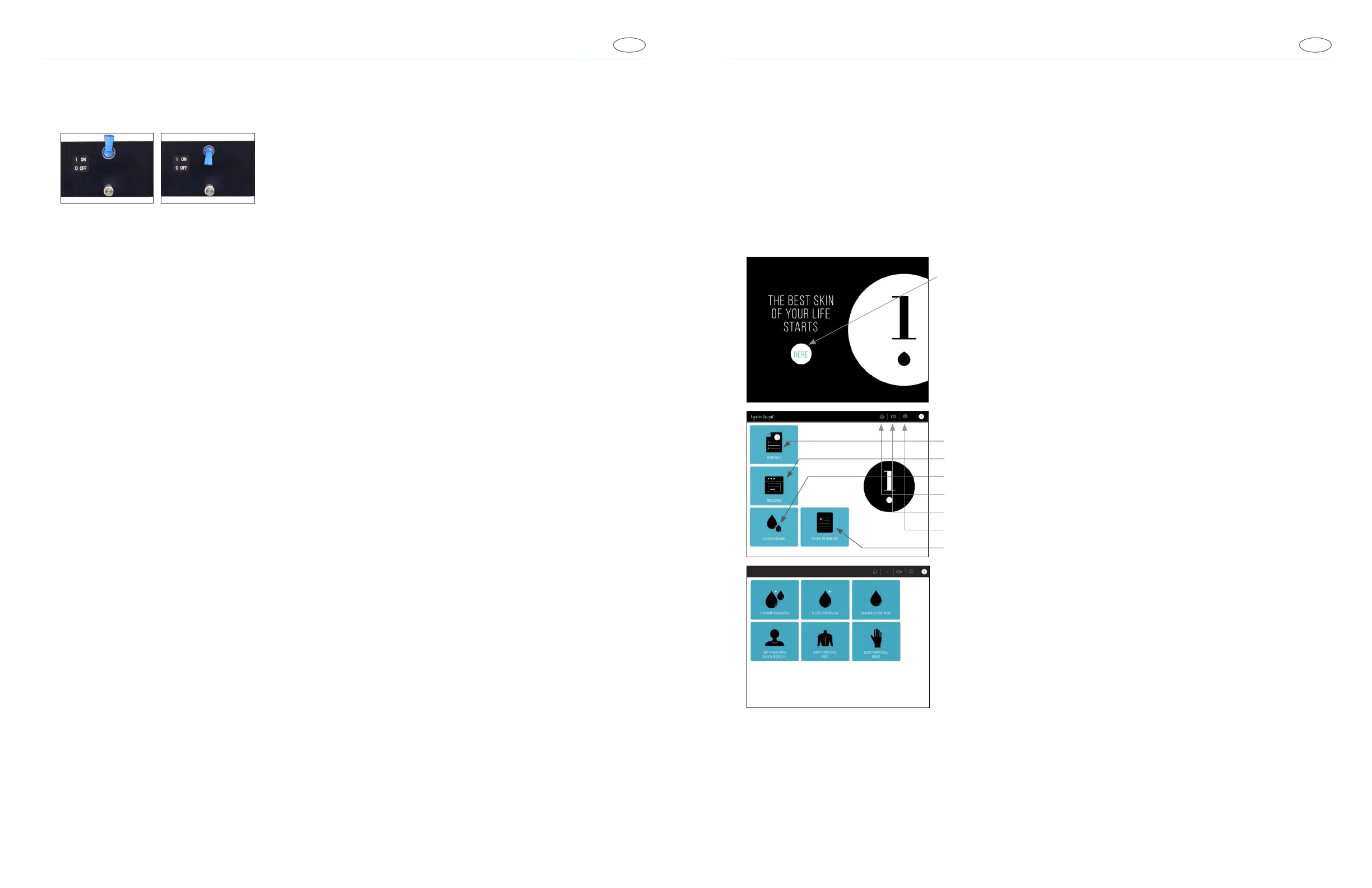
Navigating the System
Start-Up Page
Touch the button to goto the Home Page.
Home Page
• Access Protocols
•
Access Optional Modalites
• Access System Cleaning instructions
• Return to Home Page
• Adjust Volume
• Access System Settings
• Access Patient Information
HydraFacial Protocol Menu
Select desired Protocol.



 To Next Page