16
User GuideHYDRAFACIAL
Syndeo
™
1900104-B
en
QR Reader
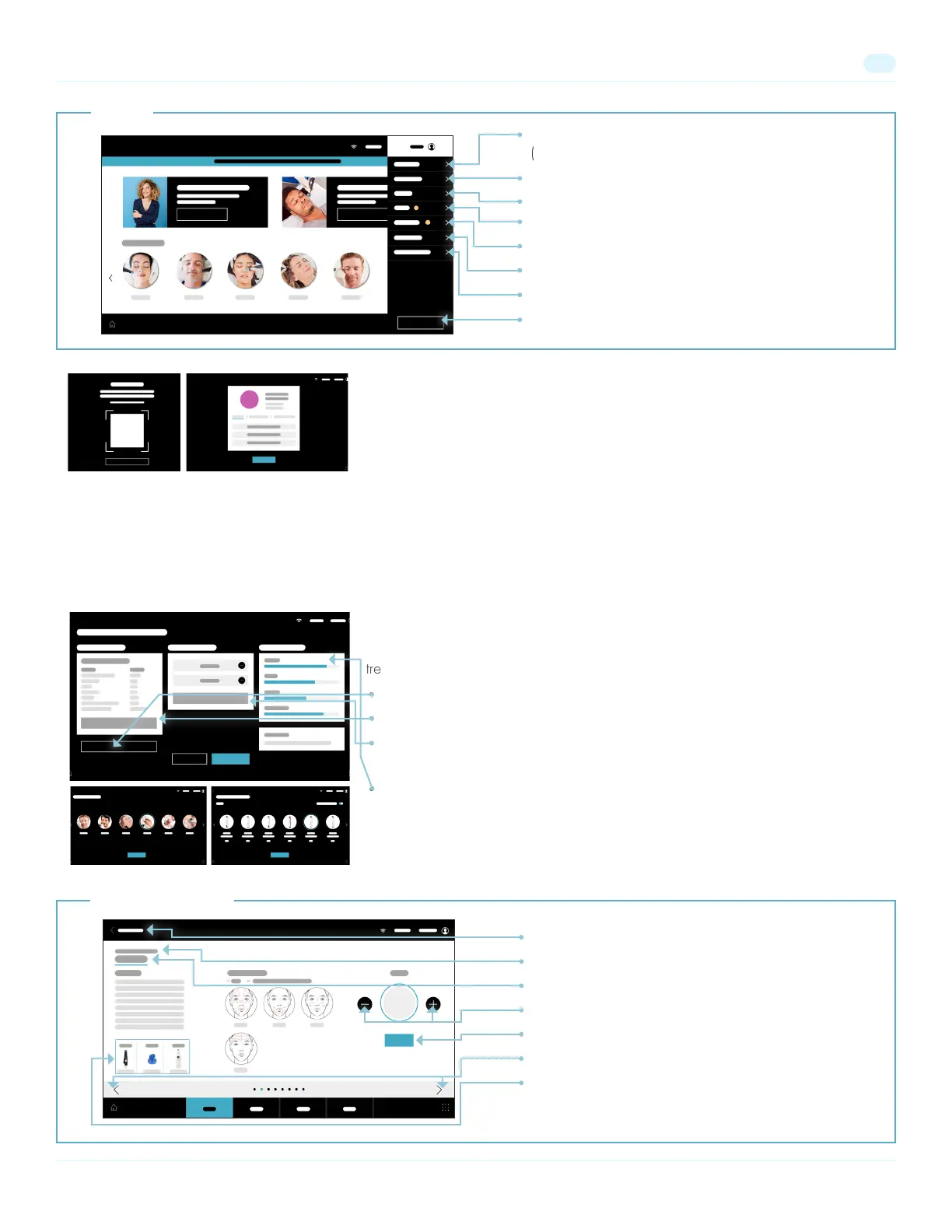
The QR reader allows you to scan a QR code to:
• Login as Provider or Esthetician
• Load a Client’s prole information
• Redeem a Gift Card
Note: Logging in as a provider or esthetician allows that user to receive credit for treatments performed. Scanning in a client
before a treatment allows the user to:
• View the client’s treatment history and sele assessment results.
• Add delivered treatment to the client’s treatment history.
Pre-Treatment Screens
Get to know your client’s history and skin status. Personalize and prep for their
treatment in Syndeo’s Pre-treatment Screens.
• Select Add a Treatment to add on another treatment for this visit.
• Select Edit Treatment to adjust the treatment plan for this visit.
• Select Edit Personalization to add or remove boosters and peels from the
treatment plan.
• View current Solution Levels in the attached solution bottles.
Client prole information
(accessible during client treatment only).
System Rinse Menu
Catalog
Settings Menu
Current Notications
Manual Mode (without Treatment Guidance).
Access QR Code Reader to Redeem Gift Card.
Sign Out of User Account
Access treatment overview screen to edit treatment
Treatment Type
Treatment Step
Adjust vacuum
Turn On/Off vacuum
Next/Previous Step
Access more information about displayed element
Treatment Screens
Menu


 To Next Page