18
HYDROPOOL SELF CLEAN SERIES CONTROL SYSTEMS NORTH AMERICA / EUROPE GECKO IN.YE/YT SPA PACK
INITIAL START-UP
Before applying voltage to power-up your hot tub,
it is very important that you understand the se-
quence of events that occur when the system is
acvated in order that the pump(s) can be primed
efficiently and damage to the system can be
avoided.
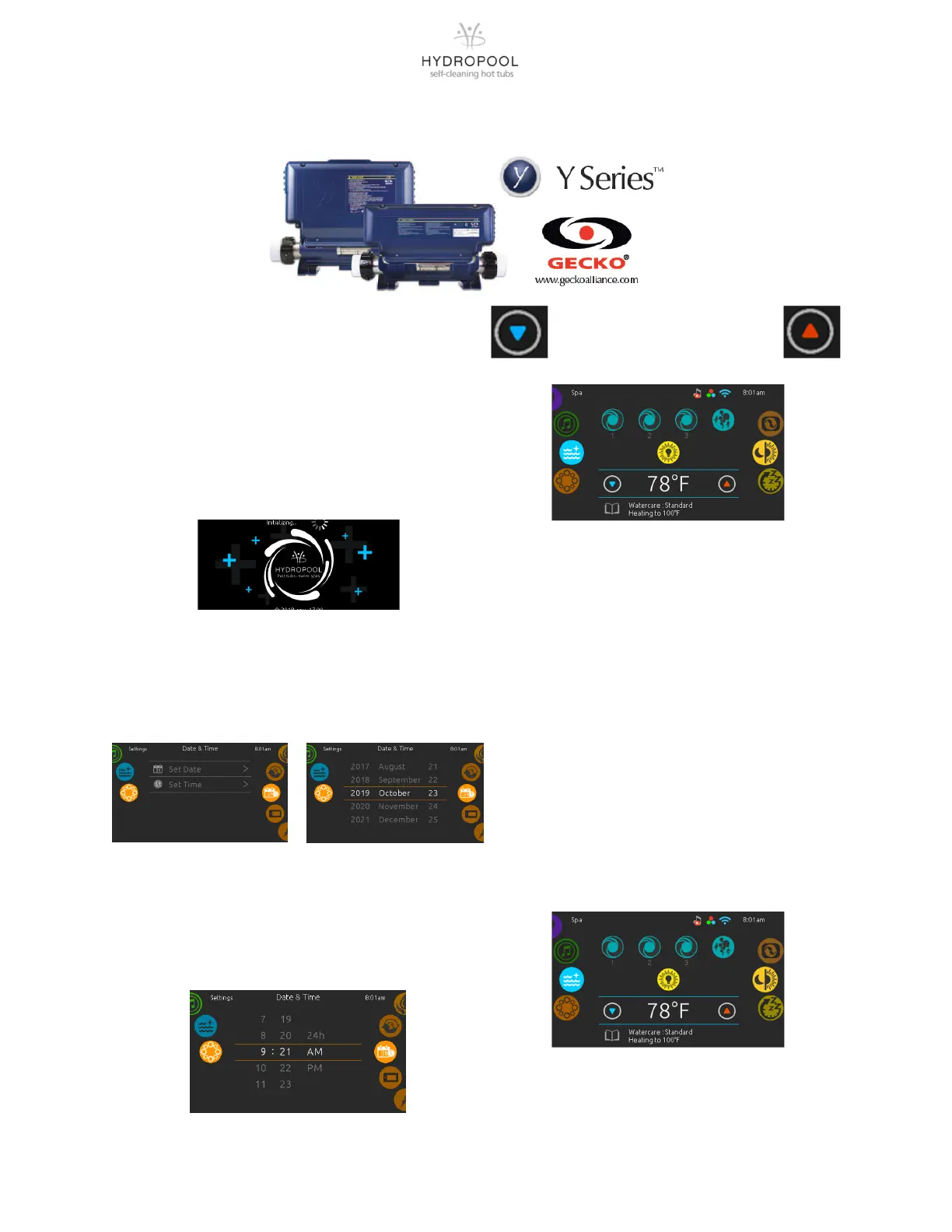
At inial power-up, the system will show the
following screen.
The keypad does store the date and me for a
limited me so when the system starts up aer a
loss of power it may be necessary to reprogram the
me and date if the power down duraon is greater
than 48 hours.
PROGRAMMING THE DATE AND TIME
Here you can adjust the me format (AM/PM or
24h), day of the week and me. Use the icons to
choose the seng that you want to adjust and
select it by scrolling through the menu.
TEMPERATURE CONTROL
FUNCTIONALITY AND
ADJUSTMENT
Aer you exit the programming mode your hot
tub will automacally heat to the factory preset
default temperature of 38°C (100°F).
The temperature shown in white on the screen
is the current water temperature. Use the UP
and DOWN icon to set the desired temperature.
The set point will appear in blue on the screen.
Aer 3 seconds without any change to the set
temperature value, the keypad will resume the
normal display of messages.
When the set value is lower than the current
temperature “Cooling to XX”F (”C)” will appear.
When the value is set higher than the current
temperature, “Heang to XX”F (”C)” will be
indicated.




 To Next Page