26
OPTIONAL I-COMMAND 2 SYSTEM
The Smart Phone App that is designed as a wireless hot tub control which allows you to pick
the water care sengs that fit your schedule. Adjust filtraon and temperature sengs and
create the ideal hot tub experience from inside your home. This opon is supported by your
iPhone®, iPOD touch®, iPAD® (requires iOS 8.0 or later) and Android Device (requires Android
2.3.3 and up).
I-Command 2 (In. touch 2) comes with a state-of-the-art app and 2 pre-paired radio frequency
transmiers:
One being part of the spa system and the second one, being connected to the Home Internet
router. Both RF transmiers are pre-linked to one another, enabling an immediate and perfect
communicaon between user and the spa.
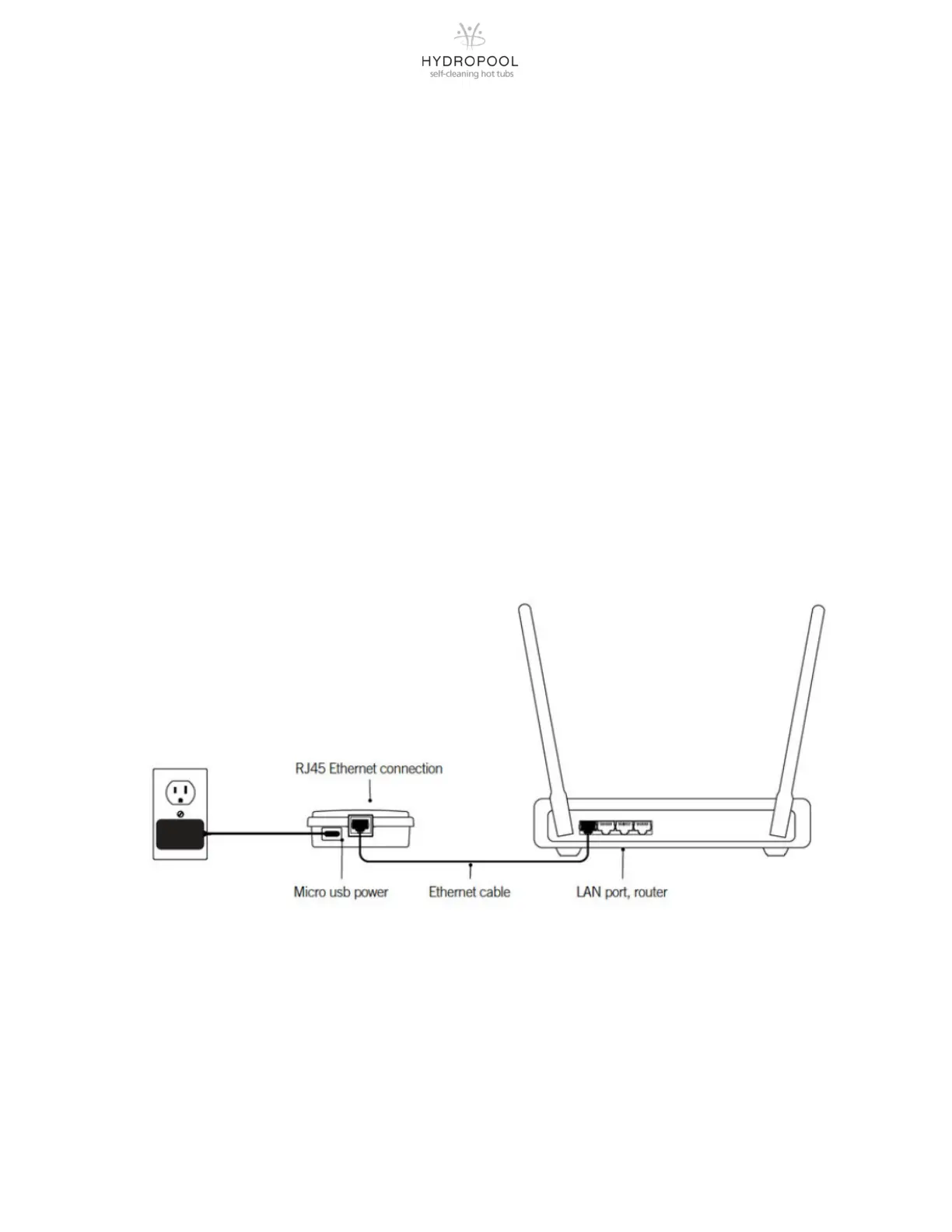
1. Installing the home transmier
The home transmier is provided with an Ethernet cable and a power supply.
The in. touch 2 home transmier unit must be installed inside the house, connected to a
router and powered by the provided wall transformer. A longer Ethernet cable may be used to
bring the home transmier closer to the spa.
Simply connect the Ethernet cable into the RJ45 port of the in. touch 2 home transmier and
in one of the available LAN ports on your router. To power up the home transmier, plug the
provided wall outlet charger to a 120V (North American model) or 220V (European model)
household supply and connect the USB cable to the wall outlet and the home transmier.




 To Next Page