hydrow.com | 76 | Hydrow Wave User Guide | 01/2023
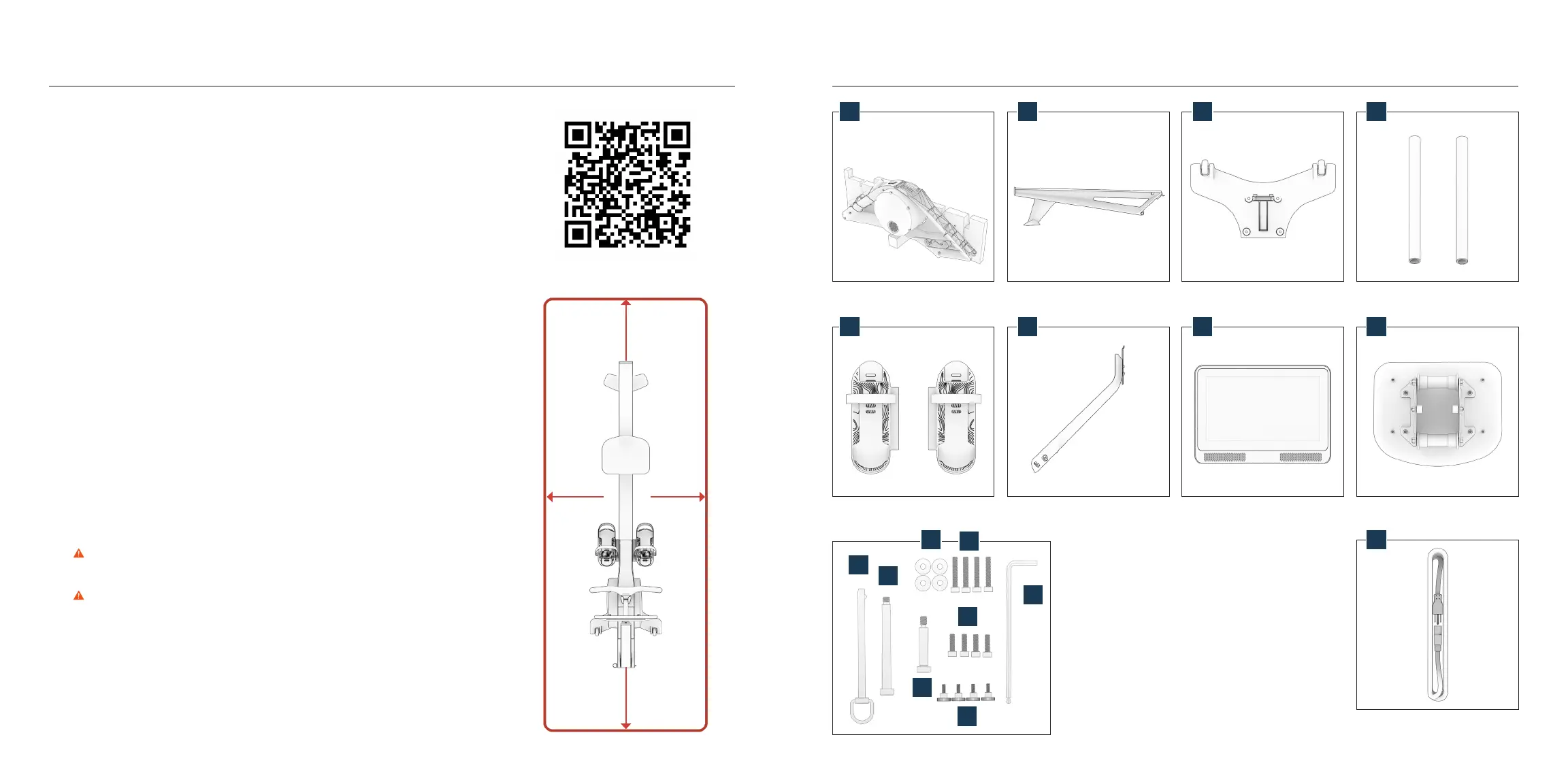
front frame (A) and cardboard
stand - do NOT remove from stand
left and right footrests (E)
hex key (I)
4 washers (J)
4 front foot bolts (K)
frame bolt (L)
4 footrest bolts (M)
monitor arm bolt (N)
monitor arm pin (O)
4 thumbscrews (P)
rear frame (B)
monitor arm (F)
front foot (C) - bottom view
monitor (G)
2 footrest tubes (D)
seat (H) - bottom view
power cord (Q)
A
E
B
F
C
G
D
H
Q
I
J
N
O
L
P
M
K
Pick a spot
Place your Hydrow Wave indoors only, on a level, solid surface. We recommend using
our floor-protecting Machine Mat.
Keep your Hydrow Wave touchscreen out of direct sunlight during use and storage.
The Hydrow Wave is 80" x 19" x 43" (204 cm x 49 cm x 110 cm). Make sure to test your
full range of motion, and leave at least 2 feet (61 cm) of clearance around the rower.
The Hydrow Wave power cord is 12 feet (3.7 m) long. Do not attempt to stretch the
cord. If you plan to connect your Hydrow Wave to Ethernet instead of Wi-Fi, please
also consider the length and placement of the Ethernet cable.
Place your Hydrow Wave within Wi-Fi range, close to your Wi-Fi router or near a
signal booster/extender. (To check signal strength at any location, try streaming video
to your phone.)
Unpack the box
1. With the This Side Up label facing up, open the Hydrow Wave box carefully with a
small knife or blade.
2. Open the monitor box, seat box, and hardware pack, and set aside the parts and
packaging.
3. Remove the remaining small parts from the Hydrow Wave box and set aside all parts
and packaging.
4. Unpack the rear frame (B).
WARNING The rear frame (B) is bulky. Take care when lifting.
5. Unpack the front frame (A) but do NOT remove it from the cardboard stand.
WARNING The front frame (A) is very heavy and bulky. Take care when lifting.
Assembly and Setup
We recommend scanning this QR code (or visiting hydrow.com/assembly) for the most
up-to-date assembly steps and video.
2 feet (61 cm) 2 feet (61 cm)
2 feet (61 cm) 2 feet (61 cm)


 To Next Page