hydrow.com | 1514 | Hydrow Wave User Guide | 01/2023
Power on
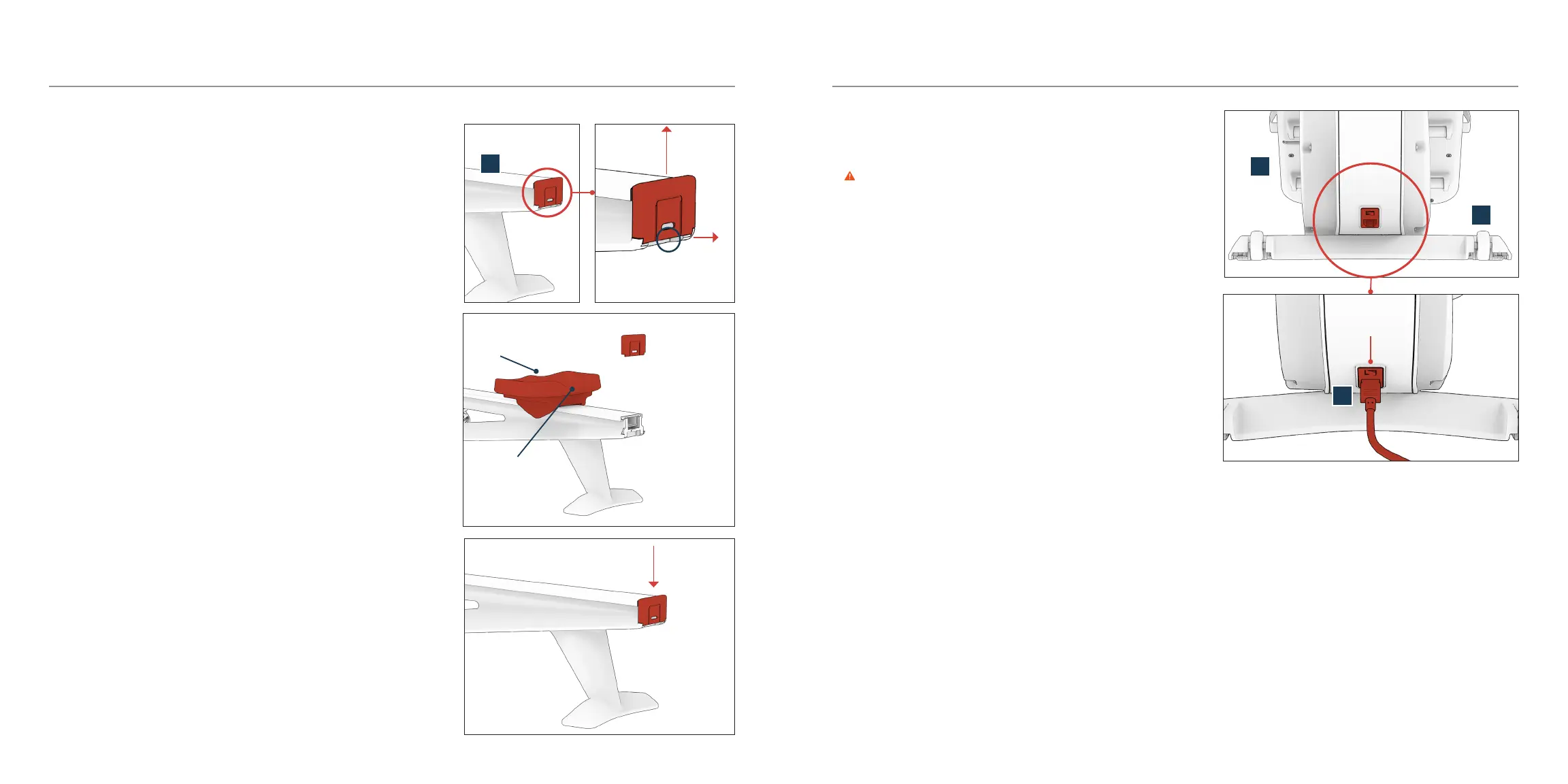
1. Connect the power cord (Q) to your Hydrow Wave on the front frame (A)
just above the front foot (C).
WARNING Ensure the power cord is completely connected prior to
use. A loose connection may result in loss of power during a workout.
2. Connect the other end of the power cord to a wall outlet.
3. Toggle the power switch (just above the power outlet) to ON.
• 0 = OFF; I = ON
• Hydrow Wave is designed as an always-on device; you do not need
to turn it o between uses.
Touchscreen will turn black after 5 minutes of inactivity.
Tap the touchscreen to wake up your Hydrow Wave.
power switch
Attach the seat
1. At the very end of the rear frame (B), locate the tab at the base of the
end cap and gently pull the tab out while sliding the cap upwards.
2. Slide the seat (H) onto the rear frame (B).
• Make sure the seat’s ridged end faces forward, with the scooped end
toward the back.
• Seat will slide forward. This is normal.
3. Slide the end cap back on.
ridge
scoop
Assembly and Setup
Q
A
C
B


 To Next Page