General 8000 SRM 1197
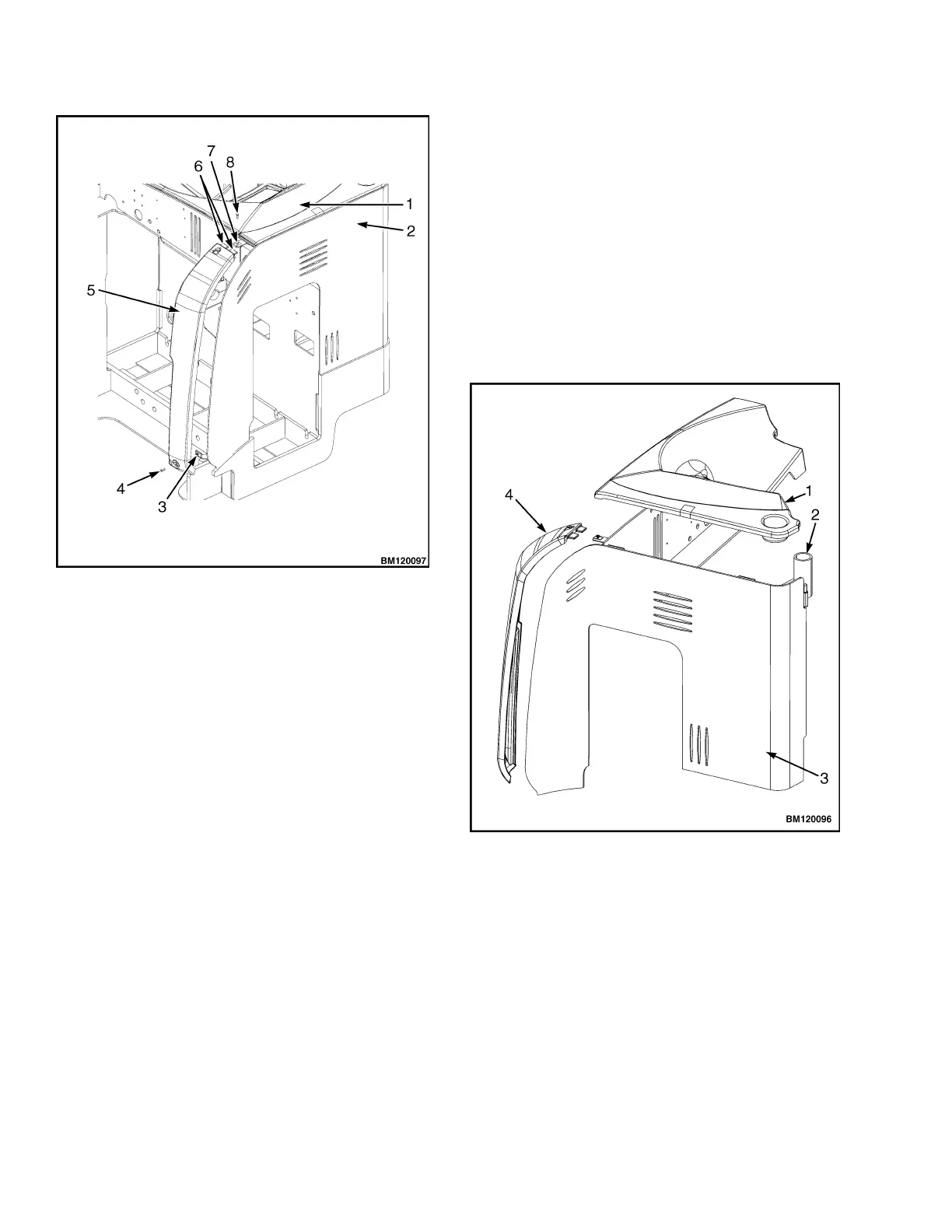
1. OPERATOR COMPARTMENT COVER
2. FRAME
3. LOWER BRACKET
4. LOWER SCREW
5. FRONT FRAME PANEL (LEFT)
6. TABS
7. UPPER BRACKET
8. UPPER SCREW
Figure 1. Front Frame Panel (Left Side)
NOTE: On right side front frame panels, ensure the
diagnostic connector cap is positioned to allow the
cover to seat properly.
To install the panel, position the upper end of the
panel partially into the retaining clip on the frame.
Insert the tabs on the upper end of the panel into
the slots in the operator compartment cover. Work
the sides of the panel into the retaining clips until all
areas of the panel are aligned with the frame. Align
the holes in the panel with the mounting brackets
on the frame and loosely install the screws into the
upper end and lower end of the panel. Make certain
the panel is seated correctly against the frame and
tighten the screws to secure in place. See Figure 1.
Operator Compartment Cover
Remove the front frame panels from the lift truck.
RefertoFrontFramePanel(LeftandRight). Re-
move the two screws securing the operator cover to
the frame brackets. One is located on the lower right
side of the operator compartment above the opera-
torpresenceswitch. Theotherislocatedbesidethe
overhead guard post mount, at the bottom of the cup
holder. Pull the operator compartment cover up from
the front right corner. Continue pulling the cover up
along the edge of the frame in both directions until
the cover is free from the retaining clips. See Fig-
ure 2.
1. OPERATOR COMPARTMENT COVER
2. OVERH
EAD GUARD POST MOUNT
3. FRAME
4. FRONT FRAME PANEL (LEFT)
Figure 2. Operator Compartment Cover
To install, position the cover over the electrical com-
partment. See Figure 2. Align the lip of the cover to
the retaining clips. Press the lip of the cover into the
retaining clips starting at the overhead guard post
and continue around until completely seated. Align
the holes in cover with the mounting brackets and in-
stall retaining screws as removed. Install the front
frame panels to complete assembly. Refer to Front
Frame Panel (Left and Right) in this section.
2



 To Next Page