4. Feature Configuration
You can configure radio features through the template of Smart MDM.
This chapter introduces the configuration path of radio features. For template creating and radio programming, see
3 Radio Programming.
4.1 Broadband
4.1.1 APN
The radio can connect to different networks, such as Internet, WAP network, enterprise internal network and
industry specific network. The APN determines the network that the radio is connected to. You can define the
APN range through the APN list of the radio to ensure the security.
You can configure the APN of the radio in two ways: Configure through Programming and Configure through
Radio Menu.
4.1.1.1 Configure through Programming
Ensure that you’ve got the APN information from the owner of the APN server.
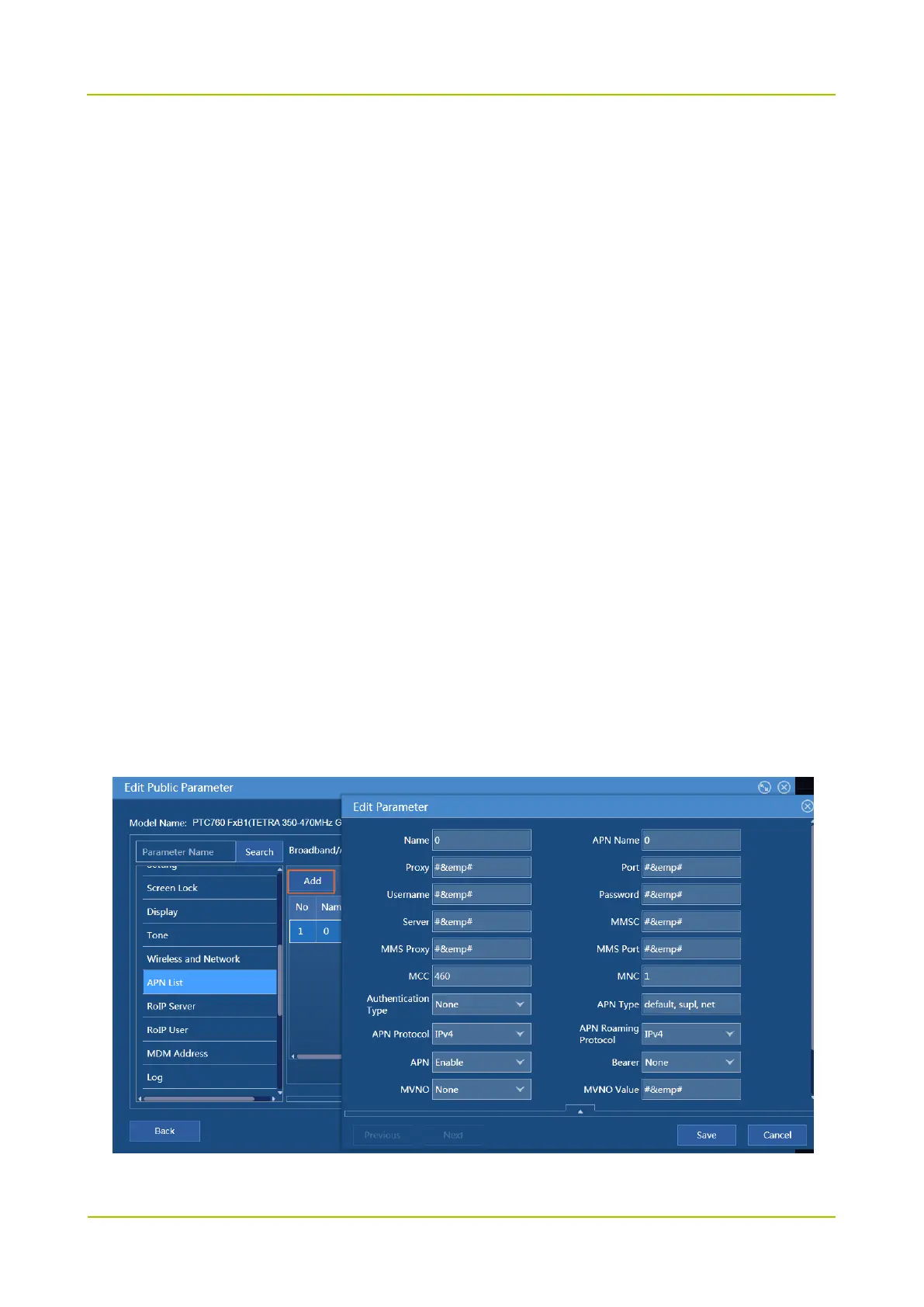
1. Path: Broadband -> APN List
Refer to the APN information to edit the APN parameters. Ensure Name, APN Name, MCC, MNC, APN
Type, and APN are correctly configured.
2. Choose Broadband -> Wireless and Network.



 To Next Page
 Loading...






