4
Alarm Information
The r epeat er wi ll ha ve re al-time dete ction of its
operation status automatically. When it is operating
abnormally, the alarm LED indicator on the front panel
will glow red until all alarms are eliminated.
When an alarm event occurs, you can diagnose and
solve the problem via the RDAC application provided by
us or contact your local dealer for technical support.
Alarm types and cau
ses are as listed below:
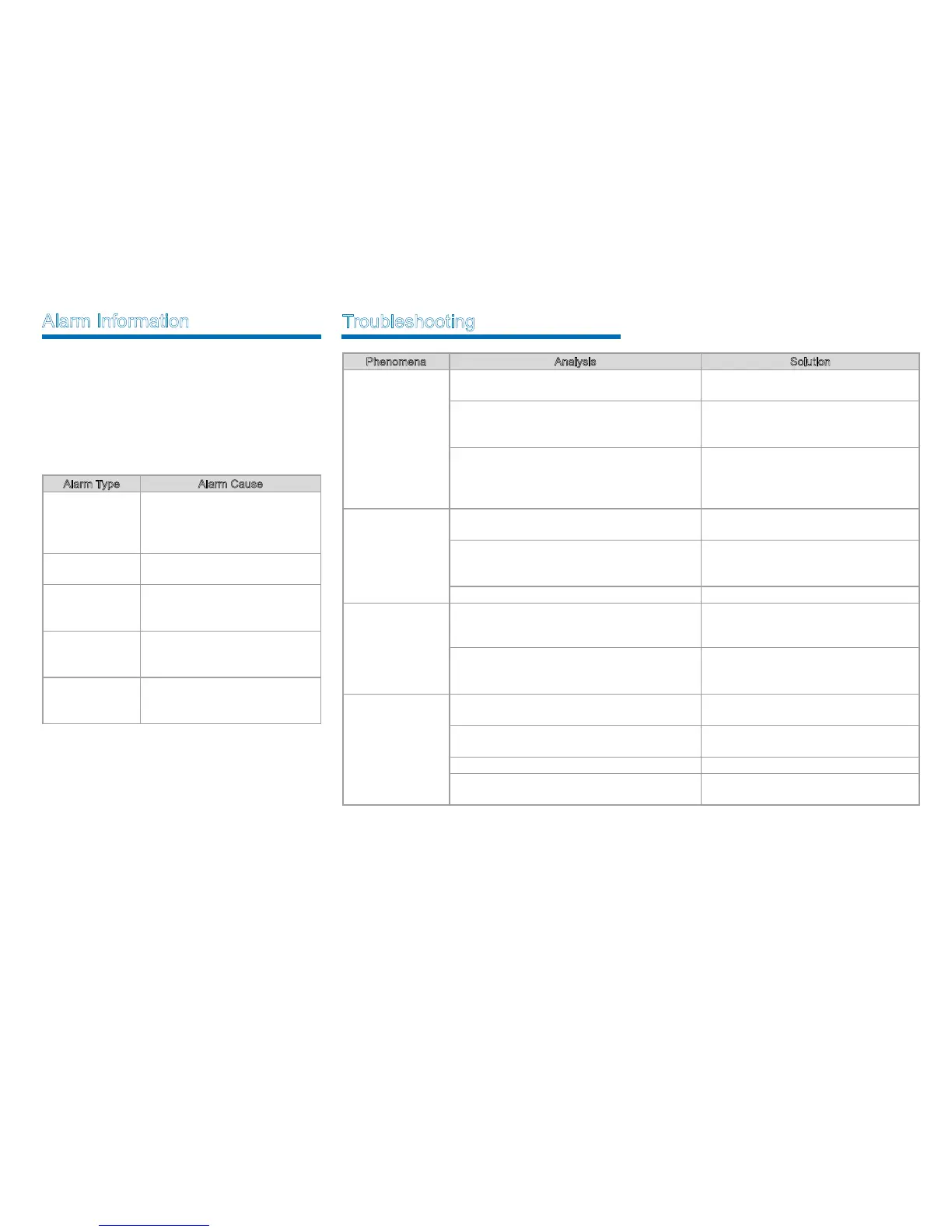
Alarm Type Alarm Cause
Abnormal External
Power
High Voltage: The input voltage is
higher than 15.8V±0.2V.
Low Voltage: The input voltage is
lower than 10.8V±0.2V.
High Temperature
Temperature sensor detects the
temperature above 85℃.
Abnormal VSWR
VSWR > 3:1.
Over-high VSWR will damage the
PA module or even disable it.
TX Unlock
T X P L L i s u nlock e d, a n d t h e
repeater stops transmitting and
repeating.
RX Unlock
R X P
L L i s u n lock e d, a nd t he
rep e ate r s t ops r ece ivi ng and
repeating.
Troubleshooting
Phenomena Analysis Solution
Power-on Failure.
The power cord may be disconnected or not
securely connected to the outlet.
Properly connect the power cord and
ensure secure connection.
The fuse in the power cord is damaged.
Check whether the DC power fuse is
damaged. If it is damaged, replace it with a
new one.
DC power supply voltage is not within the
operating voltage of the repeater.
Check whether the DC power supp
ly
voltage is within the operating voltage of
the repeater (13.6V±15%). If not, adjust it
to proper range.
The radio is unable
to communicate with
other members.
TX/RX frequency of the repeater is inconsistent
with that of portable/mobile radios.
Check if the frequencies are consistent.
Reset the frequencies when necessary.
The repeater failed to repeat useful signal due to
strong interference sig
nals.
If you cannot remove or bypass the
interference source, change to operate at
other frequencies.
The radio is out of the coverage of the repeater. Move into the coverage of the repeater.
There’s RX
indication on
the radios, but
members cannot
communicate with
each other.
Radio ID does not match that of other members. Sets the same ID with other members.
The CTCSS/CDCSSs of the radios are not
consistent.
Check whether the CTCSS/CDCSSs are
consistent. Reset the CTCSS/CDCSSs
when necessary.
Short
communication
distance and poor
voice quality
Signal loss due to connecting cable damage.
Check whether the damage is serious.
Replace the cable when necessary.
The antenna and cable are in loose connection or
disconnected.
Secure the connection. Replace the
connector when necessary.
Internal dam
age of the cable. Replace the cable.
The duplexer (if installed) may be adjusted
improperly.
Contact Hytera or the local dealer to re-
adjust the duplexer.
If the above solutions cannot fix the problems, or you have other questions, please contact Hytera or the dealer for
more technical support.



 To Next Page
 Loading...









