Need help?
Do you have a question about the I-O DATA Soundgenic and is the answer not in the manual?
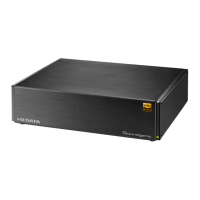
Explains Soundgenic's purpose as a network audio server and player.
Lists included accessories with the unit.
Describes the structure and content of the user manual.
Details the function of the front panel indicator lights.
Identifies rear panel ports, buttons, and their functions, including reset.
Step-by-step guide to connect the unit to a Wi-Fi router.
Instructions for connecting to network audio players.
Instructions for connecting to a USB-DAC for audio playback.
How to connect the unit to a power source using the AC adapter.
Details on connecting external USB storage or CD drives.
Guides users through setting up the control application for music management.
Instructions for ripping music from CDs using a connected drive.
Steps to copy music files from USB flash drives or HDDs.
How to copy music files from Windows computers.
How to copy music files from macOS computers.
Explains how to check the available storage capacity on the unit.
How to play music using the fidata Music App.
Guides users on how to stream and play music from Spotify.
Process for registering a USB HDD for music backup.
Steps to restore backed-up music from a USB HDD.
Details supported file formats and operating conditions.
Lists the technical specifications of the Soundgenic unit.
Important warnings for safe usage to prevent harm or damage.
Precautions regarding power connections, usage environment, and handling.
General usage precautions, handling, and environmental advice.
Instructions for cleaning the product to maintain its condition.
Instructions on data transfer, system initialization, and product disposal.
Solutions for firmware update notifications and display problems.
Troubleshooting for red indicator lights, CD import errors, and audio issues.
Addresses problems like gapless playback and system load.
 General
| Category | Server |
|---|---|
| Storage | HDD |
| Storage Capacity | 3TB |
| Audio Formats Supported | FLAC, ALAC, WAV, AIFF, MP3, AAC |
| Connectivity | Ethernet |
| USB Ports | USB 3.0 |
| Power Supply | AC adapter |
| Supported OS | Windows, macOS |

 To Next Page