11
Install this Unit > Connecting to a USB Device (as Necessary)
Connecting to a USB Device (as Necessary)
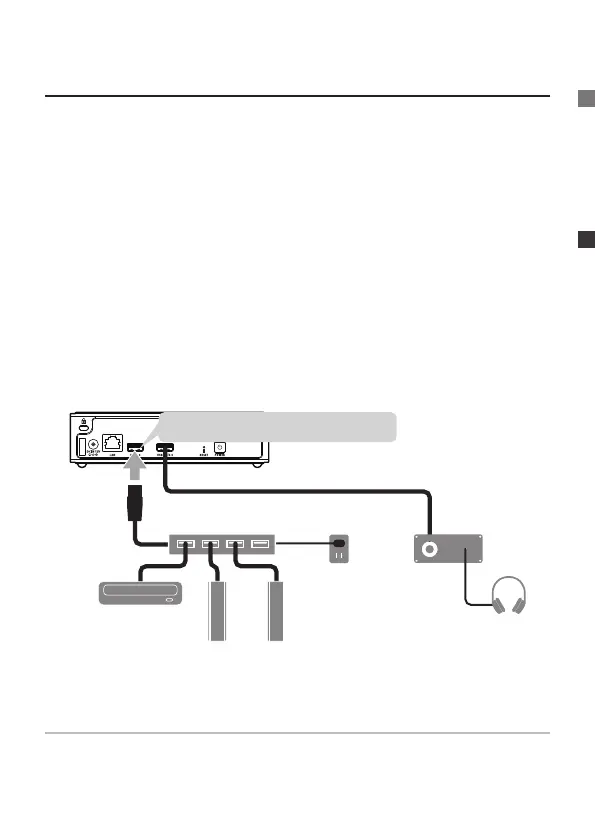
If necessary, it is possible to connect a USB HDD or USB CD, DVD,
or BD drive to Soundgenic’s USB 3.0/2.0 or USB 2.0 ports.
●
Use of USB Devices
• USB HDD
It is possible to connect one that is for sharing and one as
a backup. The USB HDD used for sharing can be used for
importing music within the USB HDD or transferring it to the
player. The USB HDD used as for backup can be used to back-
up the music within Soundgenic.
• USB CD, DVD, and BD drives
These can be used to import music from music CDs, or transfer
it to the player.
“USB 3.0/2.0”, or “USB 2.0”
electrical
socket
USB hub
USB-DAC
USB CD/DVD/BD
drive
USB HDD
(for shared, for backup)
If there are not enough USB ports
Please use a USB hub that plugs into an electrical outlet.
* Regardless of the number of ports on the USB hub, only two USB devices
can be connected when the USB hub is connected to the USB 3.0/2.0 port.


 To Next Page