5
Names and Functions of Each Part
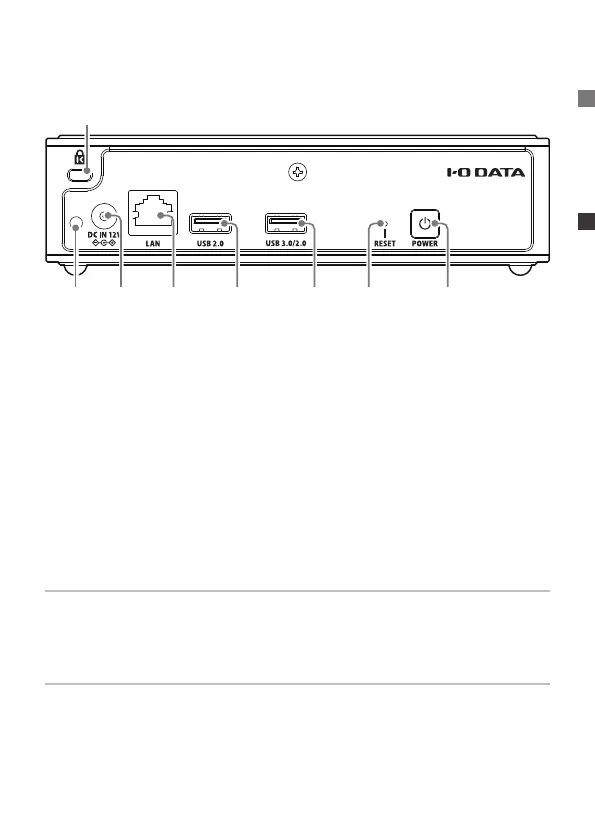
3 4 5 6 7 98
2
▼
Back
Selecting a USB port
In general, it is possible to use any USB port. If there is a problem
with playback using a USB-DAC, try changing the USB port.
Initializing settings (Reset button)
Press the reset button for 1 second using a pin or other object with a
ne tip.
The following settings will return to their original state at the time of
purchase.
IP address (DHCP enabled/disabled), Twonky Server database,
and contents of work les for importing CDs.
2. Security slot .................
A Kensington lock is installed to prevent theft.
3. Cable hook hole ........Used to install the included cable hook.
4. Power connector .......Used to connect the included AC adapter.
5. LAN port .......................Used to connect to a Wi-Fi router via LAN
cable.
6. USB 2.0 port ................Used to connect a USB device.
7. USB 3.0/2.0 port ........Used to connect a USB device.
8. Reset button ................ Returns some settings to their initial state
at the time of purchase.
9. Power button...............Turns the power On and Off (page 10).


 To Next Page