2.Key Operation
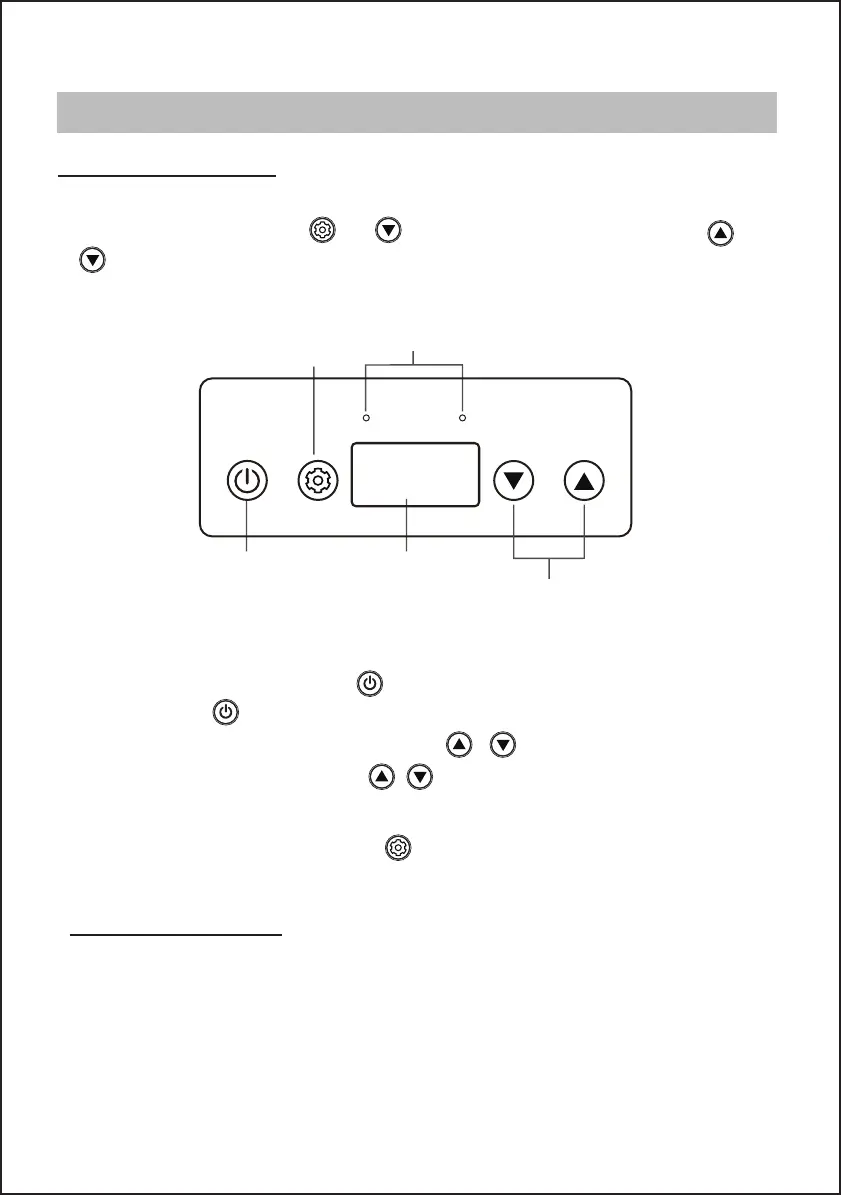
● In the standby status, short press the , and it will enter work mode. Under operating condition,
short press the , the appliance enters the standby mode.
1. After power on, the digital screen lights up for 2 seconds and then displays normally.
ECOMAX
Setting
Mode Indicator Light
ON/OFF
Temperature Display
Temperature Adjustment
● When it is in the normal working state, short press / to adjust temperature from
0°F (-18°C)-50°F (+10°C). Long perss / , adjust temperature 5.4°F (3°C) per second.
3.ECO/MAX Function
When the appliance is running, short press
to adjust the ECO&MAX mode.
Temperature Setting
In the standby mode, long press and at the same time for 3 seconds, use the
or to select Celsius or Fahrenheit.
3
OPERATION
CONTROL PANEL USE
SAVING ENERGY TIPS
● Do not open the appliance frequently if unnecessary.
● Make sure leave enough space to ventilating.
● Deforest the appliance once a layer of ice forms.
● Allow warm food to cool down first before placing it in the freezer to keep cool.


 To Next Page