Industrivej 62
DK-6740 Bramming
Denmark
Version: 2.0
IceTech PR350H
User’s manual
Date: 2017.07.03
Init: JM
MACHINE CONTROLS
PR350H
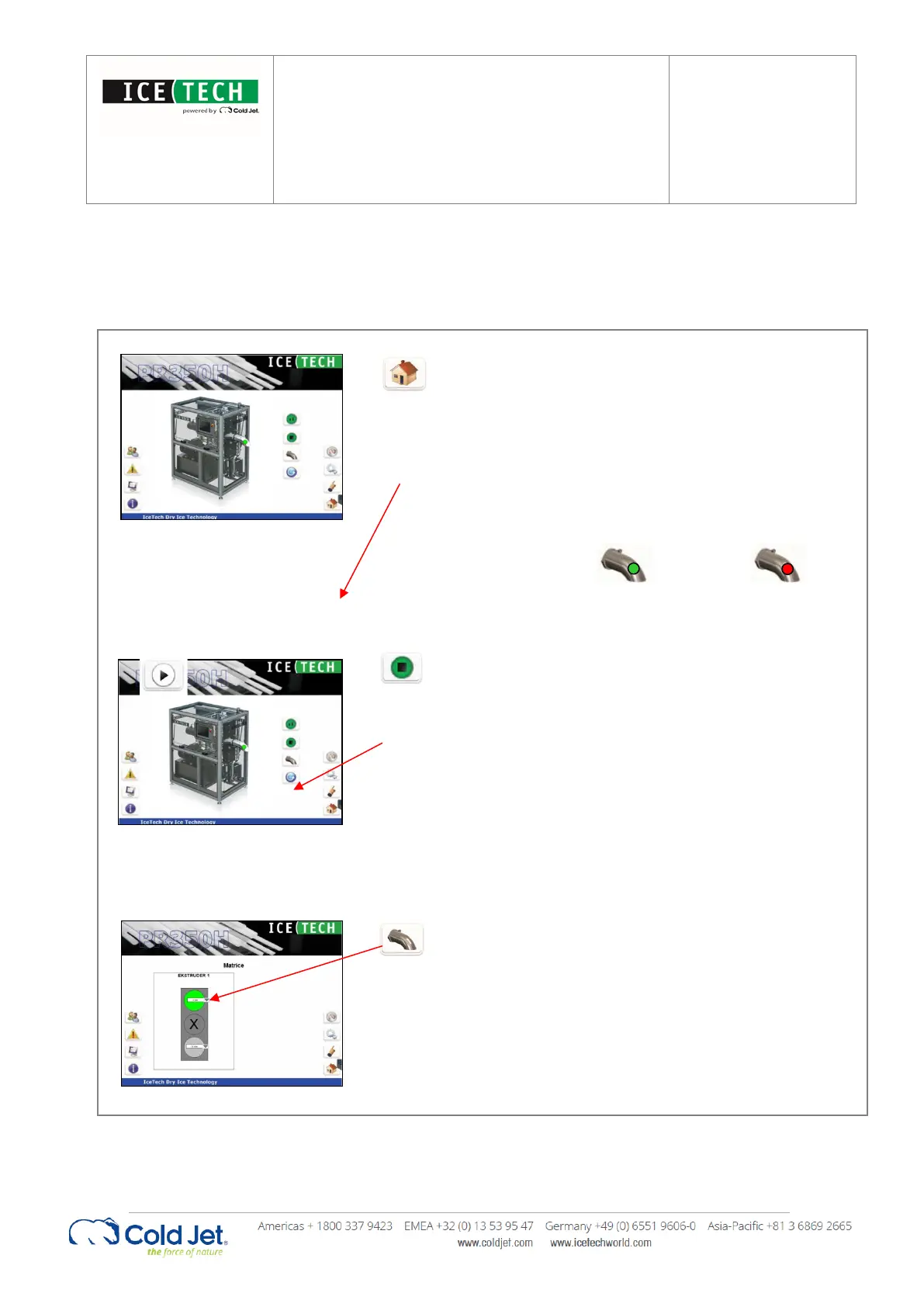
This page can be activated from any page by pressing
the “Home button” in the lower right hand corner.
The main page shows if the extruder is selected by
colouring the outlet sprout green. If the outlet sprout
is gray then it has not been selected. It also displays
which extruder plate is selected, indicated on the
outlet sprout.
Active Inactive
Main functions
The main functions can be activated by pressing one
of the three wide buttons on the main screen.
By activating the “Start / Stop” button the machine
starts or stops when in group mode.
2 Extruder plate changer
By activating the “Extruder plate changer” button, the
extruder plate changer page will show which extruder
plates are available for production.
It is possible to select between upper extruder plate,
lower extruder plate and medium-closed position, in
which production is stopped. The extruder plate
selection can be made before and during production.
During production stops it is possible to physically
change the extruder plates. After this operation it is
important to change the extruder plate value in the
select box according to the extruder plate installed.


 To Next Page